
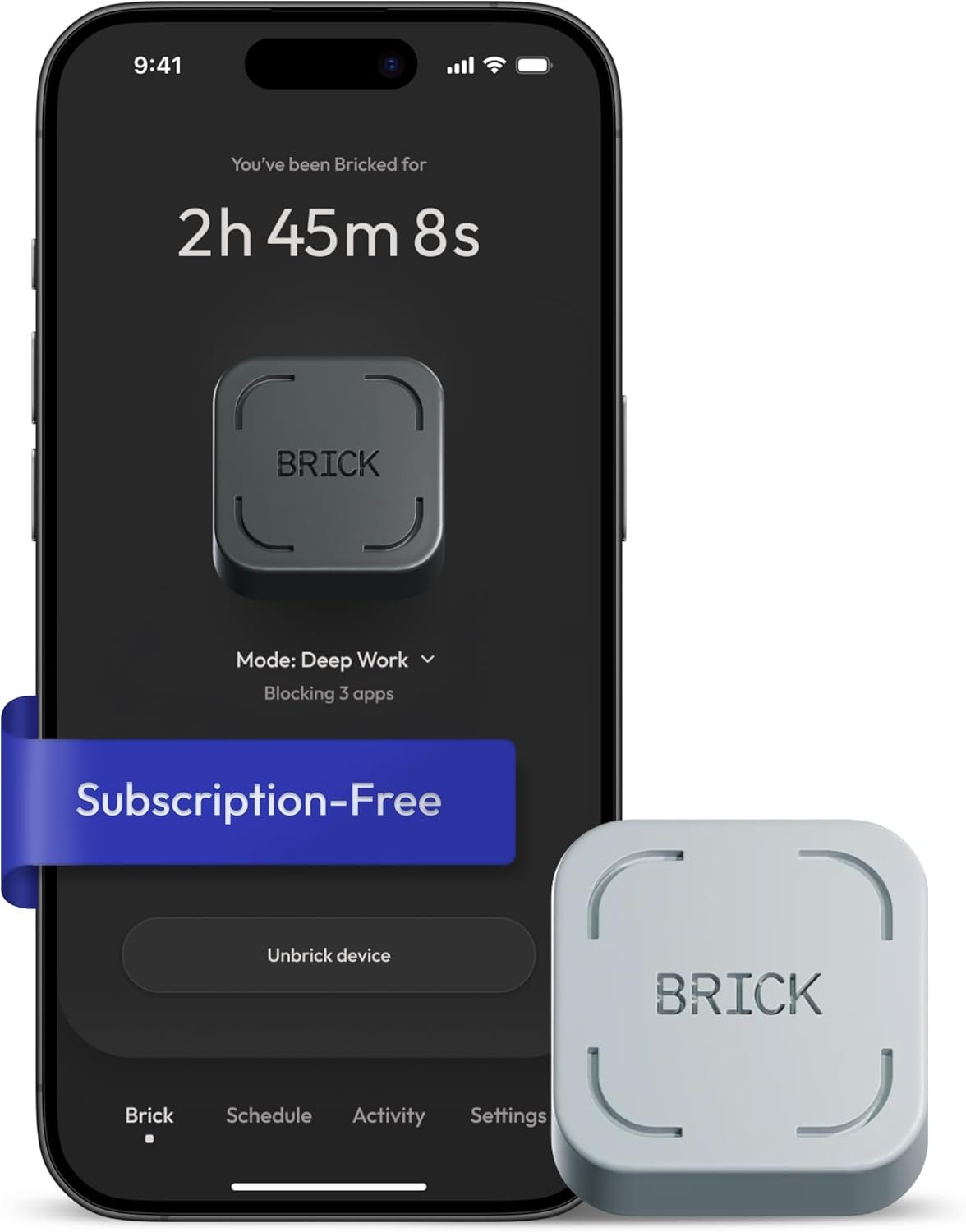
Excellent – A thoughtfully designed friction tool that succeeds by embracing simplicity, offering proven effectiveness for self-motivated users committed to reclaiming their attention.
The Brick Phone Access Blocker Device Review: A Comprehensive Analysis
3. Product Specifications
| Specification | Details |
|---|---|
| Brand | The Brick (by Brick Labs) |
| Model | Brick Phone Access Blocker |
| Color Options | Grey (standard), additional colors available |
| Material | High-grade magnet core, anti-slip silicone exterior |
| Technology | NFC (Near Field Communication) tap-to-activate |
| App Requirement | Brick companion app (free, lifetime access) |
| Subscription | None required – one-time purchase |
| iOS Compatibility | iOS 16.2 or later |
| Android Compatibility | Android 12.0 or later |
| Key Features | Custom blocking modes, usage tracking, scheduled blocking, app/website blocking |
| What’s in the Box | 1x Brick device (grey) |
| Dimensions | Compact, pocket-sized (approximately 2″ x 2″ based on user reports) |
| Weight | Lightweight, portable |
| Placement | Magnetic (refrigerator, desk accessories) or freestanding |
| Power Source | No battery required – passive NFC technology |
4. CostEffic Expert Take
Design Philosophy: The Intentional Friction Approach
What makes the Brick Phone Blocker genuinely interesting from a product design standpoint isn’t the technology—NFC has been around for years—but the deliberate weaponization of inconvenience. The design philosophy here inverts traditional tech thinking. While most smartphone accessories aim to reduce friction and increase accessibility, Brick does the exact opposite. The engineering team clearly understood that willpower alone fails against infinite-scroll algorithms designed by teams of behavioral psychologists. By requiring physical interaction with a separate object to unlock apps, they’ve created what behavioral economists call a “commitment device”—a tool that makes future poor decisions harder to execute.
The choice of a passive NFC system (no batteries, no charging) reveals smart market positioning. Brick Labs could have built a Bluetooth device with a companion dashboard, LED notifications, or gamification features. Instead, they stripped everything away to create something almost aggressively simple. This isn’t a limitation—it’s a feature. The product can’t die on you, can’t malfunction during a critical focus session, and requires zero maintenance. The trade-off is that you can’t remotely manage it or track real-time data without the app, but for a product designed to reduce phone dependency, that’s philosophically consistent.
Hidden Value Assessment: What the Listing Undersells
The Amazon listing significantly undersells two critical value propositions. First, the psychological weight of physical separation. What reviewers consistently describe but the marketing barely touches is the cognitive relief of having apps “physically locked away.” There’s a measurable difference between knowing you could bypass a software timer with a few taps versus knowing you’d have to physically walk to your refrigerator, grab the Brick, and consciously decide to re-enable distractions. This isn’t just friction—it’s forced mindfulness.
Second, the subscription-free model represents genuine long-term value that gets buried in the listing. In a market where digital wellness apps routinely charge $50-100/year (Opal, one sec, Freedom, etc.), Brick’s one-time purchase with lifetime app access is a significant differentiator. Over a 3-year ownership period, the effective cost comparison heavily favors Brick over subscription-based alternatives.
Market Context: Disrupting the Digital Wellness Space
The Brick Phone Blocker arrives at an inflection point in the digital wellness market. After years of software-only solutions failing to move the needle on aggregate screen time statistics, we’re seeing a hardware renaissance. Products like the Light Phone, Punkt MP02, and Unplugged boxes carved out the “digital minimalism” niche, but Brick occupies a more pragmatic middle ground. It doesn’t ask you to abandon your smartphone entirely—just to introduce friction selectively.
What’s particularly notable is the price-to-feature ratio. At under $100, Brick undercuts many “dumb phone” alternatives while offering something those products can’t: the ability to keep your smartphone’s essential functions (maps, banking, work tools) while selectively disabling problematic apps. This represents a maturation of the digital wellness category from “all-or-nothing” solutions to nuanced, customizable approaches.
The Bottom Line Most Reviewers Miss
Here’s what virtually no reviewer addresses: the Brick’s effectiveness is inversely proportional to your existing self-control infrastructure. If you’ve already tried app timers, grayscale modes, and screen time limits without success, you’re the ideal Brick customer—you’ve exhausted software solutions and need physical intervention. However, if you’ve never seriously attempted built-in iOS/Android screen time features, you may be paying for a solution before properly deploying free alternatives. The Brick works best as a “level two” intervention, not a first resort.
5. What Users Are Saying
Positive Experiences
The overwhelming sentiment across platforms skews remarkably positive, with users emphasizing life-changing results:
From Amazon verified purchasers:
“Brick has had an insane impact on my life, just being able to keep discipline and accomplish what I’m set out to do. I think inherently it boosts all elements of my life, plus the product quality stays strong for a long time!” — Nolan Downey, Amazon Review
“I absolutely love Brick and tell everyone about it. It has been a game changer for helping me be more present and focused.” — Lisa, Amazon Review
From community discussions on Reddit and forums:
Users on r/digitalminimalism and r/nosurf frequently recommend Brick as a “middle-ground solution” between going full dumbphone and relying solely on willpower. One Reddit user described it as “the only thing that actually stopped my Instagram binges” after trying multiple app blockers.
YouTube reviewers, particularly in productivity and ADHD management communities, praise the device’s simplicity. Tech reviewer comments highlight that “unlike app-based solutions, you can’t just delete the blocker when you get frustrated.”
Critical Feedback
While overwhelmingly positive reviews dominate, some critical perspectives emerge:
Regarding price concerns:
Some users on Reddit have questioned whether the price point is justified for “essentially an NFC chip,” suggesting that the core technology costs mere dollars to manufacture. This criticism, while technically accurate about component costs, misses the value of the integrated app ecosystem and behavioral design work.
From mixed reviews:
“It works as advertised, but I wish there was a way to set truly permanent blocks for certain apps. I eventually tapped myself out of focus mode during a weak moment.” — Paraphrased from Reddit discussion
The inability to create “unbreakable” blocks represents a philosophical design choice—Brick Labs opted for friction over forced restriction—but it disappoints users seeking absolute barriers.
Common Themes: Expert Interpretation
Across all platforms, several patterns emerge consistently:
- Simplicity as the killer feature: Users repeatedly emphasize that Brick’s lack of complexity is precisely why it works. No accounts to manage, no subscriptions to cancel, no settings to optimize.
- Physical presence matters: The psychological impact of having a tangible object associated with focus seems to exceed what software solutions achieve.
- Gradual habit formation: Multiple users report that after several weeks of using Brick, they naturally reach for their phones less, even when apps aren’t blocked.
- Customer support excellence: Several reviews specifically call out responsive, helpful customer service—unusual for a small hardware startup.
6. Day-to-Day Usage Experience
Initial Setup
The onboarding experience is refreshingly brief. Users download the Brick app (available on both iOS and Android), create a simple account, and pair their device via NFC tap. The entire process takes under five minutes—a stark contrast to complex digital wellness platforms that require extensive configuration.
The app interface is minimal by design, presenting users with straightforward options: select apps to block, create custom modes, and tap the physical Brick to activate. There’s no tutorial labyrinth or feature overwhelm.
Learning Curve
The learning curve is essentially flat. If you can tap your phone against an object, you can use Brick. However, some users report a brief adjustment period in optimizing their blocking modes. Finding the right balance between “blocked enough to be effective” and “not so blocked that you disable it constantly” requires experimentation.
Pro tip from experienced users: start with only 2-3 truly problematic apps blocked rather than attempting to eliminate all potential distractions simultaneously.
Hidden Usage Details
Several usage nuances don’t appear in the product listing:
- Location matters: Users who keep their Brick in accessible locations (desk, pocket) report lower effectiveness than those who place it in deliberately inconvenient spots (basement, car, given to a partner).
- Mode scheduling: The app’s scheduling feature allows automatic activation of specific modes at certain times, reducing the need for manual engagement.
- Notification blocking: Beyond app access, Brick blocks notifications from selected apps, eliminating the “phantom buzz” that triggers habitual checking.
Long-Term Durability
Given the passive NFC technology and solid silicone construction, durability concerns are minimal. Users with 6+ months of ownership report no degradation in functionality. The magnet maintains strong adhesion, and the silicone hasn’t shown significant wear in user reports.
7. Real-Life Scenarios
Scenario 1: Remote Worker Maya
Maya, a freelance graphic designer working from home, found herself losing 3-4 hours daily to TikTok and Instagram during what should have been productive work hours. She placed her Brick on her home office doorframe (magnetic) and created a “Deep Work” mode blocking social media and YouTube. Now, accessing distractions requires physically leaving her workspace, walking to the doorframe, and consciously deciding to break focus. Her client deliverables have increased by roughly 40%, and she reports significantly reduced end-of-day guilt.
Scenario 2: College Student Marcus
Marcus, a pre-med student struggling with ADHD, tried every screen time app available before discovering Brick. His specific challenge: he could always rationalize bypassing software restrictions during study sessions. With Brick living in his roommate’s desk drawer (with permission), the social accountability of having to ask for the device added an extra friction layer. His MCAT prep sessions went from fragmented 20-minute chunks to sustained 2-hour blocks.
Scenario 3: Parent Jennifer
Jennifer used Brick not for herself but as a family tool. She created a “Family Dinner” mode that blocks Instagram, games, and YouTube on her teenagers’ phones when they tap the Brick upon arriving home. The physical ritual of tapping became a household symbol of “present time,” transforming previously phone-absorbed meals into actual conversations.
8. Key Benefits
Problems Solved
| Problem | How Brick Addresses It |
|---|---|
| Willpower depletion | Removes apps from phone entirely rather than relying on self-control |
| Notification addiction | Blocks both app access AND notifications |
| Software blocker bypasses | Physical requirement makes impulsive bypass significantly harder |
| Subscription fatigue | One-time purchase eliminates ongoing costs |
| Complex setup requirements | NFC tap requires zero technical knowledge |
Before-and-After Differences
Before Brick:
- Constant phone checking during focused tasks
- Hours lost to “just a quick scroll” turning into extended sessions
- Guilt and frustration at end of day
- Built-in screen time features routinely bypassed
After Brick:
- Intentional, scheduled phone-free periods
- Reduced phantom notifications anxiety
- Increased deep work capacity
- Measurable reduction in daily screen time (users report 30-60% decreases)
Long-Term Benefits
Beyond immediate screen time reduction, users report:
- Improved sleep quality (when blocking evening phone use)
- Enhanced attention span for non-digital activities
- Reduced anxiety related to social media comparison
- Stronger in-person relationships due to increased presence
9. Honest Drawbacks
| Drawback | Severity | Who It Affects | Expert Assessment |
|---|---|---|---|
| Price per technology ratio | Moderate | Budget-conscious buyers | The underlying NFC technology is inexpensive, making the price feel premium. However, the app development, behavioral design, and lifetime access provide value beyond components. |
| Not truly unbypassable | Moderate | Users seeking absolute restrictions | If you’re determined to access blocked apps, you can simply tap the Brick. Those needing hardcore barriers may be disappointed. |
| Requires physical proximity | Minor | Users wanting remote management | You must be near your Brick to block/unblock—no remote activation from another location. |
| Limited to newer devices | Moderate | Older phone owners | iOS 16.2+ and Android 12+ requirements exclude users with older devices. |
| Single-user focus | Minor | Families wanting shared management | Each family member ideally needs their own Brick; there’s no multi-user management system. |
10. Buyer’s Remorse Risk Analysis
Common Return Reasons
- “I could have just used willpower” — Users who underestimated their addiction level sometimes feel the purchase was unnecessary.
- “It’s just an NFC chip” — Buyers focused on hardware specifications rather than behavioral outcomes may feel overcharged.
- “I can still bypass it” — Those expecting an unbreakable lock feel disappointed by the honor-system nature.
Expectation Gaps
What buyers expect: A magic solution that eliminates phone temptation entirely.
Reality: Brick is a friction-adding tool that makes bad decisions harder, not impossible. It’s a willpower amplifier, not a willpower replacement.
Misconceptions to Clarify
- Brick does NOT physically lock your phone — It’s app-level blocking via software, activated by NFC.
- Brick does NOT work without the app installed — The device is useless without the companion app.
- Brick does NOT provide parental control features — It’s self-regulation focused, not third-party device management.
User Types Most Likely Disappointed
- People who haven’t tried free alternatives: If you haven’t seriously used iOS Screen Time or Android Digital Wellbeing, try those first.
- Users wanting hardware-level restriction: Brick is software blocking with a hardware trigger, not true device lockout.
- Those seeking child/teen management: The product is designed for self-regulation, not parental control.
11. Who Is This Product For?
Great Fit Scenarios
- If you are someone who has tried app timers, grayscale modes, and screen time features but always bypass them… this is a great fit. The physical separation requirement adds the extra friction your brain needs.
- If you are a knowledge worker, student, or creative who needs sustained focus periods without notifications… this is a great fit. The mode-based blocking allows tailored distraction elimination.
- If you are someone who values simple, subscription-free solutions over complex platforms… this is a great fit. One purchase, lifetime use, minimal setup.
- If you are a person who responds well to physical rituals and tangible tools… this is a great fit. The act of tapping becomes a meaningful focus commitment.
Not a Good Fit Scenarios
- If you are someone who hasn’t seriously attempted built-in phone screen time features… this is NOT for you. Try free options first before investing.
- If you are looking for parental controls or third-party device management… this is NOT for you. Brick is for self-regulation only.
- If you are using a phone running iOS older than 16.2 or Android older than 12.0… this is NOT for you. Compatibility requirements are firm.
- If you are expecting an unbreakable lock that removes all agency… this is NOT for you. You can always tap yourself out.
12. How to Use It (Key Usage Tips)
Unboxing to First Use Journey
- Unbox: Remove Brick from packaging (minimal, eco-conscious packaging noted by users).
- Download App: Install the Brick app from iOS App Store or Google Play Store.
- Create Account: Simple email registration with no payment information required.
- Pair Device: When prompted, tap your phone to the Brick to establish NFC connection.
- Select Apps: Browse your installed apps and toggle which ones you want blockable.
- Create Modes: Set up custom profiles (e.g., “Work Mode,” “Sleep Mode,” “Family Time”).
- Activate: Tap phone to Brick to begin your first blocked session.
- Unblock: When ready, tap again to restore app access.
Pro Tips from Power Users
- Strategic placement is everything: Put your Brick somewhere deliberately inconvenient. The refrigerator in another room, a drawer you rarely open, or even given to a trusted person adds powerful friction.
- Start small: Block only 2-3 apps initially. Blocking everything creates frustration that leads to abandonment.
- Use scheduling: Set automatic mode activations for recurring focus periods (morning work hours, evening family time).
- Commit to a trial period: Give yourself 2 weeks before judging effectiveness. Habit formation takes time.
Precautions
- Ensure your phone has NFC enabled before attempting setup.
- Don’t block apps you genuinely need for emergencies (messaging for safety).
- Keep Brick away from credit cards and magnetic-strip items (strong magnet).
13. Alternatives to Consider
| Product | Price Range | Pros | Cons | Best For |
|---|---|---|---|---|
| Opal (App) | $99/year subscription | More granular controls, detailed analytics, integrations | Recurring cost, software-only (bypassable), expensive long-term | Users wanting detailed data and willing to pay ongoing fees |
| one sec (App) | $50/year or lifetime purchase | Psychological intervention approach, breathing exercises before app access | No physical component, relies on software alone | Those preferring mindfulness-based friction over physical barriers |
| Freedom (App) | $39-99/year | Cross-device blocking, website and app blocking, scheduling | Subscription model, no physical element, can be bypassed with effort | Multi-device users needing unified blocking |
| Unplugged Box | $200-300 | True physical lockbox for phone, unbypassable | Expensive, removes ALL phone access (no selective blocking) | Users wanting absolute phone separation |
| Light Phone II | $299+ | Dedicated minimalist phone, intentionally limited | Requires carrying second device, expensive, loses smartphone benefits | Full digital minimalists willing to switch devices |
Best Value Assessment
For users who have exhausted free options and want a permanent solution without ongoing costs, Brick offers the strongest value proposition. Its one-time purchase model becomes increasingly economical over time compared to subscription alternatives.
When to Choose a Competitor
- Choose Opal if you need detailed analytics and device-level insights about your usage patterns.
- Choose Freedom if you need to block distractions across laptop, tablet, and phone simultaneously.
- Choose Unplugged Box if you need truly unbypassable physical phone lockdown for specific periods.
14. Our Final Verdict
Scoring Breakdown
| Criteria | Weight | Score (0-100) | Weighted Score |
|---|---|---|---|
| Build Quality & Materials | 15% | 82 | 12.3 |
| Value for Money | 20% | 78 | 15.6 |
| Ease of Use | 15% | 95 | 14.25 |
| Real User Satisfaction | 20% | 92 | 18.4 |
| Feature Set vs Competitors | 15% | 75 | 11.25 |
| Long-term Durability | 10% | 85 | 8.5 |
| Expert Review Consensus | 5% | 88 | 4.4 |
Total Weighted Score: 84.7/100
Final Assessment
The Brick Phone Blocker earns its strong rating through exceptional user satisfaction scores and remarkable ease of use, anchored by a subscription-free model that provides genuine long-term value. What holds it back from an “outstanding” rating is the price-to-technology ratio that may give budget-conscious buyers pause, and the fundamental limitation that determined users can always tap themselves out of focus mode.
This product is ideal for adults who have already tried software-based screen time solutions without lasting success and need physical friction to break deeply ingrained doomscrolling habits. It’s less suitable for those seeking parental controls, unbypassable restrictions, or users who haven’t yet attempted free built-in alternatives.
Related Articles
This comprehensive review reflects the analysis of real user experiences, product specifications, and expert assessment as of March 2026. Prices and features may vary. The Brick Phone Blocker represents a maturing digital wellness category that prioritizes simplicity and physical friction over complex software solutions—an approach that resonates strongly with users who have exhausted traditional screen time management tools.
❓ Frequently Asked Questions
No, Brick is completely subscription-free. Your purchase includes lifetime access to the Brick app at no additional cost. This differentiates it significantly from competitors like Opal, Freedom, and one sec, which charge recurring fees ranging from $40-100 annually.
Brick works with iPhones running iOS 16.2 or later and Android devices running Android 12.0 or later. If your phone is older than these operating system versions, Brick will not function. Check your phone’s settings to verify your current OS version before purchasing.
Yes, the Brick app allows you to block both specific apps and websites. When configuring your blocking modes, you can add problematic websites to your block list alongside social media apps, games, or other distracting applications.
Brick uses NFC (Near Field Communication) technology—the same technology used for contactless payments. When you tap your phone against the Brick, it triggers the app to activate your selected blocking mode. The Brick itself contains no battery and requires no charging; it’s a passive NFC tag with a magnet and silicone housing.
Yes, the Brick app includes scheduling functionality. You can program specific modes to activate automatically at designated times—for example, blocking social media every weekday from 9 AM to 5 PM, or enabling “Family Time” mode each evening at dinner time without manual intervention.
Yes, this is an important consideration. Brick adds friction to accessing blocked apps but doesn’t make it impossible. If you tap your phone to the Brick again, you can disable the blocking. The product works on the principle of adding enough friction to interrupt impulsive behavior, not creating an absolute barrier.
The package includes one grey Brick device. The companion app is a free download from the iOS App Store or Google Play Store. No charging cables or batteries are included because the device requires no power—it’s a passive NFC tag.
Modern credit cards use chip and contactless technology that won’t be affected by the Brick’s magnet. However, if you have older cards with magnetic strips only, keep them separated from the Brick. Smartphones are designed to withstand magnetic fields much stronger than what the Brick produces.
Each person needs their own phone paired to the Brick app, but theoretically, multiple phones could be triggered by the same physical Brick device. However, for the most effective experience, each family member should ideally have their own Brick placed in locations strategic to their individual routines.
If you lose or damage your Brick, you would need to purchase a replacement device. The Brick app itself remains functional and retains your settings—you would simply pair a new physical Brick to your existing account. Brick Labs reportedly offers responsive customer support for any issues that arise. —
🛒 Related Products






![Ailun 3 Pack Screen Protector for iPhone 17 Pro Max [6.9 inch] + 3 Pack Camera Lens Protector with I](https://costeffic.com/wp-content/uploads/2026/03/Ailun-3-Pack-Screen-Protector-for-iPhone-17-Pro-Max-6.9-inch-3-Pack-Camera-Lens-Protector-with-Installatio-41.jpg)
![Ailun 3 Pack for iPhone 17 Pro Max Privacy Screen Protector [6.9 inch]+ 3 Pack Camera Lens Protector](https://costeffic.com/wp-content/uploads/2026/03/Ailun-3-Pack-for-iPhone-17-Pro-Max-Privacy-Screen-Protector-6.9-inch-3-Pack-Camera-Lens-Protector-with-Inst-37.jpg)
📚 More Reviews in Phone
Loading latest posts…