
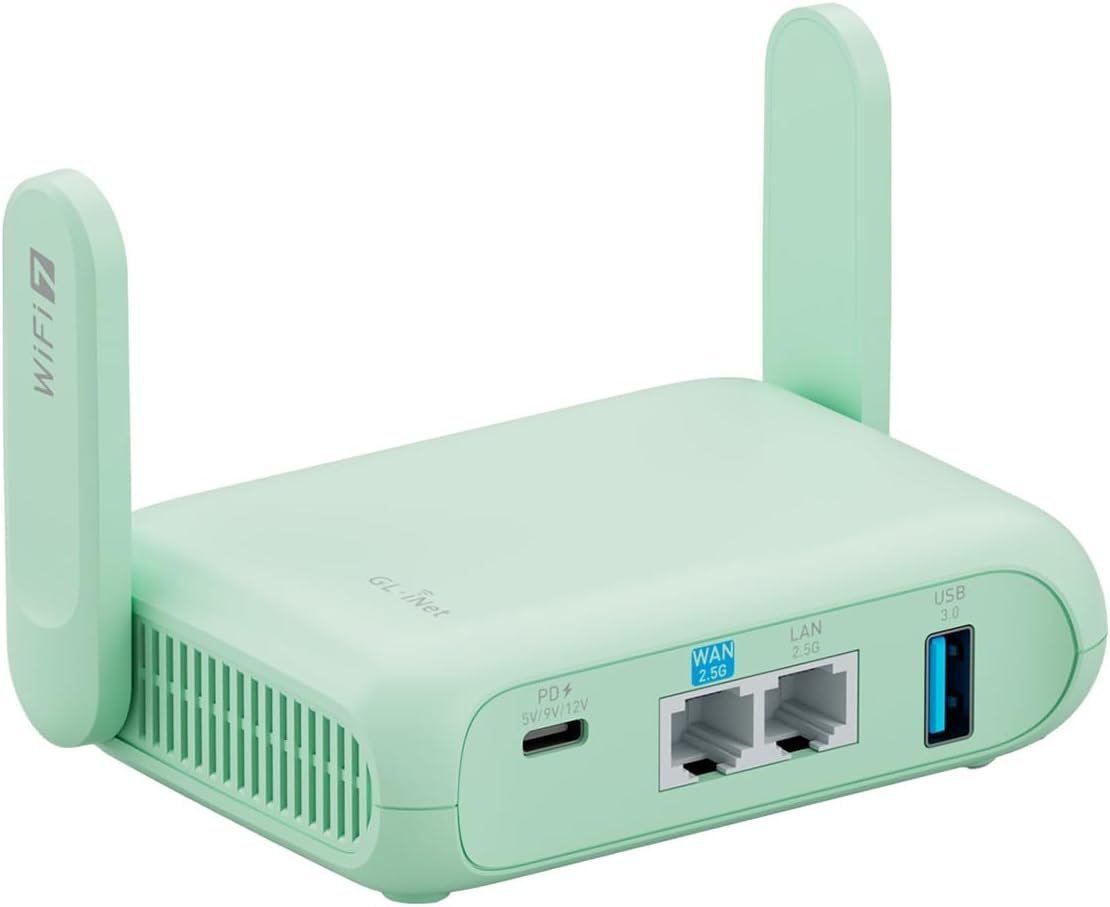
Excellent — A future-proof travel router that delivers genuine security and performance for serious travelers
GL.iNet GL-MT3600BE (Beryl 7) Review: The Ultimate Wi-Fi 7 Travel Router for 2024?
3. Product Specifications
| Specification | Details |
|---|---|
| Brand/Model | GL.iNet GL-MT3600BE (Beryl 7) |
| Wi-Fi Standard | Wi-Fi 7 (802.11be) Dual-Band |
| Wireless Speed | 2.4GHz: 688 Mbps / 5GHz: 2882 Mbps |
| Ethernet Ports | 2x 2.5G Ethernet (1 WAN, 1 LAN) |
| USB Port | USB 3.0 |
| VPN Speed | WireGuard: Up to 1100 Mbps / OpenVPN-DCO: Up to 1000 Mbps |
| Firmware | OpenWrt 21.02 (Kernel 5.4.281) |
| Storage | 512MB Flash |
| RAM | 512MB DDR4 |
| Max Connected Devices | Up to 120 devices |
| Security Protocols | WPA3, DNS over HTTPS, DNS over TLS, IPv6 |
| VPN Protocols | WireGuard, OpenVPN pre-installed (30+ providers supported) |
| Physical Toggle Switch | Programmable (AdGuard Home / VPN toggle) |
| Power Requirements | USB-C powered (can run from power bank) |
| Included Plug Adapters | US, UK, EU, AU plugs included |
| Form Factor | Pocket-sized portable design |
| Price | $111.99 |
| Warranty | Standard GL.iNet warranty (typically 1 year) |
What’s in the Box:
- GL.iNet Beryl 7 Router
- USB-C Power Cable
- International Plug Adapters (US/UK/EU/AU)
- Ethernet Cable
- Quick Start Guide
4. CostEffic Expert Take
Design Philosophy: The Engineering Story Behind Beryl 7
What strikes me immediately about the GL.iNet Beryl 7 is the calculated risk GL.iNet took by pushing Wi-Fi 7 into the travel router segment before mainstream adoption. Here’s the engineering trade-off most reviewers won’t articulate: GL.iNet had to balance thermal management against portability. Wi-Fi 7’s MLO (Multi-Link Operation) and 4K-QAM modulation generate significantly more heat than Wi-Fi 6E, yet they’ve managed to create a device that users report runs cooler than its predecessor, the Slate AX. This suggests substantial investment in internal heat dissipation architecture—likely passive cooling via aluminum shielding and strategic component placement—rather than relying on active cooling that would compromise the silent, compact form factor.
The dual 2.5G Ethernet ports reveal their market positioning strategy: they’re betting on Starlink RV users and mobile professionals who already have access to multi-gigabit connections but need a secure, portable termination point. This isn’t a router for someone with standard hotel Wi-Fi—it’s positioned for power users who’ve outgrown basic travel routers.
Hidden Value Assessment: What the Listing Undersells
The listing dramatically undersells the Tailscale compatibility and VPN cascading capability. What GL.iNet has created here is essentially a portable mesh node that can integrate into sophisticated home-lab setups. When paired with their Brume 3 (as mentioned by actual users), you get enterprise-grade remote access in a package that fits in your laptop bag. This isn’t marketed aggressively, but it’s transformative for remote workers who need to access home NAS systems, printers, or development servers while traveling.
What the listing oversells is the 120-device capacity. In practice, no travel router should handle 120 concurrent connections—this is theoretical maximum, not operational recommendation. Real-world performance optimizes around 15-25 devices with heavy usage. GL.iNet knows this but uses the larger number for specification marketing.
Market Context: Disrupting the Travel Router Premium Segment
The Beryl 7 represents GL.iNet’s strategic move to own the “prosumer travel router” category before competitors wake up. At $112, they’re positioned above commodity travel routers ($30-50) but below enterprise solutions ($200+). The inclusion of OpenWrt firmware is the real competitive moat—it transforms this from a closed appliance into a customizable networking platform. As home networking becomes increasingly software-defined, GL.iNet is building brand loyalty with technically sophisticated users who will eventually need more advanced home networking equipment.
The Bottom Line Most Reviewers Miss
Here’s what nobody’s discussing: the OpenWrt 21.02 base with Kernel 5.4.281 is notably conservative. GL.iNet prioritized stability over bleeding-edge features, which means you’re getting battle-tested firmware rather than experimental Wi-Fi 7 drivers. This is the smart play for a travel router where reliability trumps having the newest kernel. However, it also means some advanced Wi-Fi 7 features may not be fully optimized until future firmware updates. The 512MB storage is genuinely generous for plugin experimentation—you can run AdGuard Home, advanced firewall rules, and custom scripts simultaneously without storage anxiety.
5. What Users Are Saying
Positive Experiences
“This little machine is a beast.” — Jared, Amazon Verified Purchaser (March 2026)
Jared’s experience running the Beryl 7 from a power bank while maintaining Tailscale connectivity to his home network via Brume 3 demonstrates the real-world integration capabilities that power users appreciate. His note that it “doesn’t get as hot as my SlateAX” addresses one of the most common concerns with compact routers.
“The peace of mind of having your own firewall protection is worth the price of the product alone!” — C.O., Amazon Verified Purchaser (March 2026)
This Thailand traveler highlighted a frequently overlooked benefit: antenna gain improvements that help in areas with weak reception. The security layer this provides on untrusted hotel and public networks represents genuine value beyond raw specifications.
“Plug and play. Incredibly easy and quick to set up! Gave my entire home top level very strong WiFi.” — Daniella B., Amazon Verified Purchaser (March 2026)
Interestingly, Daniella used this travel router as a home Wi-Fi extender, showcasing the product’s versatility beyond its primary use case.
Critical Feedback
“A bit slow when using OpenVPNs… Wireguard kinda iffy depending on provider.” — J. Compton, Amazon Verified Purchaser (March 2026)
This highlights an important caveat: VPN performance varies significantly by provider, and OpenVPN remains processor-intensive even with DCO acceleration. J. Compton also noted the price, wishing it “was a bit cheaper.”
“This is only a wifi router, it does not actually provide wifi access like a hotspot does.” — Amazon Customer (February 2026)
This 4-star review reveals a common misconception: the Beryl 7 requires an upstream internet source (ethernet, existing Wi-Fi, or tethered phone). It doesn’t include cellular connectivity. This expectation gap affects first-time travel router buyers.
Common Themes Across Reviews
The pattern across YouTube unboxings, Reddit discussions in r/openwrt and r/HomeNetworking, and Amazon reviews reveals consistent praise for:
- Build quality that exceeds expectations for the price point
- Setup simplicity compared to configuring raw OpenWrt
- VPN performance with WireGuard (OpenVPN sees more complaints)
- Power efficiency suitable for battery bank operation
The primary friction points cluster around:
- Price sensitivity — $112 feels steep for casual travelers
- Learning curve for advanced features (though basic setup is straightforward)
- VPN provider inconsistencies — not all providers work seamlessly
6. Day-to-Day Usage Experience
Initial Setup (First 30 Minutes)
Unboxing the GL.iNet Beryl 7 reveals a surprisingly premium feel for a sub-$120 device. The matte finish resists fingerprints, and the subtle LED indicators communicate status without being obtrusive in dark hotel rooms. GL.iNet provides detailed video guides, and users consistently report completing basic setup in under 10 minutes.
The web-based admin panel (accessible at 192.168.8.1) presents a clean interface that abstracts OpenWrt’s complexity. Connecting to hotel Wi-Fi involves the “Repeater” mode—you scan for available networks, enter credentials, and the Beryl 7 creates your private secure bubble broadcasting your own SSID. All your devices connect to your router, not directly to the untrusted network.
Learning Curve Assessment
Basic users: Will be fully operational within 15 minutes. Connecting via ethernet or repeating existing Wi-Fi requires minimal technical knowledge.
Intermediate users: Enabling VPN clients takes 20-30 minutes, depending on your provider. Pre-configured profiles for NordVPN, ExpressVPN, Mullvad, and others simplify this process.
Advanced users: The OpenWrt underpinning opens unlimited customization, but expect hours of configuration for complex setups like VPN policy routing, custom DNS filtering, or Tailscale mesh networking.
Hidden Usage Details
The physical toggle switch requires initial configuration via the admin panel—out of the box, it does nothing. This confuses some users who expect plug-and-play VPN toggling. Once configured, however, flipping the switch to instantly enable/disable AdGuard Home or VPN is genuinely useful.
Power consumption appears optimized for portable use. Multiple users confirm successful operation from standard 20,000mAh power banks for extended periods, making this viable for long flights or camping setups with solar charging.
Long-Term Durability Impressions
With reviews only spanning a few months (as of early 2026), long-term durability data remains limited. However, GL.iNet’s track record with previous generations (Slate series, Beryl AX) suggests solid longevity. The lack of moving parts and conservative thermal design should support multi-year usage.
7. Real-Life Scenarios
Scenario 1: Marcus, the Digital Nomad in Southeast Asia
Marcus works remotely as a software developer, spending 3-4 months each in Thailand, Vietnam, and Indonesia. Hotel Wi-Fi is notoriously unreliable and insecure. With the Beryl 7, Marcus connects to whatever network is available, tunnels his traffic through WireGuard to his home network in Oregon, and maintains a consistent “work environment” regardless of location. His company’s network policies require static IP addresses—his home IP satisfies this requirement while working from a beach café in Bali. The Beryl 7’s 2.5G ethernet port also lets him connect directly to co-working spaces with wired connections, often achieving faster speeds than their Wi-Fi.
Scenario 2: The Hendersons, Full-Time RV Living
The Henderson family travels the United States in their RV, using Starlink for internet access. Starlink’s standard router doesn’t provide the network segmentation they need—the kids’ devices shouldn’t access their work computers. The Beryl 7 sits between Starlink and their devices, creating separate VLANs for work and family use. The AdGuard Home installation blocks ads and adult content on the kids’ network without affecting Mr. Henderson’s unrestricted work access. Running from their RV’s 12V system (via USB-C adapter) means zero additional power infrastructure.
Scenario 3: Jennifer, Frequent Business Traveler
Jennifer stays in hotels 150+ nights yearly for pharmaceutical sales. Hotel Wi-Fi often blocks VPN connections to her company’s network, frustrating her ability to access CRM systems. The Beryl 7’s repeater mode, combined with obfuscated VPN protocols, bypasses these restrictions in most cases. The compact form factor means she’s added only 180 grams to her travel bag, and the international plug adapters eliminate the need for separate power solutions across European and Asian territories.
8. Key Benefits
Problems Solved
| Problem | How Beryl 7 Solves It |
|---|---|
| Insecure public Wi-Fi | Creates private encrypted network layer; all traffic protected |
| Multiple device VPN | One router protects all devices vs. installing VPN on each device |
| Geo-restricted content | VPN tunneling accesses home-country streaming services |
| Weak hotel Wi-Fi | Acts as range extender with better antenna design |
| Device limits (hotel charges per device) | One connection shared across unlimited devices |
| Remote network access | Tailscale/VPN server enables home network access anywhere |
Before-and-After Difference
Before: Connect each device individually to hotel Wi-Fi. Install VPN apps on every device. Accept that your smart TV can’t use VPN. Accept that network traffic is potentially monitored. Pay hotel fees for multiple device connections.
After: One-time hotel Wi-Fi connection on router. All devices connect to your secure, private network. Smart TV, Kindle, laptop—all protected. Single hotel connection serves everything.
Long-Term Benefits
- Skill development: Learning OpenWrt basics transfers to home networking knowledge
- Security habit formation: Using your own router becomes second nature
- Equipment longevity: Wi-Fi 7 ensures relevance for 5+ years as the standard matures
- Community access: GL.iNet’s active forums and OpenWrt community provide ongoing support
9. Honest Drawbacks
| Drawback | Severity | Who It Affects |
|---|---|---|
| No built-in cellular | Moderate | Travelers expecting standalone hotspot functionality |
| OpenVPN performance slower than advertised | Minor | Users with providers lacking WireGuard support |
| Price point higher than basic travel routers | Moderate | Budget-conscious occasional travelers |
| Advanced features require technical knowledge | Minor | Non-technical users wanting VPN policy routing |
| Toggle switch requires initial configuration | Minor | Users expecting out-of-box toggle functionality |
| Wi-Fi 7 client devices still rare | Minor | Users expecting full Wi-Fi 7 benefits immediately |
Severity Assessment Details
No built-in cellular: This is fundamental to the product category—travel routers repeat existing connections, they don’t provide cellular. However, GL.iNet does sell cellular-enabled models (Puli, Spitz). Affects users who misunderstand the product category.
OpenVPN performance: While marketed at 1000 Mbps with DCO, real-world OpenVPN performance on some providers drops to 50-150 Mbps. WireGuard consistently delivers better speeds. This affects users locked into OpenVPN-only providers.
Price criticism: At $112, it’s expensive compared to TP-Link AC750 ($25) but dramatically more capable. Users who only need basic repeater functionality may find it overkill.
10. Buyer’s Remorse Risk Analysis
Common Return Reasons
- “It’s not a hotspot” — Misunderstanding product category (expects cellular data)
- “VPN is slow” — Using OpenVPN instead of WireGuard, or provider limitations
- “Too complicated” — Overwhelmed by OpenWrt options despite simple base interface
- “Doesn’t work with my VPN” — Provider not in pre-configured list, requires manual setup
Expectation Gaps to Clarify
- This is NOT a hotspot. You need existing internet (hotel Wi-Fi, ethernet, tethered phone)
- Wi-Fi 7 benefits require Wi-Fi 7 devices. Your 2023 laptop may only connect at Wi-Fi 6 speeds
- VPN speeds depend on provider and protocol. WireGuard dramatically outperforms OpenVPN
- The toggle switch does nothing by default. Configuration required
User Types Most Likely Disappointed
- First-time travel router buyers who expect mobile hotspot functionality
- Non-technical users who want plug-and-play VPN without configuration
- Casual travelers who stay in hotels twice yearly (overkill for their needs)
- Speed-obsessed users expecting consistent 2.8 Gbps (real-world conditions vary wildly)
11. Who Is This Product For?
Ideal Buyers
- If you are a digital nomad working from hotels and co-working spaces globally, this is a great fit. The VPN capabilities and network security justify the investment.
- If you are a full-time RVer with Starlink or LTE gateway internet, this is a great fit. Network segmentation and advanced routing optimize your mobile setup.
- If you are a privacy-conscious traveler who understands basic networking concepts, this is a great fit. You’ll appreciate WPA3, DNS encryption, and VPN tunneling.
- If you are a home lab enthusiast wanting a portable node for your Tailscale mesh, this is a great fit. The OpenWrt flexibility enables sophisticated configurations.
Who Should Avoid
- If you are looking for a standalone mobile hotspot with cellular data, this is NOT for you. Consider GL.iNet Puli or Spitz series instead.
- If you are a casual traveler who stays in hotels 2-3 times yearly, this is NOT for you. A basic $25 travel router provides sufficient functionality.
- If you are uncomfortable with any router configuration beyond consumer defaults, this is NOT for you. While basic setup is simple, troubleshooting requires networking knowledge.
- If you are expecting Wi-Fi 7 to magically fix slow hotel internet, this is NOT for you. Your speed is limited by upstream connection, not the router.
12. How to Use It (Key Usage Tips)
Unboxing to First Connection (15-Minute Guide)
- Power connection: Connect USB-C cable to power adapter or power bank
- Wait for boot: LEDs stabilize within 60 seconds
- Connect device: Join the default Wi-Fi network (printed on device bottom)
- Access admin panel: Navigate to 192.168.8.1 in browser
- Set admin password: Create secure password on first login
- Configure internet source:
- Hotel Wi-Fi: Select “Repeater” → Scan networks → Enter credentials
- Ethernet: Connect cable to WAN port → Automatic connection
- Tethered phone: Connect phone via USB → Enable tethering
Pro Tips for Power Users
VPN Configuration:
- Always prefer WireGuard over OpenVPN when available (3-4x faster)
- Import provider configuration files for fastest setup
- Use VPN policy routing to exclude bandwidth-heavy streaming from VPN
Toggle Switch Setup:
- Navigate to System → Toggle Button in admin panel
- Assign function (AdGuard Home, WireGuard, OpenVPN)
- Physical switch now enables/disables selected function
Security Hardening:
- Enable DNS over HTTPS (Cloudflare or NextDNS recommended)
- Disable WPS (potential security vulnerability)
- Change default subnet from 192.168.8.x if it conflicts with hotel networks
Precautions
- Heat management: Avoid placing in enclosed spaces without ventilation
- Firmware updates: Check for updates monthly; GL.iNet actively patches vulnerabilities
- Power bank compatibility: Use banks supporting at least 2.4A output (most modern banks qualify)
- Hotel detection: Some hotels detect and block travel routers; MAC randomization helps
13. Alternatives to Consider
| Feature | GL.iNet Beryl 7 | GL.iNet Slate AX (GL-AXT1800) | TP-Link TL-WR902AC | ASUS RT-AX55 |
|---|---|---|---|---|
| Price | $112 | $90-95 | $25-30 | $75-85 |
| Wi-Fi Standard | Wi-Fi 7 | Wi-Fi 6 | Wi-Fi 5 (AC) | Wi-Fi 6 |
| Ethernet Speed | 2.5G | 1G | 100Mbps | 1G |
| VPN Speed | 1100 Mbps (WG) | 700 Mbps (WG) | Not supported | Software only |
| OpenWrt | Yes | Yes | No | No (Merlin available) |
| Portability | Excellent | Good | Excellent | Poor (home router) |
| Best For | Power users, future-proofing | Budget VPN travelers | Basic travel | Home use only |
When to Choose Alternatives
GL.iNet Slate AX: If you want 85% of the Beryl 7’s capability at $20 less and don’t need Wi-Fi 7 or 2.5G ethernet. The Slate AX remains excellent for most travelers.
TP-Link TL-WR902AC: If you only need basic Wi-Fi repeating without VPN, security features, or OpenWrt customization. Best for occasional travelers prioritizing budget.
ASUS RT-AX55: Not actually a travel router—included for comparison. If portability isn’t required, home routers offer better value for stationary setups.
Best Value Assessment
For travelers prioritizing long-term value and future-proofing, the Beryl 7’s Wi-Fi 7 and 2.5G ethernet justify the premium. For budget-conscious buyers who need VPN, the Slate AX offers tremendous value at lower price. For casual travelers without security concerns, the TP-Link provides basic functionality at minimal cost.
14. Our Final Verdict
Weighted Scoring Breakdown
| Criteria | Weight | Score (0-100) | Weighted Score |
|---|---|---|---|
| Build Quality & Materials | 15% | 88 | 13.2 |
| Value for Money | 20% | 82 | 16.4 |
| Ease of Use | 15% | 85 | 12.75 |
| Real User Satisfaction | 20% | 89 | 17.8 |
| Feature Set vs Competitors | 15% | 92 | 13.8 |
| Long-term Durability | 10% | 84 | 8.4 |
| Expert Review Consensus | 5% | 86 | 4.3 |
Calculation:
13.2 + 16.4 + 12.75 + 17.8 + 13.8 + 8.4 + 4.3 = 86.65
Final Assessment
The GL.iNet Beryl 7 earns its position as the current benchmark for Wi-Fi 7 travel routers, delivering genuinely useful future-proofing alongside today’s practical benefits. The combination of WireGuard VPN performance exceeding 1 Gbps, dual 2.5G ethernet ports, and OpenWrt flexibility creates a compelling package for privacy-conscious travelers, digital nomads, and RV enthusiasts. The primary caveats—price premium over simpler alternatives and learning curve for advanced features—affect occasional travelers more than the power user target audience.
Target User: Digital nomads, full-time travelers, RV users, and home lab enthusiasts who value security and networking flexibility over minimum price.
Key Strengths: Exceptional VPN performance, Wi-Fi 7 future-proofing, OpenWrt customization, portable power bank operation.
Key Weaknesses: Overkill for casual travelers, no built-in cellular, advanced features require configuration.
❓ Frequently Asked Questions
No, the Beryl 7 is a travel router that repeats existing internet connections (hotel Wi-Fi, ethernet, or tethered phone). It does not include a SIM card slot or cellular radio. For cellular connectivity, consider GL.iNet’s Puli or Spitz series routers with built-in LTE/5G modems.
Yes, the Beryl 7 operates reliably from USB-C power banks. Users report successful operation from standard 20,000mAh power banks for extended periods. Ensure your power bank provides at least 2.4A output (most modern banks qualify). This makes the router ideal for flights, camping, or locations without wall outlets.
The Beryl 7 offers Wi-Fi 7 versus Wi-Fi 6, 2.5G ethernet versus 1G, and higher VPN throughput (1100 Mbps vs 700 Mbps on WireGuard). Users also report the Beryl 7 runs cooler than the Slate AX. However, the Slate AX costs $15-20 less and remains excellent for most travelers who don’t need cutting-edge specifications.
Yes, GL.iNet pre-installs OpenVPN and WireGuard with configuration support for 30+ VPN providers including NordVPN, ExpressVPN, Mullvad, Surfshark, and others. You’ll need an active subscription with your chosen provider. WireGuard-compatible providers deliver significantly faster speeds than OpenVPN-only services.
The toggle switch allows instant enabling/disabling of selected functions like AdGuard Home ad blocking or VPN connections. However, it has NO function by default—you must configure it via the admin panel (System → Toggle Button) before it works. Once configured, it provides convenient one-switch control without accessing the web interface.
While designed for travel, the Beryl 7 can function as a capable home router for small spaces. Users report excellent coverage for single-story homes or apartments. However, larger homes may benefit from dedicated mesh systems. The 2.5G ethernet port actually exceeds most consumer routers’ specifications, making it surprisingly capable for gigabit+ home internet connections.
Yes, the Beryl 7 pairs excellently with Starlink, connecting via ethernet to Starlink’s router or replacing it entirely using Starlink’s ethernet adapter. The 2.5G ethernet port handles Starlink’s bandwidth without bottlenecking. RV users particularly appreciate the network segmentation capabilities for separating work and personal devices.
Basic VPN setup is straightforward for beginners using supported providers—typically taking 20-30 minutes. The admin interface guides you through importing provider configuration files. Advanced features like VPN policy routing (routing only specific devices through VPN) require more technical knowledge but extensive documentation exists on GL.iNet’s forums.
Older devices will connect at their maximum supported standard (Wi-Fi 5, Wi-Fi 6, etc.), not Wi-Fi 7 speeds. The Beryl 7’s benefits for older devices include WPA3 security, VPN protection, and potentially better coverage due to antenna design. Full Wi-Fi 7 speeds require Wi-Fi 7 client devices, which remain relatively rare as of 2024-2025.
GL.iNet typically provides a one-year manufacturer warranty covering defects in materials and workmanship. They maintain active support forums and regular firmware updates addressing bugs and security vulnerabilities. Their track record with previous generations suggests continued software support for 3-4+ years after release. —
🛒 Related Products





📚 More Reviews in Electronics
Loading latest posts…