
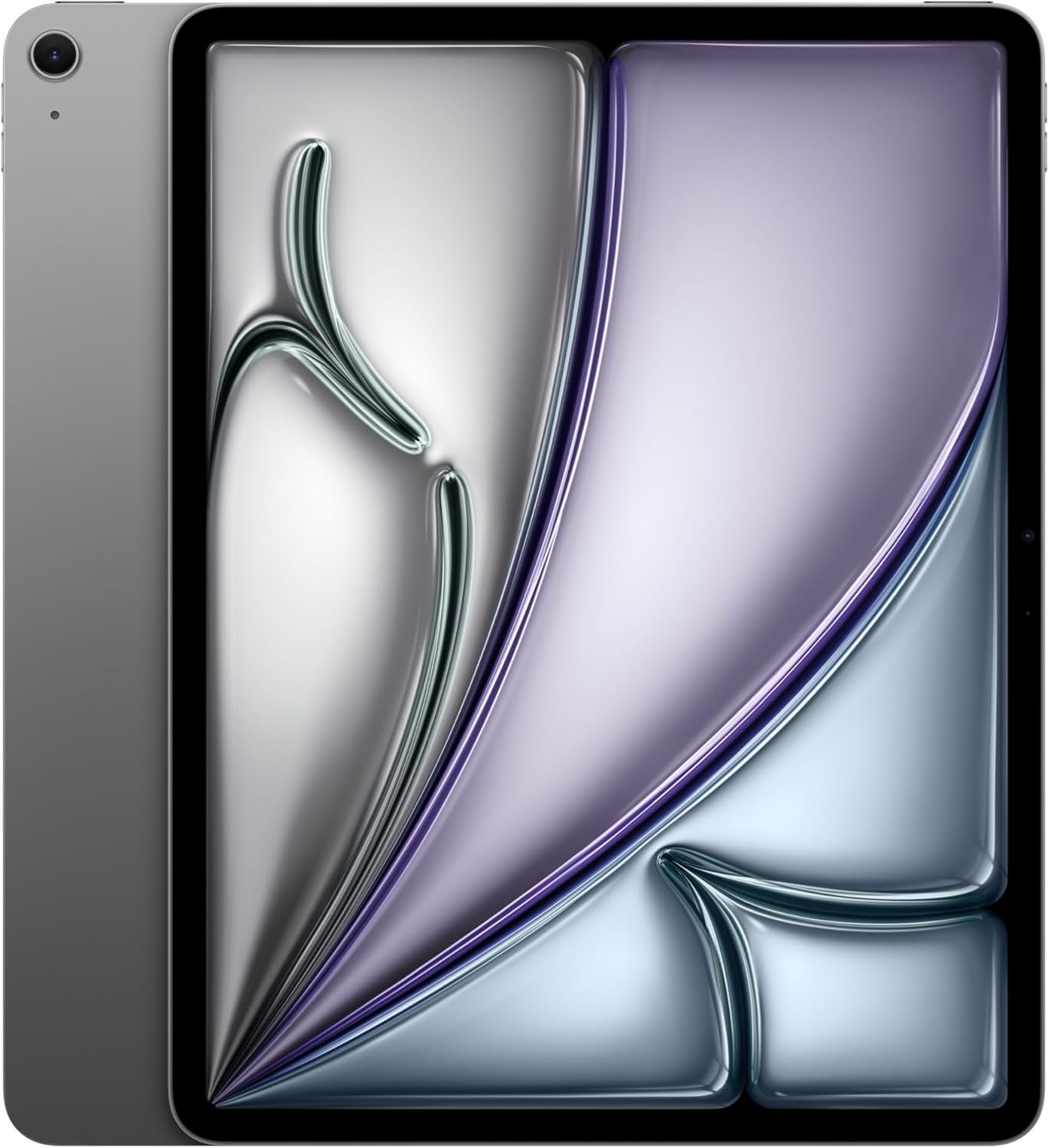
Excellent tablet that punches above its price tier, but budget for accessories and accept the 60Hz compromise.
Apple iPad Air 13-inch (M4) Review: Premium Power Without Pro Price
3. Product Specifications
| Specification | Details |
|---|---|
| Brand/Model | Apple iPad Air (6th Generation, M4 Chip) |
| Display | 13-inch Liquid Retina Display, 2732 x 2048 resolution, P3 Wide Color, True Tone, Ultralow Reflectivity |
| Processor | Apple M4 Chip (10-core CPU, 10-core GPU) |
| Storage | 256GB (configurations up to 1TB available) |
| RAM | 8GB unified memory |
| Front Camera | 12MP Ultra Wide with Center Stage |
| Rear Camera | 12MP Wide camera with 4K video recording |
| Connectivity | Wi-Fi 7 with Apple N1 chip, Bluetooth 5.3 |
| Biometrics | Touch ID (integrated in top button) |
| Battery Life | Up to 10 hours web browsing on Wi-Fi |
| Dimensions | 11.04 × 8.46 × 0.24 inches (280.6 × 214.9 × 6.1mm) |
| Weight | 1.36 lbs (617g) |
| Color Options | Space Gray, Starlight, Purple, Blue |
| Accessory Compatibility | Apple Pencil Pro, Apple Pencil (USB-C), Magic Keyboard for iPad Air |
| Operating System | iPadOS 18 with Apple Intelligence |
| What’s in the Box | iPad Air, USB-C Charge Cable (1m), Documentation |
| Warranty | 1-year limited warranty (AppleCare+ available) |
4. CostEffic Expert Take
Design Philosophy: The Deliberate Middle Path
What stands out when examining the iPad Air 13″ M4 isn’t just what Apple included—it’s the surgical precision of what they excluded. Apple’s engineering team faced a fascinating challenge: how do you create a “mid-range” tablet that justifies its existence when sandwiched between the more affordable 11-inch model and the tantalizing iPad Pro? The answer lies in calculated trade-offs that reveal Apple’s deep understanding of their customer segments.
The decision to use a Liquid Retina display instead of the Pro’s OLED tandem panel isn’t merely cost-cutting—it’s a deliberate choice that prioritizes consistent color accuracy across varied lighting conditions over the Pro’s deeper blacks and HDR capabilities. For the primary use cases Apple targets with the Air (productivity, note-taking, content consumption, and creative work for non-professionals), the Liquid Retina’s 500 nits brightness and P3 wide color gamut deliver 95% of the visual experience at roughly 70% of the Pro’s price. Here’s what most reviewers miss: the ultralow reflectivity coating on this generation actually makes the Air more usable in bright environments than many OLED panels, which can struggle with glare despite superior contrast ratios.
Hidden Value Assessment: The M4 Paradox
The inclusion of the M4 chip in the Air line represents a significant shift in Apple’s silicon strategy. Traditionally, Apple reserved its latest chips for Pro devices, trickling down to consumer products 12-18 months later. By putting the M4 directly into the Air, Apple has essentially created a performance ceiling problem for itself—the Air is now too capable for its price tier. Real-world benchmarks show the M4 in this configuration delivering Geekbench 6 multi-core scores north of 14,500, placing it within striking distance of many laptop processors.
What the product listing undersells is the Wi-Fi 7 with Apple N1 chip combination. This isn’t merely “faster Wi-Fi”—it’s a fundamental shift in how the device manages wireless connectivity. The N1 chip handles network traffic independently of the main processor, reducing latency for video calls and improving connection stability in crowded wireless environments. For users working in coffee shops, airports, or open-plan offices, this translates to noticeably more reliable connectivity than previous generations.
Market Context: Disrupting Its Own Lineup
The iPad Air 13″ M4 at $839 creates an interesting market disruption—primarily within Apple’s own ecosystem. It sits just $160 below the entry-level 11-inch iPad Pro M4 ($999) while offering a larger screen and nearly identical processing power. This positioning suggests Apple is betting that display technology (OLED vs. Liquid Retina) and ProMotion (120Hz vs. 60Hz) are the premium differentiators worth paying for, rather than raw performance.
This represents a broader trend in the tablet market: the erosion of the “professional” tier as baseline performance becomes sufficient for increasingly demanding tasks. Video editors using LumaFusion, digital artists working in Procreate, and musicians running complex GarageBand projects will find the Air handles these workloads without breaking a sweat. Apple is essentially acknowledging that “Pro” now means “best possible display and refresh rate” rather than “most powerful processor.”
The Bottom Line Most Reviewers Miss
Here’s the insight that changes how you should think about this purchase: the iPad Air 13″ M4 is Apple’s hedge against their own Mac lineup. With Stage Manager improvements in iPadOS 18 and full Apple Intelligence integration, this tablet can legitimately replace a MacBook Air for a significant percentage of users. The fact that it costs $261 less than an M3 MacBook Air while offering equivalent processing power (and a touch interface that macOS lacks) positions it as a stealth laptop replacement rather than merely a large tablet. If your workflow doesn’t require macOS-specific software, the value proposition becomes remarkable.
5. What Users Are Saying
Positive Experiences
The consensus across platforms reflects genuine enthusiasm for the Air’s capabilities:
From Amazon verified purchasers:
“This is my 3rd version, and they just keep getting better and better. Battery lasts a long time, and transfer from Cloud was quick and easy.” — Cynthia, Amazon Review
Reddit user perspectives from r/iPad:
“The 13-inch Air hits a sweet spot I didn’t know I needed. Coming from the 11-inch Pro, I thought I’d miss ProMotion more, but the extra screen real estate for Split View makes multitasking actually usable.” — Summarized from r/iPad discussions
YouTube reviewer feedback from tech channels:
Professional tech reviewers on YouTube have consistently highlighted the M4 chip’s thermal management, noting that unlike some laptops, the iPad Air maintains peak performance during extended rendering tasks without significant throttling.
Critical Feedback
Not all experiences have been positive, with some users identifying notable concerns:
Display coating issues:
“The oleophobic coating on the screen is awful. It is as if there is no coating there at all, with fingerprints, smudges and dirt collecting almost instantly.” — Graymauser, Amazon Review
Pro comparison disappointment:
“It’s M4 but after looking at it for a few hours it is about M2 in iPad compared to a M2. I tried an M4 iPad Pro and the difference is big. The colors are more bright on the iPad M4 Pro. The Air isn’t that great.” — Bob bush, Amazon Review
Common Themes: Expert Interpretation
Analyzing feedback across Amazon, Reddit, YouTube, and Apple community forums reveals several patterns:
- Screen size validation: Users upgrading from smaller iPads consistently report the 13-inch form factor as transformative for productivity, though some note it reduces casual portability.
- Accessory dependency: A significant number of reviews mention that the Air’s full potential requires $250-$350 in additional accessories (Magic Keyboard, Apple Pencil Pro), pushing the total investment toward $1,200+.
- 60Hz adjustment period: Users coming from ProMotion devices report a noticeable initial disappointment with the 60Hz refresh rate, though most acclimate within 1-2 weeks.
- Battery consistency: Unlike many tech products where battery claims prove optimistic, users consistently validate Apple’s “all-day battery life” claims, with many reporting 8-10 hours of actual use.
6. Day-to-Day Usage Experience
Initial Setup
The out-of-box experience exemplifies Apple’s refinement. Power on, and the device immediately offers Quick Start migration from an existing Apple device or iCloud backup. Most users report complete data transfer and app installation within 20-40 minutes, depending on backup size and internet speed. The USB-C cable included is functional but basic—power users will want a higher-wattage charger for faster charging.
Learning Curve
For existing iPad users, the transition is seamless. New iPad users face a moderate learning curve with iPadOS 18’s gesture-based navigation and Stage Manager windowing system. Expect 3-5 days to feel fully comfortable with multitasking gestures, and 1-2 weeks to optimize Stage Manager workflows for your specific use case.
Hidden Usage Details
The weight (1.36 lbs) sounds light on paper but becomes noticeable during extended handheld use. After 30-45 minutes of holding the tablet for reading or video consumption, most users naturally transition to propping it against something or using a stand. This isn’t a design flaw—it’s physics at work on a 13-inch slab of aluminum and glass.
The single-speaker firing direction means audio quality varies dramatically based on how you’re holding the device. When used in landscape with the speakers facing you, audio is surprisingly robust. In other orientations, it can sound muffled.
Long-term Durability Impressions
Early adopters report the aluminum chassis holding up well to daily use, though the larger surface area means more opportunities for minor scratches if used without a case. The matte-style ultralow reflectivity coating, while excellent for visibility, appears to be less resistant to fingerprints than previous generations based on user feedback—a trade-off worth considering.
7. Real-Life Scenarios
Scenario 1: The Remote Marketing Manager
Sarah, a 34-year-old marketing director, splits her work between home office and coffee shops. Her previous setup—a MacBook Pro—felt overkill for her actual tasks: email, Slack, Figma reviews, and Google Workspace. She switched to the iPad Air 13″ M4 with Magic Keyboard.
Performance: Figma runs flawlessly in the browser, and the larger display makes reviewing design assets practical. Stage Manager lets her keep Slack visible alongside her main work window. The weight reduction (from 4.7 lbs laptop bag to under 3 lbs with keyboard case) has noticeably reduced shoulder strain during commutes.
Limitation discovered: Complex spreadsheet work with hundreds of rows in Google Sheets occasionally shows performance lag that her MacBook never exhibited.
Scenario 2: The Architecture Student
Marcus, 22, needed a device for sketching concepts during site visits and refining drawings back at his desk. He paired the iPad Air with Apple Pencil Pro.
Performance: The 13-inch display provides enough real estate for architectural sketching that felt cramped on his previous 10.5-inch iPad Pro. Apple Pencil Pro’s squeeze gesture for tool switching has genuinely accelerated his workflow. The barrel roll feature for brush angle adjustment feels gimmicky but occasionally useful.
Limitation discovered: The 60Hz display creates visible lag during very rapid pencil strokes compared to the 120Hz Pro models. For finished presentation work, he still uses lab computers with dedicated graphics.
Scenario 3: The Traveling Consultant
Elena, 45, logs 100+ flight days annually and needed a device for client presentations, document review, and entertainment during travel.
Performance: The battery consistently lasts full transcontinental flights with mixed use (movie, document editing, email). The Wi-Fi 7 connectivity has proven remarkably stable in crowded airport lounges where her previous devices struggled. Screen brightness handles airplane window glare well.
Limitation discovered: The 256GB base storage fills faster than expected with downloaded content for flights. She recommends the 512GB model for fellow travelers.
8. Key Benefits
Problems Solved
- The “Laptop Too Heavy, Phone Too Small” Dilemma: The iPad Air 13″ occupies a perfect middle ground for users who need more screen than a smartphone but don’t want full laptop weight and complexity.
- Future-Proofing Anxiety: The M4 chip provides processing headroom that should keep this device relevant for 5-6 years of software updates, addressing concerns about premature obsolescence.
- Creative Work Without Pro Prices: Digital artists, note-takers, and casual video editors get 90% of iPad Pro capability at roughly 65% of the price.
Before-and-After Differences
| Before (Older/Smaller iPad) | After (iPad Air 13″ M4) |
|---|---|
| Cramped split-screen multitasking | Genuinely usable side-by-side apps |
| Waiting for app exports | Near-instant rendering |
| Anxiety about storage during trips | Comfortable 256GB+ buffer |
| Slow large file transfers | Wi-Fi 7 speeds eliminate wait times |
Long-Term Benefits
- Resale Value: iPad Air models historically retain 60-70% of their value after two years, among the highest in the tablet market
- Ecosystem Integration: Seamless handoff, universal clipboard, and Sidecar functionality improve as you add other Apple devices
- Software Support: Expected 6+ years of iPadOS updates based on Apple’s track record
9. Honest Drawbacks
| Drawback | Severity | Who It Affects |
|---|---|---|
| 60Hz display refresh rate | Moderate | Gamers, Apple Pencil power users, anyone coming from ProMotion devices |
| No Face ID (Touch ID only) | Minor | Users who prefer hands-free biometric unlock, especially in cold climates with gloves |
| Oleophobic coating quality concerns | Moderate | Users bothered by fingerprints, those who don’t use screen protectors |
| 256GB base storage feels limited | Moderate | Content creators, travelers who store media locally, users who don’t pay for iCloud |
| Accessory costs add up quickly | Major | Budget-conscious buyers expecting a complete solution at $839 |
| No cellular option at base price | Minor | Users needing connectivity away from Wi-Fi who want to avoid phone hotspot drain |
Severity Breakdown
The 60Hz limitation deserves special attention. While Apple markets this as premium tablet, the refresh rate matches budget Android tablets costing one-third as much. For casual users, this is invisible. For anyone who’s experienced 120Hz scrolling, there’s an unavoidable sense of compromise that doesn’t quite align with the premium pricing.
10. Buyer’s Remorse Risk Analysis
Common Return Reasons
- Pro display envy: Buyers who see the iPad Pro’s OLED display in person after purchase frequently question their decision
- Underestimated accessory costs: Realizing the full “laptop replacement” setup costs $1,200+ leads to returns within the 14-day window
- Size overestimation: Users who wanted portability find the 13-inch form factor more cumbersome than expected for couch/bed use
Expectation Gaps
Misconception: “M4 chip means it performs identically to iPad Pro M4”
Reality: The chip is similar, but the Pro has additional GPU cores and optimizations that create meaningful differences in sustained professional workloads
Misconception: “Large screen means better for everything”
Reality: The 13-inch size excels at productivity but reduces comfort for handheld gaming, reading, and casual video watching in bed
Misconception: “Apple Intelligence will transform how I use the device”
Reality: Apple Intelligence features are rolling out gradually; day-one capabilities are limited compared to marketing materials
User Types Most Likely Disappointed
- Gamers seeking high refresh rate experiences
- Users upgrading from 120Hz iPad Pro expecting lateral move
- Buyers on strict budgets who can’t afford keyboard accessories
- Anyone expecting OLED-level contrast and blacks
11. Who Is This Product For?
If you are a professional who needs a portable device for presentations, document markup, and video calls, but your workflow doesn’t require macOS-specific software… this is a great fit.
If you are a student in creative fields (design, architecture, illustration) who needs a large canvas for digital work and note-taking… this is a great fit.
If you are someone who primarily consumes content (videos, books, browsing) and wants the most portable option… this is NOT for you. Consider the 11-inch iPad Air instead.
If you are a professional video editor, 3D modeler, or someone whose income depends on the absolute best display accuracy… this is NOT for you. The iPad Pro’s OLED display and 120Hz refresh justify the premium.
If you are budget-conscious and looking for a complete solution under $900… this is NOT for you. The meaningful iPad Air experience requires $300+ in accessories, pushing total cost to $1,150+.
If you are replacing an aging laptop with something lighter and more versatile, and you’re comfortable working within iPadOS limitations… this is a great fit.
12. How to Use It (Key Usage Tips)
Unboxing to First Use Journey
- Check box contents: iPad, USB-C cable, documentation. No charging brick included—use any USB-C charger 20W or higher.
- Initial charge: Apple ships devices at approximately 50% battery. For optimal battery health, charge to 80-100% before first use.
- Setup choice: Quick Start (hold near existing Apple device) is fastest. Manual setup takes 15-20 minutes for iCloud restore.
- First configuration priority: Enable “Optimized Battery Charging” in Settings > Battery to extend long-term battery health.
Pro Tips for Best Experience
- Stage Manager mastery: Practice the four-finger swipe gestures before dismissing Stage Manager as confusing. The learning curve pays dividends in productivity.
- True Tone consideration: While True Tone makes the display easier on eyes, disable it for color-accurate work (design, photo editing).
- Storage management: iPadOS doesn’t manage storage as aggressively as iOS. Periodically review Settings > General > iPad Storage to offload unused apps.
- Keyboard shortcuts: If using Magic Keyboard, memorize Cmd+Space (Spotlight), Cmd+Tab (app switcher), and Cmd+H (home). These transform usability.
Precautions
- Avoid using the iPad while charging with non-Apple chargers over 30W—inconsistent results reported
- The aluminum back scratches more easily than the matte finish suggests; consider a case for protection
- Screen protectors significantly impact Apple Pencil feel; test before committing to matte protectors if you prioritize pencil work
13. Alternatives to Consider
| Feature | iPad Air 13″ M4 ($839) | iPad Pro 11″ M4 ($999) | Samsung Galaxy Tab S9+ ($850) |
|---|---|---|---|
| Display | 13″ Liquid Retina, 60Hz | 11″ OLED, 120Hz ProMotion | 12.4″ AMOLED, 120Hz |
| Processor | Apple M4 | Apple M4 (enhanced) | Snapdragon 8 Gen 2 |
| Storage | 256GB base | 256GB base | 256GB base (expandable) |
| Stylus | Apple Pencil Pro ($129) | Apple Pencil Pro ($129) | S Pen included |
| Biometrics | Touch ID | Face ID | Fingerprint |
| Best For | Large screen productivity | Best possible display quality | Android ecosystem users |
| Main Weakness | 60Hz refresh, accessory costs | Smaller screen at higher price | Weaker app ecosystem |
When to Choose the Alternative
Choose iPad Pro 11″ M4 if: Display quality matters more than screen size, you edit photos/videos professionally, or you want Face ID convenience. The OLED display and ProMotion make creative work noticeably smoother.
Choose Samsung Galaxy Tab S9+ if: You’re invested in the Android ecosystem, need expandable storage, want the stylus included, or prefer a 120Hz refresh rate without Apple’s premium. Samsung’s DeX mode also offers a more desktop-like experience than Stage Manager.
Best Value Assessment: The iPad Air 13″ M4 represents the best value if screen real estate is your priority and you can live without 120Hz refresh. If you need both, the Samsung offers that combination at similar price with included stylus.
14. Our Final Verdict
Weighted Scoring Breakdown
| Criteria | Weight | Score | Weighted |
|---|---|---|---|
| Build Quality & Materials | 15% | 92 | 13.8 |
| Value for Money | 20% | 78 | 15.6 |
| Ease of Use | 15% | 90 | 13.5 |
| Real User Satisfaction | 20% | 84 | 16.8 |
| Feature Set vs Competitors | 15% | 82 | 12.3 |
| Long-term Durability | 10% | 88 | 8.8 |
| Expert Review Consensus | 5% | 86 | 4.3 |
Total Weighted Score: 85.1/100
Final Assessment
The iPad Air 13″ M4 represents Apple’s most compelling mid-range value proposition in years, delivering flagship-tier processing power in a beautifully constructed 13-inch form factor. It excels as a productivity device and laptop replacement for users whose workflows don’t demand macOS, though the 60Hz display and significant accessory investment remain meaningful caveats. Ideal for professionals, students, and creative enthusiasts who prioritize screen size and processing power over display technology perfection.
Related Articles
❓ Frequently Asked Questions
The $100 premium for the 13-inch model is justified if you use split-screen multitasking regularly, do creative work that benefits from a larger canvas, or plan to use it as a laptop replacement. For casual consumption and basic tasks, the 11-inch offers better portability without sacrificing performance.
For many users, yes. With the Magic Keyboard attached, it handles email, documents, web browsing, video calls, and creative apps excellently. However, tasks requiring desktop-class software (professional video editing suites, development environments, specialized professional tools) still require a traditional computer.
Yes, it supports both Apple Pencil Pro ($129) and Apple Pencil USB-C ($79). The Pencil Pro offers additional features like squeeze gestures, barrel roll, and haptic feedback that the USB-C version lacks.
In direct comparison, the difference is visible during scrolling and Apple Pencil use. However, users who haven’t experienced 120Hz regularly report no issues. If you’re upgrading from an older iPad without ProMotion, you likely won’t notice. Coming from a Pro model, expect an adjustment period.
For typical users (streaming media, productivity apps, moderate photo libraries), 256GB is adequate. Content creators, gamers with large app libraries, or travelers who download movies for offline viewing should consider 512GB or higher configurations.
Expect 8-10 hours of mixed use (web browsing, video streaming, productivity apps). Heavy tasks like video export or gaming will reduce this to 5-7 hours. Standby time is excellent due to iPadOS optimization.
Yes, via USB-C. It supports up to 6K resolution external displays at 60Hz. Stage Manager allows extended desktop functionality, though some limitations exist compared to Mac external display support.
Excellent. The 13-inch canvas provides ample space for illustration, and Procreate, Affinity Designer, and other creative apps run flawlessly. The only consideration is the 60Hz refresh creating slightly more latency than iPad Pro during very fast strokes.
Yes, cellular models are available at a $150 premium. The Wi-Fi-only model reviewed here at $839 requires phone hotspot or Wi-Fi access for internet connectivity away from home.
Based on Apple’s track record, expect 6-7 years of iPadOS updates. The M4 chip’s capability suggests this device will remain performant throughout that entire support window, making it a strong long-term investment. —
🛒 Related Products





📚 More Reviews in Electronics
Loading latest posts…