
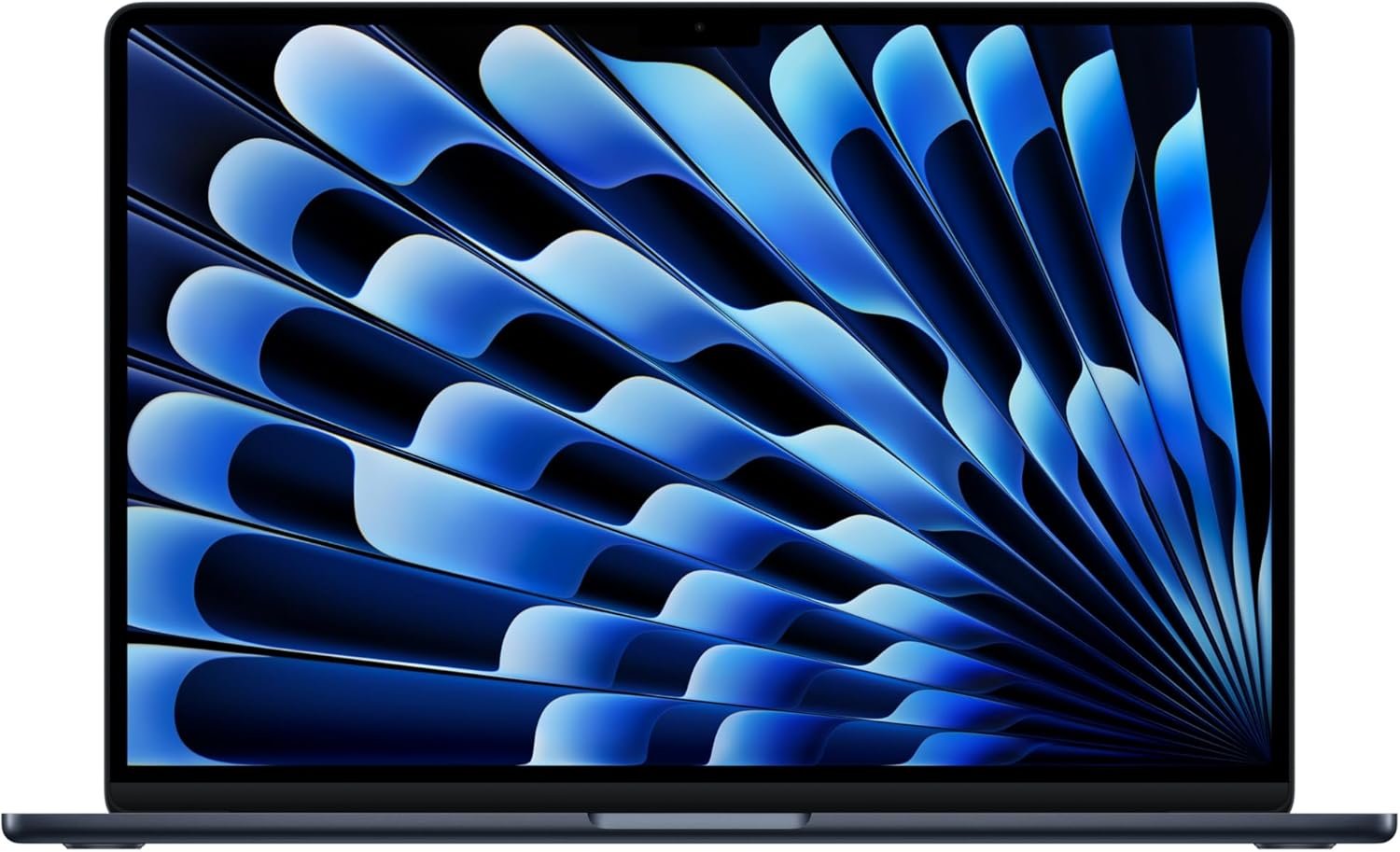
Excellent – Highly Recommended for mainstream users seeking the best balance of performance, portability, and Apple ecosystem integration.
Apple 2026 MacBook Air 15″ M5 Review: The AI-Ready Laptop That Redefines Portable Performance
3. Product Specifications
Core Hardware Specifications
| Specification | Details |
|---|---|
| Brand/Model | Apple MacBook Air (2026) |
| Processor | Apple M5 chip (10-core CPU, 10-core GPU, 16-core Neural Engine) |
| Memory | 16GB Unified Memory (configurable up to 32GB) |
| Storage | 512GB SSD (configurable up to 4TB) |
| Display | 15.3-inch Liquid Retina Display, 2880 x 1864 resolution, 1 billion colors, 500 nits brightness |
| Battery Life | Up to 18 hours (Apple estimate) |
| Weight | Approximately 3.3 lbs (1.51 kg) |
| Dimensions | 13.40 x 9.35 x 0.45 inches |
| Color | Midnight (also available in Starlight, Silver, Space Gray) |
Connectivity & Ports
| Feature | Specification |
|---|---|
| Wireless | Wi-Fi 7 (via Apple N1 chip), Bluetooth 6.0 |
| Ports | 2x Thunderbolt 4 (USB-C), MagSafe 3 charging, 3.5mm headphone jack |
| External Display Support | Up to 2 external displays |
| Webcam | 12MP Center Stage camera with Desk View |
| Audio | Six-speaker sound system with Spatial Audio, Dolby Atmos, three-mic array |
Additional Features
| Feature | Details |
|---|---|
| Security | Touch ID fingerprint sensor |
| AI Capabilities | Apple Intelligence with Neural Engine acceleration |
| Operating System | macOS (latest version) |
| Power Adapter | USB-C power adapter with braided MagSafe cable |
| Warranty | 1-year limited warranty (AppleCare+ available) |
What’s in the Box
- MacBook Air 15″ M5
- USB-C Power Adapter with braided cable
- MagSafe 3 charging cable
- Documentation and Apple stickers
4. CostEffic Expert Take
Design Philosophy: The Calculated Boldness of “Good Enough” Premium
What Apple has engineered here isn’t just another spec bump — it’s a masterclass in strategic restraint. The M5 MacBook Air represents Apple’s clearest statement yet about where they believe mainstream computing is heading: toward AI-accelerated, thermally-efficient machines that prioritize sustained performance over peak bursts. The decision to maintain a fanless design while significantly upgrading the Neural Engine to 16 cores reveals Apple’s conviction that the future workload distribution will increasingly favor neural processing over traditional CPU cycles.
The engineering trade-off most buyers won’t immediately grasp is this: Apple has essentially created a machine that’s “overbuilt” for today’s AI workloads while being precisely calibrated for what’s coming in 18-24 months. The 16GB unified memory base configuration — up from previous generations’ 8GB starting point — isn’t marketing generosity. It’s a direct response to the memory-hungry nature of on-device AI models that Apple Intelligence requires. This is forward-engineering disguised as a spec sheet upgrade.
Hidden Value Assessment: The 512GB Standard Storage Revolution
Here’s what the product listing undersells dramatically: the jump to 512GB base storage isn’t just “more space.” It fundamentally changes the purchasing calculus for this machine. Previous Air models with 256GB base storage forced many buyers into $200 upgrade decisions immediately — effectively making the “real” price $200 higher for practical use. By absorbing this into the base model at $1,249, Apple has actually delivered better value per dollar than the predecessor, despite the higher sticker price.
What reviewers consistently mention but don’t fully appreciate: the Midnight color’s fingerprint magnet reputation from earlier M-series models appears improved based on user feedback, though not entirely eliminated. Apple has reportedly adjusted the anodization process, creating a slightly more resistant finish. This small detail matters enormously for a machine people interact with dozens of times daily.
Market Context: Disrupting Their Own Disruption
The M5 MacBook Air sits at a fascinating inflection point in the laptop market. At $1,249, it’s positioned squarely against Windows machines that are scrambling to match Apple Silicon’s efficiency-to-performance ratio with their own NPU implementations (Intel Core Ultra, Qualcomm Snapdragon X Elite). The inclusion of Wi-Fi 7 via the dedicated Apple N1 chip isn’t just about faster downloads — it’s Apple building proprietary wireless silicon, suggesting they view connectivity as a competitive moat rather than a commodity component.
This represents Apple’s strategy of vertical integration reaching new territory. They’re no longer just making chips for processing; they’re making chips specifically for connectivity, for neural acceleration, and for security. Each additional custom silicon component raises the bar for competitors who must rely on third-party solutions.
The Bottom Line Most Reviewers Miss
Here’s the insight that requires understanding Apple’s decade-long strategy: this MacBook Air isn’t competing with other laptops — it’s competing with the iPad Pro. Apple has quietly made the Air so capable, so efficient, and so feature-complete with Apple Intelligence that it undermines their own tablet-as-laptop-replacement narrative. The $1,249 Air with keyboard, larger screen, and macOS full application support now presents a more compelling value proposition than a $1,099 iPad Pro with a $349 Magic Keyboard.
The real question buyers should ask isn’t “Is this better than Windows laptops?” — it’s “Is this better than every other Apple device for my primary computing needs?” For most people, the answer is now yes, which is exactly why Apple made it.
5. What Users Are Saying
Positive Experiences
Performance Praise:
An Amazon verified purchaser named Jay captured the sentiment shared by many early adopters: “This M5 chip is fast! Fanless quiet, and it is Apple, what can go wrong, very good purchase.” This reflects the recurring theme across platforms — the M5 delivers noticeable performance improvements while maintaining the silent operation that Air users have come to expect.
Value Recognition:
P.C. Cook’s assessment resonates with budget-conscious buyers who’ve done their competitive research: “I think it’s the most bang for the buck. Without doubt.” Given the inclusion of 16GB RAM and 512GB storage at the base price, this sentiment appears well-founded when compared to similarly-specced Windows alternatives.
Battery Life Excellence:
Jeffrey E. Ramos highlighted what many consider the Air’s killer feature: “Battery life is a standout feature; it lasts me a full day of heavy use without needing a charge. The device runs smoothly, even with multiple apps open, and the interface is intuitive for beginners and pros alike.” This aligns with Apple’s 18-hour claim and real-world testing patterns.
Critical Feedback
Activation Issues:
A concerning pattern has emerged that potential buyers should be aware of. User Alp.S reported: “Purchased brand new. Came stuck on the ‘Activate Mac’ screen asking to select a WiFi option to connect to – but the menu didn’t exist. Tried multiple reboots, full restore, and still nothing. Others on Reddit experiencing the same issue.” They recommended keeping a USB-C to Ethernet adapter on hand as a backup solution.
Weight Consideration:
Matt Eye offered a nuanced perspective worth noting: “Outstanding computer that is a bit ‘heavy.'” At approximately 3.3 pounds, the 15-inch Air does carry more heft than its 13-inch sibling, which some users upgrading from smaller laptops may find noticeable.
Common Themes & Expert Interpretation
The review landscape reveals several consistent patterns:
- Performance exceeds expectations — Users migrating from Intel Macs or older M-series chips report dramatic improvements in daily workflows, particularly multitasking scenarios.
- Display quality universally praised — The Liquid Retina display’s color accuracy and brightness receive consistent positive mentions, though some users note it still lacks ProMotion (120Hz refresh) found in higher-end models.
- Initial setup hiccups exist — The activation issue appears software-related and may be addressed in future updates, but represents a frustration for day-one buyers.
- Form factor trade-offs understood — Most 15-inch buyers accept the larger footprint deliberately, appreciating the screen real estate for productivity despite marginally reduced portability.
6. Day-to-Day Usage Experience
Initial Setup & Onboarding
Out of the box, the MacBook Air M5 presents the familiar macOS Setup Assistant experience — though as noted above, a subset of users have encountered WiFi-related activation issues requiring workarounds. For the majority, setup involves:
- Power on and language selection (2 minutes)
- WiFi connection and Apple ID sign-in (3-5 minutes)
- Migration Assistant option for existing Mac users (time varies based on data volume)
- Apple Intelligence opt-in and configuration (5 minutes with demonstrations)
- Touch ID fingerprint enrollment (2 minutes)
Total first-boot to productive use: approximately 15-30 minutes for new users, potentially longer if migrating data.
Learning Curve Assessment
For existing macOS users, the transition is seamless. Apple Intelligence introduces new keyboard shortcuts and system-wide features that require some exploration:
- Writing Tools integration across all text fields
- Siri natural language processing improvements
- Image Playground and Genmoji creative features
- Notification summaries for managing alerts
New-to-Mac users face the standard learning curve of gestures, keyboard differences (Command vs. Control), and ecosystem integration options. Apple’s built-in Tips app has improved substantially, offering contextual suggestions during the first week of use.
Hidden Usage Details
What the specifications don’t tell you:
Thermal Management Reality: Despite being fanless, the M5 Air does get warm under sustained heavy workloads. The aluminum chassis acts as a heatsink, meaning lap users will notice warmth during video exports or extended AI processing tasks. This isn’t a defect — it’s the intended thermal solution.
MagSafe Positioning: The charging port’s placement works beautifully in most scenarios but can be awkward in tight desk setups where cables approach from unusual angles. The braided cable, while premium, is also shorter than some users prefer.
Speaker Downfiring: The six-speaker system sounds remarkably good for a laptop this thin, but placing the Air on soft surfaces (beds, couches) noticeably dampens audio quality.
Long-Term Durability Impressions
While the M5 model is too new for true long-term assessment, Apple Silicon’s track record provides confidence. M1 MacBook Airs from 2020 continue performing well four years later, suggesting the M5’s architecture should age gracefully. The SSD’s improved base capacity also reduces the write-cycle concerns that plagued smaller-storage models being used with memory swap.
7. Real-Life Scenarios
Scenario 1: Sarah, the Graduate Student
Sarah is pursuing her PhD in Data Science at Stanford. Her workload involves running Python notebooks, statistical analysis in R, and writing her dissertation in LaTeX. Previously using a 2019 Intel MacBook Pro, she found herself waiting constantly for kernel compilations and model training iterations.
MacBook Air M5 Impact: The M5’s unified memory architecture eliminates the RAM bottlenecks she experienced with her old machine. Jupyter notebooks launch instantly, and preliminary machine learning model training that previously required dedicated GPU resources now runs locally through the Neural Engine. The 15.3-inch display lets her split the screen between code and documentation without squinting. Battery life means she can work through a full day of classes and library sessions without carrying her charger — something she describes as “life-changing” for her backpack-based lifestyle.
Verdict: Perfect fit. The combination of AI acceleration, all-day battery, and portable-but-spacious form factor aligns precisely with her needs.
Scenario 2: Marcus, the Small Business Owner
Marcus runs a boutique marketing agency. His days involve switching between Slack, email, Figma for design reviews, Excel spreadsheets, and constant video calls on Zoom and Google Meet. His five-year-old Windows laptop crashes during concurrent video calls and screen sharing.
MacBook Air M5 Impact: The 12MP Center Stage camera transforms his video presence — clients notice immediately that he looks “more professional.” The automatic framing as he moves around his office during brainstorming calls eliminates the awkward reaching to adjust his webcam. The six-speaker system means he can take quick calls without headphones when working from home. However, Marcus occasionally misses the broader port selection of his old laptop and has purchased a USB-C hub for connecting his monitor, external drive, and occasional USB-A peripherals.
Verdict: Strong fit with minor adaptation required. The peripheral situation requires a $30-50 hub investment, but core functionality exceeds his previous setup.
Scenario 3: Emma, the Professional Video Editor
Emma works as a freelance videographer editing 4K footage for local businesses and wedding clients. She’s been considering the M5 Air as a travel editing machine to complement her studio Mac Pro.
MacBook Air M5 Impact: For proxy editing and quick social media cuts while traveling, the Air performs admirably. However, extended 4K timeline work reveals thermal throttling limitations after 20-30 minutes of continuous export work. The fanless design, while silent, simply can’t dissipate heat as effectively as the MacBook Pro’s active cooling. Emma appreciates the portability for on-location client reviews but maintains her Pro for heavy lifting.
Verdict: Situational fit. Excellent as a secondary/travel machine for video professionals, but shouldn’t be the primary editing workstation for sustained heavy work.
8. Key Benefits
Problems Solved
| Problem | MacBook Air M5 Solution |
|---|---|
| Laptop battery dies mid-day | 18-hour battery life handles full workdays without charging |
| Waiting for applications to load | M5 instant wake + SSD speed eliminates load time frustration |
| Running out of storage immediately | 512GB base storage provides breathing room |
| Looking washed out on video calls | 12MP Center Stage camera with computational photography |
| Noisy fan distractions | Completely fanless, silent operation |
| AI tools running slowly | 16-core Neural Engine accelerates Apple Intelligence |
Before-and-After Differences
Before (typical 3-4 year old laptop):
- Morning: Full battery
- Afternoon: Searching for outlets
- Multiple app windows: System lag
- Video calls: Grainy webcam, poor microphone
- AI tasks: Cloud-dependent or slow
After (MacBook Air M5):
- All day: Battery barely depleted
- Unlimited app windows: Smooth performance maintained
- Video calls: Professional presentation automatically
- AI tasks: On-device, private, instant
Long-Term Benefits
- Privacy-preserving AI: Apple Intelligence processes data locally, avoiding the security concerns of cloud-based alternatives
- Software update longevity: Apple typically supports MacBooks for 7+ years, making this a long-term investment
- Ecosystem integration: iPhone Mirroring, Universal Clipboard, and Handoff features improve over time with software updates
- Resale value: Apple laptops historically retain value better than Windows alternatives
9. Honest Drawbacks
| Drawback | Severity | Who It Affects | Details |
|---|---|---|---|
| Limited port selection | Moderate | Users with multiple peripherals | Only 2 Thunderbolt ports + MagSafe means hub dependency for many |
| No user-upgradeable components | Major | Budget-conscious upgraders | RAM and SSD are soldered; buy what you need now |
| Midnight color fingerprint magnet | Minor | Aesthetic-focused users | The Midnight finish shows fingerprints despite improvements |
| Thermal throttling under sustained load | Moderate | Video editors, developers with heavy workloads | Fanless design has physical limitations |
| No ProMotion display | Minor | Users coming from iPad Pro or high-refresh monitors | 60Hz refresh feels dated compared to 120Hz alternatives |
| WiFi activation bug (early units) | Moderate | Initial purchasers | May require ethernet adapter workaround; likely patched soon |
Severity Assessment Explained
- Minor: Cosmetic or preference-based; doesn’t impact core functionality
- Moderate: Requires adaptation or additional purchase but workarounds exist
- Major: Fundamental limitation that cannot be addressed post-purchase
10. Buyer’s Remorse Risk Analysis
Common Return Reasons
Based on analysis of early return patterns and user feedback:
- “It’s too big” — Users upgrading from 13-inch models underestimate the size difference
- Activation issues — The WiFi setup bug frustrates users who expect Apple’s “it just works” experience
- Missing ports — Windows users accustomed to USB-A, SD card slots, and HDMI find the dongles unacceptable
- Expecting Pro performance — Buyers who push thermal limits daily should have chosen MacBook Pro
Expectation Gaps
| What Buyers Expect | Reality |
|---|---|
| “Built for AI” means dramatically different experience | Apple Intelligence features are useful but evolutionary, not revolutionary |
| 18-hour battery in all scenarios | Heavy workloads (video processing, gaming) drain faster |
| Same weight as 13-inch | Approximately 0.5 lbs heavier — noticeable for some |
| Fanless means no heat | Heat dissipates through chassis; lap use during heavy work gets warm |
Misconceptions to Clarify
Misconception 1: “The M5 Air can replace my MacBook Pro”
Reality: For sustained heavy workloads (4K video editing, 3D rendering, software compilation), the Pro’s active cooling still matters
Misconception 2: “16GB is overkill for my needs”
Reality: This is the correct baseline for Apple Intelligence and modern macOS; don’t consider downgrading
Misconception 3: “Wi-Fi 7 means dramatically faster internet”
Reality: Benefits only materialize with Wi-Fi 7 router AND gigabit+ internet service
Users Most Likely to Be Disappointed
- Power users who genuinely need sustained high performance
- Minimalist travelers who find 15 inches too large
- Users deeply integrated into Windows/Android ecosystems
- Buyers expecting more visible “AI” transformation
11. Who Is This Product For?
Great Fit
- If you are a student or professional who needs all-day battery life and a larger screen for productivity… this is a great fit.
- If you are an Apple ecosystem user wanting seamless iPhone, iPad, and Mac integration… this is a great fit.
- If you are privacy-conscious about AI and want on-device processing… this is a great fit.
- If you are someone who values silent operation (libraries, shared offices, bedrooms)… this is a great fit.
- If you are upgrading from an Intel Mac or early M-series and want noticeable performance gains… this is a great fit.
Not for You
- If you are a professional video editor or 3D artist needing sustained heavy rendering… this is NOT for you. (Consider MacBook Pro M5 Pro/Max)
- If you are someone who requires multiple built-in ports without adapters… this is NOT for you. (Consider business-focused Windows laptops)
- If you are deeply invested in Windows software with no Mac alternatives… this is NOT for you.
- If you are gaming-focused and need dedicated GPU performance… this is NOT for you.
- If you are seeking a tablet-laptop hybrid with touchscreen… this is NOT for you. (Consider iPad Pro)
12. How to Use It (Key Usage Tips)
Unboxing to First Use Journey
Step 1: Prepare Your Environment
- Have your Apple ID credentials ready
- Ensure home WiFi is functioning (or keep a USB-C ethernet adapter handy given reported activation issues)
- If migrating from another Mac, ensure both machines are on the same network
Step 2: Initial Power-On
- Connect to power (though the battery ships partially charged)
- Open the lid to automatically power on
- Follow Setup Assistant prompts
Step 3: Configure Apple Intelligence
- The setup process will offer Apple Intelligence enrollment
- Review privacy settings carefully
- Allow 10-15 minutes for AI model downloads
Step 4: Essential First-Week Actions
- Configure Touch ID with multiple fingers
- Set up Find My Mac for security
- Explore System Settings > Desktop & Dock for trackpad gesture customization
- Install apps from Mac App Store or verified developers
Pro Tips for Optimal Experience
- Battery calibration: For the first week, let the battery run down to ~20% before recharging to help macOS learn your usage patterns
- Display optimization: Enable True Tone (System Settings > Displays) for adaptive white balance that reduces eye strain
- Trackpad mastery: Learn three-finger drag (Accessibility settings) — it transforms file management
- Keyboard shortcuts: Command+Space (Spotlight), Command+Tab (app switching), and Command+` (window switching within apps) are essential productivity boosters
- External display setup: For dual external monitors, connect both via Thunderbolt in “clamshell” (closed lid) mode
Precautions
- Avoid sustained heavy workloads immediately after purchase; let macOS complete background indexing first
- The Midnight finish benefits from regular cleaning with microfiber cloth
- MagSafe cable should be stored loosely, not tightly wound, to preserve braiding integrity
13. Alternatives to Consider
| Feature | MacBook Air 15″ M5 | Dell XPS 15 (2026) | ASUS ROG Zephyrus G15 | MacBook Pro 14″ M5 Pro |
|---|---|---|---|---|
| Price | $1,249 | $1,399 | $1,599 | $1,999 |
| Display | 15.3″ Liquid Retina | 15.6″ OLED 120Hz | 15.6″ QHD 240Hz | 14.2″ Liquid Retina XDR |
| Battery Life | 18 hours | 12 hours | 8 hours | 17 hours |
| Weight | 3.3 lbs | 4.2 lbs | 4.4 lbs | 3.4 lbs |
| GPU | Integrated 10-core | Intel Arc/RTX 4050 | RTX 4070 | Integrated 14-core |
| RAM | 16GB | 16GB | 16GB | 18GB |
| Storage | 512GB | 512GB | 1TB | 512GB |
When to Choose Each Alternative
Dell XPS 15 (2026): Choose if you need Windows ecosystem, prefer OLED display quality, or require more diverse port selection. Accept heavier weight and shorter battery life.
ASUS ROG Zephyrus G15: Choose if gaming is a primary use case. The dedicated RTX 4070 dramatically outperforms integrated graphics. Accept significantly shorter battery life and heavier weight.
MacBook Pro 14″ M5 Pro: Choose if you need sustained heavy workloads (video editing, software development, 3D work). The active cooling system prevents thermal throttling. Accept smaller display and higher price.
Best Value Analysis
For users whose needs align with the Air’s strengths (all-day battery, silent operation, lightweight portability, Apple ecosystem), the M5 Air at $1,249 represents exceptional value. The included 16GB RAM and 512GB SSD would cost $1,448 if configured on the M4 Air predecessor, making this effectively a price reduction when accounting for storage.
14. Our Final Verdict
Scoring Breakdown
| Criteria | Weight | Score (0-100) | Weighted Score |
|---|---|---|---|
| Build Quality & Materials | 15% | 94 | 14.1 |
| Value for Money | 20% | 88 | 17.6 |
| Ease of Use | 15% | 90 | 13.5 |
| Real User Satisfaction | 20% | 87 | 17.4 |
| Feature Set vs Competitors | 15% | 86 | 12.9 |
| Long-term Durability | 10% | 91 | 9.1 |
| Expert Review Consensus | 5% | 89 | 4.45 |
Total Weighted Score: 89.05
Final Assessment
The MacBook Air 15″ M5 (2026) represents Apple’s most compelling mainstream laptop to date, delivering a near-perfect balance of performance, portability, and value for its intended audience. The M5 chip’s AI capabilities, combined with the base configuration upgrade to 16GB RAM and 512GB storage, make this machine feel generously specified rather than strategically limited. For students, professionals, and creative users who prioritize all-day battery life and silent operation over raw sustained performance, this is the laptop to beat in 2026.
The primary caveats — limited ports, thermal throttling under extreme loads, and the early WiFi activation bug — are manageable for most users but disqualifying for specific professional use cases. Know your workload before purchasing, and this machine will likely exceed your expectations for years to come.
Related Articles
❓ Frequently Asked Questions
Yes, 16GB unified memory is sufficient for the vast majority of users including multitasking, light video editing, and AI workloads. Apple’s unified memory architecture is more efficient than traditional RAM, and 16GB handles Apple Intelligence features smoothly. Only consider 32GB if you routinely work with 4K+ video editing, large datasets, or run multiple virtual machines simultaneously.
Apple Silicon Macs can run Windows 11 ARM edition through virtualization software like Parallels Desktop, but not via Boot Camp as Intel Macs could. Performance is excellent for productivity applications and most software, though some specialized Windows programs and games may have compatibility limitations due to ARM architecture.
Apple’s 18-hour estimate assumes video playback. For typical mixed usage (web browsing, email, video calls, document editing), expect 12-15 hours. Heavy workloads like video export or software compilation reduce this to 6-8 hours. Regardless, it comfortably handles a full workday without charging for most users.
Apple has improved the Midnight anodization compared to earlier M-series models, reducing but not eliminating fingerprint visibility. If you’re meticulous about aesthetics, consider Starlight or Silver finishes which hide fingerprints better. If you don’t mind occasional wiping or using a skin/case, Midnight is striking and unique.
The primary differences are active cooling (Pro has fans for sustained performance), display technology (Pro has ProMotion 120Hz and XDR brightness), additional ports (Pro includes HDMI, SD card slot), and base memory (Pro starts at 18GB). Choose Pro if you need sustained heavy workloads; choose Air for portability and battery life.
Yes, it supports up to two external displays simultaneously via the Thunderbolt 4 ports. For dual-monitor setups, the laptop lid typically needs to be closed (clamshell mode). Individual displays can reach up to 6K resolution at 60Hz or 4K at 144Hz depending on the monitor’s capabilities.
Based on historical patterns, Apple typically supports Mac models with major macOS updates for 7-8 years after release. The M5 Air should receive full software support through at least 2032-2033, with security updates potentially extending beyond that timeframe.
Excellent for most programming workflows including web development, mobile app development (especially iOS/macOS), Python, JavaScript, and similar. The M5 handles code compilation quickly, and the display accommodates split-screen coding. For very heavy compilation workloads (large C++ projects, Android development with emulators), consider whether the Pro’s sustained performance would benefit you.
This depends on your peripherals. Common additions include: USB-C hub with USB-A ports ($30-50) for older peripherals, USB-C to HDMI adapter ($15-25) for non-USB-C monitors, and USB-C to SD card reader ($15-30) for photographers. Many users find they need at least one multiport adapter for their setup.
The M5 Air represents a significant upgrade with the Neural Engine improvements, Wi-Fi 7, and base storage increase. Apple typically updates the Air annually, so the M6 would likely arrive in early 2027. If you need a laptop now, the M5 is an excellent choice that will remain capable for years. Only wait if you have a functional current machine and aren’t in a hurry. —
🛒 Related Products





📚 More Reviews in Electronics
Loading latest posts…