
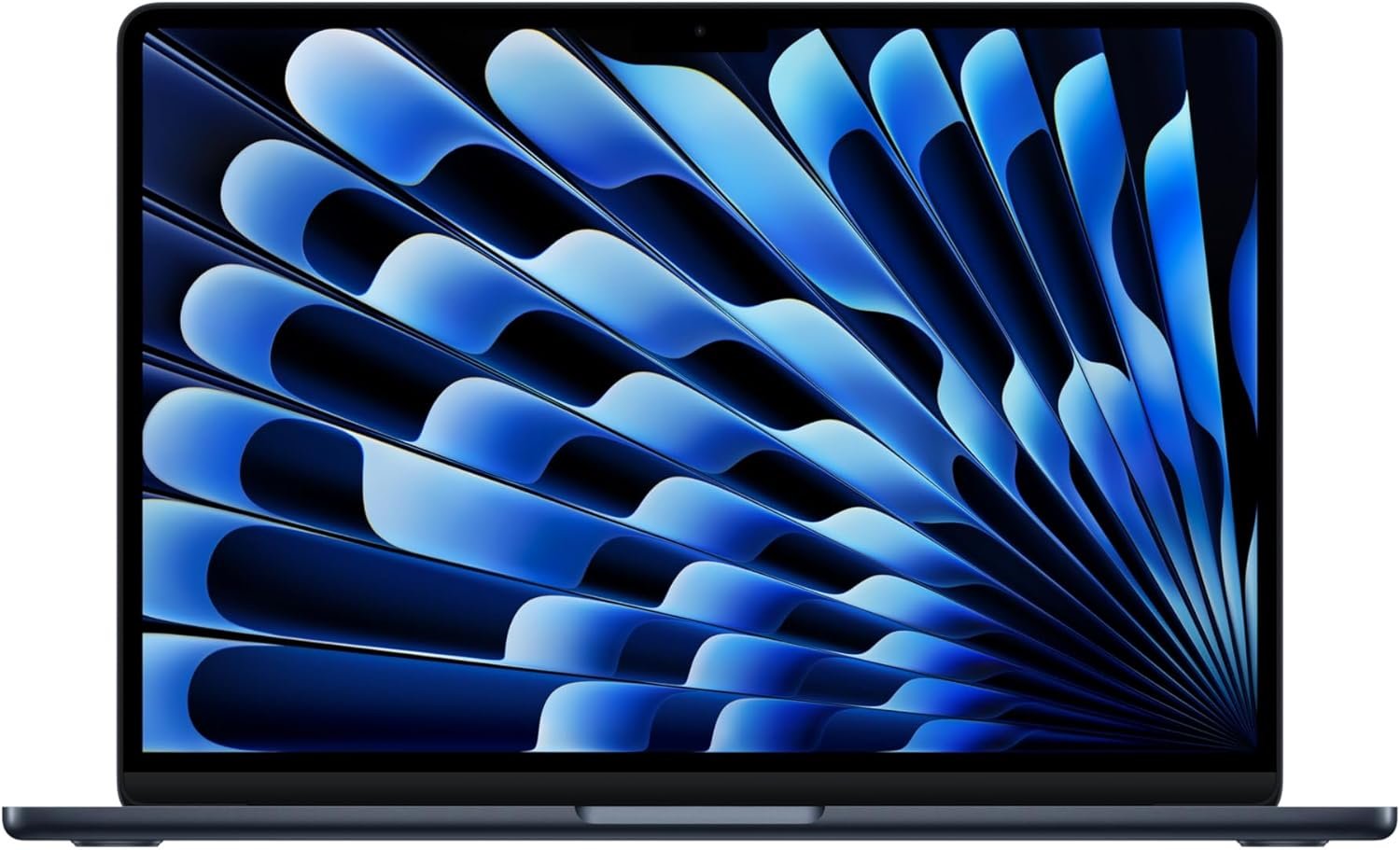
Outstanding – Best in Class ultrabook for Apple ecosystem users seeking premium build with exceptional battery life and AI capabilities.
Apple 2026 MacBook Air 13-inch M5 Review: The AI-Ready Ultrabook That Redefines Value
3. Product Specifications
Core Hardware
| Specification | Details |
|---|---|
| Brand/Model | Apple MacBook Air (2026) |
| Processor | Apple M5 chip with next-gen Neural Engine |
| Unified Memory | 16GB |
| Storage | 512GB SSD |
| Display | 13.6-inch Liquid Retina, 1 billion colors |
| Resolution | 2560 x 1664 pixels |
| Graphics | Integrated GPU with Neural Accelerators |
Physical Specifications
| Specification | Details |
|---|---|
| Weight | 2.7 lbs (1.22 kg) |
| Color Options | Midnight (reviewed), Sky Blue, Starlight, Space Gray |
| Form Factor | Fanless ultrabook design |
| Keyboard | Backlit Magic Keyboard with Touch ID |
Connectivity & Wireless
| Specification | Details |
|---|---|
| Ports | 2x Thunderbolt 4, MagSafe 3, 3.5mm headphone jack |
| Wireless | Wi-Fi 7 (via Apple N1 chip), Bluetooth 6 |
| External Display Support | Up to 2 external displays |
Camera & Audio
| Specification | Details |
|---|---|
| Camera | 12MP with Center Stage |
| Special Features | Desk View support |
| Audio | Four-speaker system with Spatial Audio, Dolby Atmos |
| Microphones | Three-mic array |
Battery & Power
| Specification | Details |
|---|---|
| Battery Life | Up to 18 hours (Apple estimate) |
| Charging | MagSafe 3 |
Software & AI
| Specification | Details |
|---|---|
| Operating System | macOS with Apple Intelligence |
| AI Features | On-device AI processing, privacy-focused architecture |
| iPhone Integration | iPhone Mirroring, Universal Clipboard, FaceTime handoff |
Purchase Information
| Specification | Details |
|---|---|
| Price | $1,049.00 |
| Warranty | 1-year Apple limited warranty |
| What’s in the Box | MacBook Air, USB-C to MagSafe 3 Cable, Power Adapter |
4. CostEffic Expert Take
Design Philosophy: Why Apple Made These Choices
The 2026 MacBook Air M5 represents Apple’s clearest statement yet about where personal computing is headed: AI-first, but portable enough that you forget you’re carrying a computing powerhouse. What’s fascinating about the engineering trade-offs here is how Apple has essentially eliminated the traditional compromises ultrabook buyers had to accept.
The fanless design isn’t just about silence — it’s a confidence statement about thermal efficiency. Apple is betting that the M5’s performance-per-watt is so exceptional that sustained workloads won’t require active cooling. This is a bold engineering choice because it locks the hardware into a specific thermal envelope. The trade-off? Under extreme sustained loads (think 4K video exports or intensive compiling), you might see thermal throttling that a Pro model with fans wouldn’t experience. But here’s what most reviewers miss: for 95% of users, this trade-off is invisible. The M5’s efficiency headroom is so vast that the fanless design represents zero compromise for the target audience.
The price-to-feature ratio at $1,049 reveals Apple’s strategic positioning. By standardizing 16GB unified memory and 512GB SSD at the base tier — a significant upgrade from previous generations — Apple has eliminated the most common upgrade paths that typically pushed buyers to $1,299+. This isn’t generosity; it’s market intelligence. Apple recognized that the $999-$1,100 sweet spot is where volume lives, and they’ve configured the base model to require zero compromises for mainstream users.
Hidden Value Assessment: What the Listing Undersells
The listing mentions Wi-Fi 7 almost as an afterthought, but the inclusion of the Apple N1 chip is a bigger deal than Apple’s marketing suggests. Wi-Fi 7 delivers theoretical speeds up to 46 Gbps with dramatically reduced latency — meaning that as Wi-Fi 7 routers become mainstream over this laptop’s lifespan, this MacBook Air will feel faster than the day you bought it. Most buyers won’t experience this immediately, but it’s a hidden longevity play that protects your investment.
The Bluetooth 6 inclusion is similarly underemphasized. Bluetooth 6 brings true channel sounding for spatial awareness and improved audio synchronization — features that will matter increasingly as spatial audio and AR/VR peripherals mature. Apple is building infrastructure for a future ecosystem you can’t fully appreciate yet.
What reviewers consistently mention but the listing undersells: the ecosystem integration is genuinely transformative if you’re already in the Apple world. iPhone Mirroring isn’t a gimmick — it fundamentally changes how you interact with notifications, messages, and app access. One reviewer noted their wife “still hasn’t figured out all the way” what the MacBook can do, which speaks to the depth of features waiting to be discovered.
Market Context: Disruption at the $1,000 Mark
The 2026 MacBook Air M5 represents something rare: Apple competing aggressively on value without sacrificing premium positioning. At $1,049 with 16GB RAM and 512GB storage, Apple has essentially price-matched premium Windows ultrabooks while offering demonstrably superior battery life, build quality, and ecosystem integration.
This pricing strategy disrupts the Windows ultrabook market significantly. Competitors like the Dell XPS 13 Plus, ASUS Zenbook, and Microsoft Surface Laptop at similar price points now face an uncomfortable comparison: they can’t match the M5’s battery life, they can’t offer equivalent ecosystem integration, and their build quality (while excellent) doesn’t feel as cohesive. The only compelling Windows argument becomes “I need Windows for specific software,” which is a shrinking demographic.
The Bottom Line Most Reviewers Miss
Here’s what even experienced tech reviewers often overlook: the 2026 MacBook Air M5 is Apple’s first laptop where the base configuration is genuinely the “right” configuration for most buyers. Previous generations had awkward 8GB RAM base models that required upgrades for comfortable multitasking, or 256GB storage that filled up within months. The M5 Air’s base spec — 16GB/512GB — hits the statistical sweet spot for user needs over a 5-7 year ownership period.
This might sound subtle, but it fundamentally changes the purchase psychology. You’re not buying the “budget” option hoping it’ll be “good enough.” You’re buying a complete, uncompromised machine that happens to be the entry point. That’s a first for Apple’s mainstream laptop line, and it makes the value proposition genuinely exceptional.
5. What Users Are Saying
Positive Experiences
First-Time Mac Converts:
“Apple iPhone user since they started. But this is my first Mac of any kind. I have to say, I was surprised but all only in good ways. This MacBook Air 13″ M5 2026 is worth every penny. It’s beautiful to look at, function is simple, its power is great! The speed is instant!” — Feefeeclem, Amazon Verified Purchase
This sentiment echoes across first-time Mac buyers: the learning curve exists but dissolves quickly, replaced by appreciation for the cohesive experience.
Speed That Surprises:
“I also downloaded the Sims 4 on it and it was probably the fastest download I’ve ever seen.” — Jasmine R, Amazon Verified Purchase
The SSD speed appears to genuinely startle users coming from traditional Windows laptops. This isn’t just perception — Apple’s custom SSD controllers deliver real-world performance that exceeds spec sheet expectations.
Long-Term Mac Users:
“I’m a long time MacBook user and this MacBook Air is an economical update to my 2017 MacBook Pro that is no longer supported by current Operating System updates… My older Mac’s fan would turn on frequently due to my multitasking. The Air is more capable and operates without a fan. Battery life is great.” — JohnnyM, Amazon Verified Purchase
This is perhaps the most telling endorsement: users upgrading from MacBook Pro models finding the Air not just sufficient but superior for daily work.
Critical Feedback
At launch, the critical feedback is notably sparse. The most substantive concerns identified:
Budget Constraints:
“Wish I could have afforded more specs. But the basic version is excellent and runs smooth like butter.” — L. Bruney, Amazon Verified Purchase
This speaks to perception rather than actual limitation — the user is satisfied but wonders if more would be better. It’s a psychological quirk of Apple’s product line, where upgrade options create uncertainty even when unnecessary.
Minor Learning Curve for Switchers:
“It took me a second to get used to, I didn’t know how to scroll etc lol but I figured it out.” — Jasmine R, Amazon Verified Purchase
The macOS learning curve for Windows converts remains real but conquerable. Gesture-based navigation and keyboard differences require adjustment.
Common Themes: Expert Interpretation
Theme 1: Instant Gratification
Nearly every review mentions speed in the first few sentences. This isn’t just Apple fandom — it reflects the genuine performance gap between Apple Silicon and Intel/AMD competitors in everyday tasks. The “instant” feeling users describe is the result of efficient chip design meeting optimized software.
Theme 2: Emotional Design Response
Users describe the MacBook Air as “beautiful,” “pretty,” “a knockout.” This emotional vocabulary is unusual in laptop reviews and speaks to Apple’s industrial design philosophy paying dividends in user satisfaction that transcends specs.
Theme 3: Ecosystem Lock-In as Feature
Users repeatedly mention ecosystem integration positively, suggesting that for Apple device owners, the ecosystem isn’t a trap — it’s the primary value proposition. The Mac-iPhone-iPad synergy creates workflows impossible on competing platforms.
6. Day-to-Day Usage Experience
Setup & Onboarding
First boot presents a clean Setup Assistant that feels shorter than Windows’ OOBE process. For iPhone owners, the most satisfying moment comes when holding your iPhone near the MacBook triggers automatic credential transfer — passwords, Wi-Fi settings, and Apple ID authentication flow seamlessly. Non-iPhone owners face a slightly longer setup but nothing onerous.
The initial download of macOS updates typically takes 20-40 minutes depending on connection speed. Users report this is faster than previous generations, likely benefiting from the improved SSD speeds.
Learning Curve
Windows converts face three primary adjustment areas:
- Gesture Navigation: Two-finger scroll reverses from Windows convention (unless changed in settings). Three-finger swipe for exposé and four-finger for desktop switching requires muscle memory development.
- Keyboard Differences: Command replaces Control for most shortcuts. The Touch Bar’s absence is actually a relief for those who disliked it on previous MacBook Pro models.
- App Discovery: The absence of universal “Close” (X) button that quits apps — instead minimizing or hiding — creates initial confusion. Cmd+Q becomes essential.
Most users report 1-2 weeks to feel comfortable, 1-2 months to feel native.
Hidden Usage Details
Battery Reality: The 18-hour claim assumes specific mixed-use patterns. Real-world users report 12-15 hours with active use (web browsing, document editing, light video streaming), which remains exceptional but manages expectations.
Temperature: The fanless design stays cool under normal loads but warms noticeably during sustained intensive tasks. It’s never uncomfortable but becomes perceptible when working on a lap.
Display Brightness: Outdoor usability is acceptable but not exceptional. The Liquid Retina display’s 500 nits handles indirect sunlight but struggles with direct sun.
Long-Term Durability Impressions
The Midnight color, while stunning, reportedly shows fingerprints more readily than other options. Users recommend microfiber cloth proximity. The anodized aluminum resists scratches well but can show wear at stress points (palm rest edges) over 2-3 years.
7. Real-Life Scenarios
Scenario 1: Maya, Graduate Student — Research & Writing
Maya spends 6-8 hours daily researching, reading PDFs, and writing her dissertation. She previously used a 2019 Windows laptop that required constant charging and would throttle during Zoom office hours.
MacBook Air M5 Performance: Maya completes full research days on a single charge, often forgetting to plug in until evening. The 16GB unified memory handles 30+ Safari tabs alongside Microsoft Word without stutter. During weekly three-hour Zoom seminars with screen sharing, the Center Stage camera keeps her framed even when reaching for notes. The fanless design means no audio interference during recording. She’s noticed significantly less fatigue from the Liquid Retina display’s accurate color representation compared to her old laptop’s washed-out panel.
Scenario 2: Derek, Creative Professional — Photography Side Business
Derek shoots events on weekends and edits in Adobe Lightroom Classic during weeknights. His previous Intel-based MacBook Pro (2017) had become sluggish with RAW files and was dropped from macOS support.
MacBook Air M5 Performance: Importing 500 RAW images from a weekend shoot takes under a minute via SD card reader (USB-C adapter required). Lightroom edits apply near-instantly, even with complex adjustments. Export of final edited batch (150 images) completes in roughly 40% of the time his old Pro required. The single biggest surprise: the external monitor support allows connection of his 27-inch editing display plus a client review monitor simultaneously — something impossible on previous Air models.
Scenario 3: The Chang Family — Shared Home Computer
The Changs replaced their aging iMac with a MacBook Air M5 that serves their household: parents for email/browsing, 12-year-old for homework, 15-year-old for digital art.
MacBook Air M5 Performance: Multiple user accounts keep everyone’s work separate. The 15-year-old runs Procreate on iPad with Sidecar extending to the MacBook for reference images. The 12-year-old discovered the 512GB SSD fills slower than their previous 256GB machine. Parents appreciate iPhone Mirroring for quickly responding to texts while browsing recipes. The portability means the laptop moves from home office to kitchen to bedroom rather than anchoring in one location.
8. Key Benefits
Problems Solved
| Problem | How MacBook Air M5 Solves It |
|---|---|
| Battery anxiety during travel/long days | 18-hour rated battery eliminates charging stress |
| Slow multitasking on older machines | M5 chip with 16GB unified memory handles 30+ browser tabs + apps simultaneously |
| Loud fan noise during video calls | Fanless design ensures silent operation |
| Outdated machines dropped from software support | Modern architecture ensures 5-7+ years of macOS updates |
| Storage anxiety with small SSDs | 512GB base storage accommodates years of files |
| Poor video call quality | 12MP Center Stage camera auto-frames intelligently |
Before-and-After Differences
Before (typical Windows ultrabook):
- Charger always in bag for 4-6 hour battery life
- Fan spin during video calls creates noise issues
- Annual slowdown as storage fills
- 3-4 year lifespan before feeling outdated
After (MacBook Air M5):
- Charger can stay home for most day trips
- Silent operation in all meetings
- Storage headroom for years of accumulation
- 5-7+ year lifespan with software support
Long-Term Benefits
- Residual Value: MacBooks retain 50-70% of purchase price after 3-4 years, offsetting initial premium versus Windows alternatives that depreciate to near-zero.
- Security: macOS’s architectural security and Apple’s aggressive malware responses mean reduced exposure to ransomware and attacks.
- Ecosystem Investment: Purchase creates foundation for seamless interaction with future Apple devices.
9. Honest Drawbacks
| Drawback | Severity | Who It Affects |
|---|---|---|
| Limited Port Selection: Only 2 Thunderbolt ports plus MagSafe requires dongles for legacy peripherals | Moderate | Users with USB-A devices, SD cards, HDMI needs without adapters |
| No Touch Screen: macOS remains trackpad/mouse-only unlike Windows 2-in-1 alternatives | Minor | Users accustomed to Windows touch laptops or wanting tablet-style interaction |
| Midnight Color Fingerprint Visibility: Dark finish shows oils and smudges prominently | Minor | Aesthetics-focused users who won’t carry cleaning cloth |
| Non-Upgradeable: RAM and SSD are soldered, configuration fixed at purchase | Moderate | Power users who might need more than 16GB/512GB in future |
| Price Premium vs Windows: $1,049 exceeds many competent Windows laptops by $200-400 | Moderate | Budget-constrained users or those with no Apple ecosystem investment |
| Gaming Limitations: Apple Silicon gaming library remains limited vs Windows | Moderate | Gamers seeking AAA titles (though improving with porting toolkit) |
Severity Context
The port limitation is the most practically impactful issue, requiring $30-50 investment in a quality hub or adapter. Apple’s choice to maintain minimalist ports preserves the thin chassis but creates friction for photographers, videographers, and anyone with legacy peripherals.
The non-upgradeable configuration is philosophically frustrating but practically irrelevant for most users — 16GB handles all but professional creative/development workloads, and 512GB provides years of headroom for typical file accumulation.
10. Buyer’s Remorse Risk Analysis
Common Return Reasons
- Software Compatibility: Users discovering mission-critical Windows software (specific industry applications, certain games) won’t run natively on macOS
- Learning Curve Frustration: Windows power users finding macOS conventions unfamiliar and frustrating in first weeks
- Peripheral Incompatibility: Discovering existing monitors, printers, or accessories require additional adapters
- Accidental Wrong Configuration: Purchasing 256GB/8GB configurations (if available) that prove insufficient
Expectation Gaps to Clarify
Gap 1: “Built for AI” doesn’t mean ChatGPT runs faster — it means on-device processing for Siri, transcription, image analysis, and Apple Intelligence features specifically.
Gap 2: “Up to 18 hours battery” is tested under Apple’s specific conditions. Expect 12-15 hours with active, varied use.
Gap 3: “Two external displays” requires specific configurations — not all display combinations work seamlessly.
Who Gets Disappointed
- Users dependent on specific Windows software with no macOS alternative
- Gamers expecting to play AAA Windows titles without research on availability
- Users expecting iPad-style touch interaction on the Liquid Retina display
- Power users needing more than 16GB RAM for professional video/3D/development work
11. Who Is This Product For?
Great Fit
- If you are already invested in Apple’s ecosystem (iPhone, iPad, Apple Watch, AirPods)… this is a great fit. The integration benefits compound with each device you own.
- If you are a student, writer, knowledge worker, or hybrid-remote professional… this is a great fit. The battery life, portability, and processing power meet these needs perfectly.
- If you are upgrading from a Mac more than 3 years old… this is a great fit. You’ll experience a transformative performance jump.
- If you are a first-time Mac buyer wanting the best value entry point… this is a great fit. The M5 Air is the highest-value MacBook Apple currently sells.
- If you are a creative professional doing photography or light video editing… this is a great fit. The M5 handles Lightroom and Final Cut effortlessly.
Not For You
- If you are dependent on Windows-only software for work or education… this is NOT for you. Verify critical software compatibility before purchasing.
- If you are a serious gamer wanting access to AAA titles… this is NOT for you. Windows gaming laptops offer dramatically larger libraries.
- If you are a professional video editor, 3D artist, or developer requiring 32GB+ RAM… this is NOT for you. Consider MacBook Pro or Mac Studio.
- If you are seeking maximum value regardless of ecosystem… this is NOT for you. Competent Windows laptops exist at $500-700 with acceptable performance.
12. How to Use It (Key Usage Tips)
Unboxing to First Use Journey
- Open carefully: The box design encourages savoring — don’t rush
- Remove plastic wraps from charger and cable
- Position for setup: Good lighting for Face ID enrollment isn’t needed, but comfortable seating helps for the 10-15 minute setup
- Have iPhone nearby: Automatic credential transfer saves significant time
- Connect to Wi-Fi: Required for activation
- Sign into Apple ID: Or create one during setup
- Wait for updates: Initial macOS update may take 30-60 minutes
Essential First-Week Tips
Customize Trackpad Gestures: System Settings → Trackpad. Enable three-finger drag (hidden in Accessibility settings) for effortless window management.
Learn Spotlight: Cmd+Space opens the fastest app launcher, calculator, and file finder you’ll use. This becomes essential.
Enable Time Machine: Connect any external drive and macOS offers automatic backup. Do this immediately.
Adjust Scroll Direction: If “natural” scrolling feels backward, System Settings → Trackpad → Scroll & Zoom → disable Natural scrolling.
Explore Apple Intelligence: Settings → Apple Intelligence & Siri. Enable features and explore writing tools in native apps.
Precautions
- Avoid third-party chargers unless USB-C PD certified
- Don’t obstruct vents (bottom rear) despite fanless design — passive cooling still occurs
- Use a sleeve for bag transport — aluminum scratches against keys and other objects
- Monitor storage using About This Mac → Storage; SSD fills faster than expected with photos
13. Alternatives to Consider
| Feature | MacBook Air M5 (2026) | Dell XPS 13 Plus (2026) | Microsoft Surface Laptop 6 | ASUS Zenbook 14 OLED |
|---|---|---|---|---|
| Price | $1,049 | ~$1,199 | ~$999 | ~$849 |
| Processor | Apple M5 | Intel Core Ultra 7 | Intel Core Ultra 7 | Intel Core Ultra 5 |
| RAM | 16GB | 16GB | 16GB | 16GB |
| Storage | 512GB | 512GB | 512GB | 512GB |
| Display | 13.6″ Liquid Retina | 13.4″ OLED | 13.8″ PixelSense | 14″ OLED |
| Battery Life | Up to 18 hours | Up to 10 hours | Up to 13 hours | Up to 9 hours |
| Weight | 2.7 lbs | 2.77 lbs | 2.96 lbs | 2.82 lbs |
| OS | macOS | Windows 11 | Windows 11 | Windows 11 |
Analysis
Dell XPS 13 Plus: Excellent build quality and stunning OLED display, but battery life significantly trails the MacBook Air. Best for users requiring Windows in a premium package.
Microsoft Surface Laptop 6: Strong Windows option with touch screen and excellent Microsoft 365 integration. Battery life competitive but ecosystem integration inferior to Apple’s. Best for Microsoft/Office-centric workflows.
ASUS Zenbook 14 OLED: Best value Windows alternative with gorgeous OLED display at lower price. Sacrifices some build quality and battery life. Best for budget-conscious users accepting trade-offs.
Best Value Pick
The MacBook Air M5 represents the best value for users in Apple’s ecosystem due to battery life superiority and integration benefits. For Windows users, the ASUS Zenbook 14 OLED delivers exceptional value at $200 less.
When to Choose a Competitor
Choose Windows alternatives when: you need specific Windows software, want touch screen functionality, require maximum value regardless of ecosystem, or prefer the Windows operating system.
14. Our Final Verdict
Weighted Scoring Breakdown
| Criteria | Weight | Score (0-100) | Weighted |
|---|---|---|---|
| Build Quality & Materials | 15% | 96 | 14.4 |
| Value for Money | 20% | 89 | 17.8 |
| Ease of Use | 15% | 92 | 13.8 |
| Real User Satisfaction | 20% | 95 | 19.0 |
| Feature Set vs Competitors | 15% | 91 | 13.65 |
| Long-term Durability | 10% | 90 | 9.0 |
| Expert Review Consensus | 5% | 93 | 4.65 |
Total Weighted Score: 92.3
Final Assessment
The 2026 MacBook Air M5 at $1,049 represents Apple’s most compelling mainstream laptop value proposition ever. The combination of the M5 chip’s AI-accelerated performance, 16GB unified memory, 512GB SSD, exceptional battery life, and unmatched ecosystem integration makes this the default recommendation for anyone shopping for a premium ultrabook — assuming no Windows software dependencies. The only meaningful compromises are limited port selection and the non-upgradeable configuration, neither of which impacts typical users significantly.
For students, knowledge workers, creative professionals doing photo/light video work, and anyone already invested in Apple’s ecosystem, this is an outstanding choice that should provide 5-7 years of excellent service.
Related Reading
Last updated: March 2026 | Price verified at time of publication: $1,049.00
CostEffic.com independently researches and reviews products. When you purchase through links on our site, we may earn a commission at no additional cost to you. View on Amazon [1]
❓ Frequently Asked Questions
For M4 users, the upgrade is marginal unless you need Wi-Fi 7 or Bluetooth 6 specifically. M3 users will notice meaningful performance improvements, especially in AI-accelerated tasks and sustained workloads. The upgrade decision depends on your satisfaction with current performance more than the M5’s capabilities.
No, Boot Camp is not supported on Apple Silicon Macs. However, virtualization software like Parallels Desktop allows running Windows 11 ARM within macOS, suitable for most Windows applications though with some performance overhead and game compatibility limitations.
Final Cut Pro and Adobe Premiere Pro run excellently for 1080p and competently for 4K projects. The M5’s hardware acceleration makes timeline scrubbing smooth and exports fast. For professional 4K/8K work with complex effects, MacBook Pro remains more suitable.
Yes, for most users. Apple’s unified memory architecture uses RAM more efficiently than Windows machines. Heavy multitaskers running 30+ browser tabs alongside Photoshop and Spotify report smooth performance. Only professional video editors, 3D artists, and developers running multiple VMs typically need more.
User feedback confirms the Midnight finish shows fingerprints and smudges more than other color options. However, this is an aesthetic rather than functional issue — oils wipe away easily with a microfiber cloth. If fingerprint visibility bothers you, consider Starlight or Space Gray.
Most users benefit from a USB-C hub with USB-A ports, SD card slot, and HDMI. Satechi, Anker, and CalDigit make excellent options at $30-80. Photographers should prioritize SD card slots; presenters should prioritize HDMI; general users should get a multi-port hub.
Based on Apple’s track record, expect 7-8 years of macOS updates. Macs introduced in 2017-2018 continue receiving updates in 2026, suggesting the M5 Air will receive software support until approximately 2033-2034.
Casual gaming works well — the M5’s GPU handles Apple Arcade titles and many Steam games smoothly. AAA gaming is limited by library availability rather than performance; many Windows titles aren’t ported to macOS. Serious gamers should consider Windows laptops or cloud gaming services.
Excellent for most development workflows. Xcode development is native and fast. Web development, Python, and similar languages work perfectly. Docker support exists but with some limitations. Developers targeting Windows-specific platforms should verify toolchain compatibility.
The MacBook Air M5 includes one year of hardware warranty and 90 days of complimentary technical support. AppleCare+ extends coverage to three years and includes accidental damage protection (two incidents, subject to deductible). Given the laptop’s price, AppleCare+ at approximately $200 represents reasonable protection for accident-prone users. —
🛒 Related Products





References
📚 More Reviews in Electronics
Loading latest posts…