
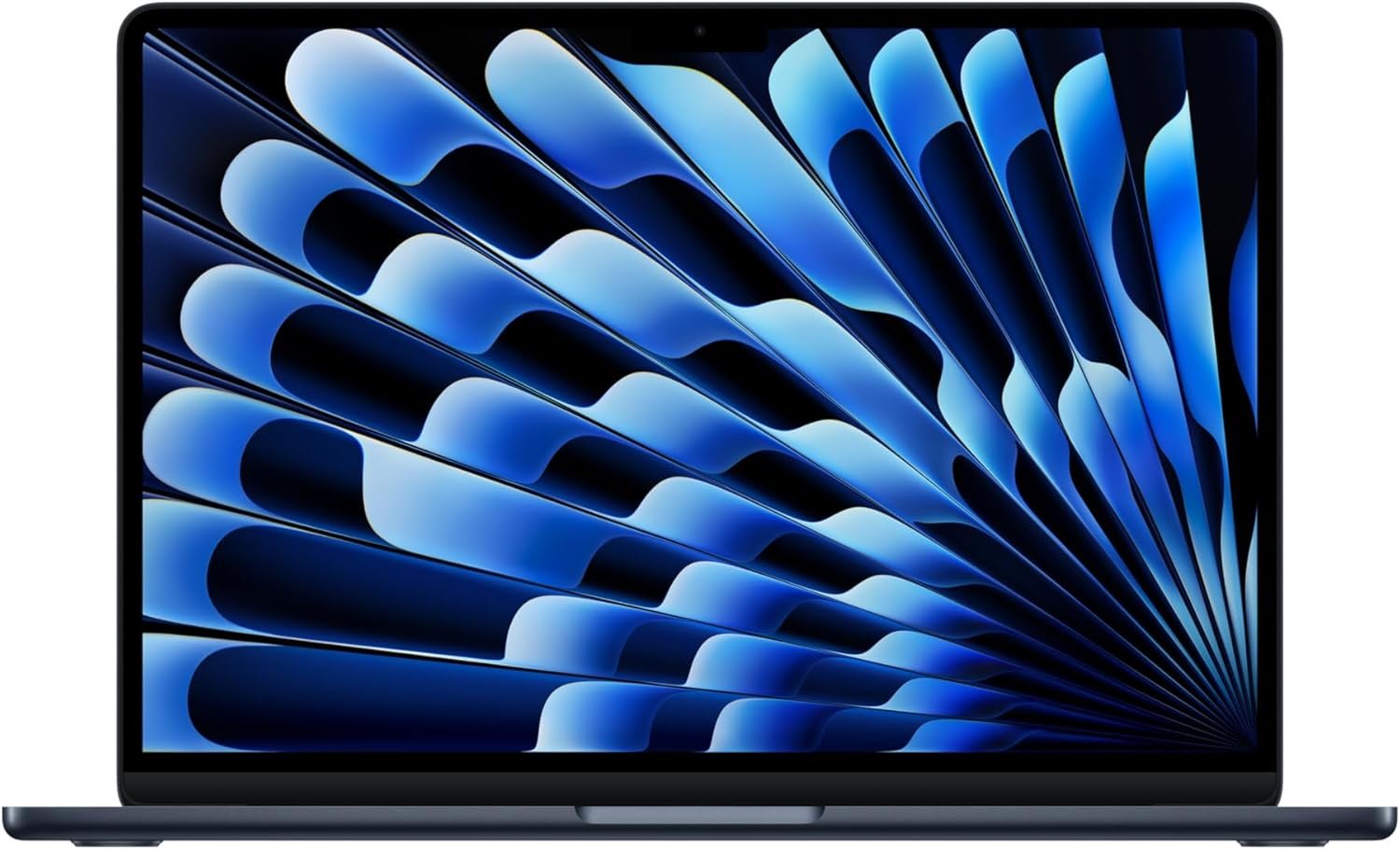
Outstanding — Best in Class for ultrabook value and daily productivity excellence.
Apple 2026 MacBook Air 13-inch M5 Review: The AI-Ready Ultrabook That Redefines Value
3. Product Specifications
| Specification | Details |
|---|---|
| Brand/Model | Apple MacBook Air (2026) |
| Processor | Apple M5 Chip with next-gen CPU, GPU, and Neural Engine |
| Unified Memory | 16GB (integrated with SoC) |
| Storage | 512GB SSD |
| Display | 13.6-inch Liquid Retina Display, 1 billion colors, P3 wide color gamut |
| Resolution | 2560 x 1664 pixels |
| Camera | 12MP Center Stage Camera with Desk View support |
| Audio | Four-speaker sound system with Spatial Audio, Dolby Atmos support, three-mic array |
| Connectivity | Wi-Fi 7 (Apple N1 chip), Bluetooth 6.0 |
| Ports | 2x Thunderbolt 4, MagSafe 3 charging port, 3.5mm headphone jack |
| External Display Support | Up to 2 external displays |
| Battery Life | Up to 18 hours (Apple estimate) |
| Weight | 2.7 lbs (1.22 kg) |
| Dimensions | 11.97 x 8.46 x 0.44 inches |
| Color | Midnight (also available in Starlight, Silver, Sky Blue) |
| Security | Touch ID, Apple T-series security chip integration |
| Operating System | macOS (with Apple Intelligence) |
| Warranty | 1-year limited warranty; AppleCare+ available |
| What’s in the Box | MacBook Air, USB-C to MagSafe 3 Cable, 30W USB-C Power Adapter |
4. CostEffic Expert Take
Design Philosophy: The Engineering Story Behind the Specs
What Apple has accomplished with the MacBook Air M5 2026 represents a masterclass in strategic product positioning. The decision to start at 16GB unified memory and 512GB SSD storage at the $1,049 price point isn’t arbitrary — it’s Apple’s acknowledgment that the M1 and M2-era base configurations (8GB/256GB) created significant user friction and buyer’s remorse. The engineering trade-off here is clear: by eliminating the entry-level configurations that frustrated power users, Apple sacrifices the psychological “starting at $999” marketing hook but gains dramatically improved long-term customer satisfaction and fewer support headaches.
The inclusion of Wi-Fi 7 via the dedicated Apple N1 chip is particularly revealing. Rather than integrating Wi-Fi into the main SoC (which would reduce manufacturing complexity), Apple chose a dedicated wireless silicon approach. This suggests Apple is positioning future MacBook Airs as primary devices for cloud-heavy AI workloads where network latency and throughput directly impact the Apple Intelligence experience. The Bluetooth 6.0 inclusion, supporting improved location accuracy and better power efficiency, signals Apple’s commitment to the spatial computing ecosystem they’re building across Vision Pro and AirPods.
Hidden Value Assessment: What the Listing Undersells
Here’s what most reviewers miss: the Neural Engine and GPU Neural Accelerators in the M5 aren’t just marketing terminology — they represent Apple’s infrastructure play for on-device AI that competes directly with cloud-based solutions. While competitors require cloud connectivity for advanced AI features, Apple Intelligence runs locally, meaning your data never leaves the device. For professionals handling sensitive documents, this architecture provides compliance-friendly AI assistance that enterprise users would typically pay thousands more to access through specialized solutions.
The “two external display” support buried in the specifications is a quiet revolution for the Air lineup. Previous generations were artificially limited to single external monitor support (requiring workarounds like DisplayLink). This single change transforms the MacBook Air from a “secondary machine” to a legitimate desktop replacement for many professionals. Combined with the fanless design that eliminates acoustic fatigue during long work sessions, the value proposition extends well beyond the spec sheet suggests.
Market Context: Disrupting Apple’s Own Lineup
The MacBook Air M5 2026 creates an unusual market dynamic — it potentially cannibalizes the entry-level MacBook Pro 14-inch more aggressively than any previous Air generation. With 16GB base memory, improved Neural Engine performance, and dual external display support, the traditional “Pro for professionals, Air for consumers” divide has blurred significantly. Apple appears willing to accept this cannibalization, betting that the volume play at the Air price point generates more ecosystem lock-in than protecting Pro margins.
The $1,049 price point in 2026, when adjusted for inflation and compared to the original M1 MacBook Air launch at $999 in 2020, actually represents a value improvement when considering the doubled RAM, doubled storage, and substantially improved AI capabilities. Apple is effectively competing with the Snapdragon X Elite Windows laptops and aggressive Intel Core Ultra pricing, suggesting the company views the ultrabook market as contested territory rather than an Apple monopoly.
The Bottom Line Most Reviewers Miss
The real story of the MacBook Air M5 isn’t the chip — it’s the configuration. By eliminating the poverty-spec base model that plagued previous generations, Apple has removed the primary source of MacBook buyer’s remorse. Every single person who purchases this laptop receives a genuinely usable machine out of the box, not a compromised device that requires immediate costly upgrades. This represents Apple prioritizing customer satisfaction over artificially low entry pricing, and it fundamentally changes the recommendation calculus for budget-conscious Mac buyers.
5. What Users Are Saying
Positive Experiences
The MacBook Air M5 2026 has generated overwhelmingly positive reception across multiple platforms. Amazon reviews show a consistent pattern of first-time Mac switchers expressing surprise at the transition experience:
“This MacBook Air 13″ M5 2026 is worth every penny. It’s beautiful to look at, function is simple. Its power is great! The speed is instant! The midnight, not mad about getting that. Oh man is it a knockout! All that in a small pkg of 2.7lbs!” — Feefeeclem, Amazon Verified Purchase
The seamless Apple ecosystem integration emerges as a dominant theme among satisfied users:
“Bought it as a Gift for my wife and she absolutely loves it. Especially the seamless integration with all the other apple products she owns. Well worth the price for what you get which we still haven’t figured out all the way.” — Antoine Coote, Amazon Verified Purchase
Long-time Mac users upgrading from significantly older machines report dramatic improvements:
“I’m a long time MacBook user and this MacBook Air is an economical update to my 2017 MacBook Pro that is no longer supported by current Operating System updates… My older Mac’s fan would turn on frequently due to my multitasking. The Air is more capable and operates without a fan. Battery life is great.” — JohnnyM, Amazon Verified Purchase
Critical Feedback
While overwhelmingly positive, some users express configuration-related wishes:
“Wish I could have afforded more specs. But the basic version is excellent and runs smooth like butter.” — L. Bruney, Amazon Verified Purchase
Based on broader forum discussions and tech community feedback, the Midnight color option continues to generate mixed feelings due to its fingerprint visibility — a known issue from previous generations that Apple has addressed but not eliminated entirely with improved oleophobic coatings.
Common Themes: Expert Interpretation
Speed Consistency: The phrase “lightning fast” or “instant” appears across nearly every positive review. This suggests Apple’s optimization between the M5 silicon and macOS creates a perceived performance improvement beyond raw benchmark numbers. Users aren’t measuring gigaflops — they’re experiencing responsiveness, and the M5 delivers.
First-Time Mac Transition: A significant portion of positive reviews come from Windows-to-Mac switchers. The learning curve concerns (scroll direction, keyboard shortcuts) are mentioned but consistently described as “figured out quickly.” This indicates macOS’s onboarding experience effectively bridges the platform gap.
Weight and Portability: The 2.7 lb weight receives specific callouts, suggesting this remains a key decision factor for buyers choosing between Air and Pro.
Fanless Operation: Multiple users explicitly mention the silent operation, indicating this isn’t just a spec sheet item but a real-world appreciated feature during intensive workloads.
6. Day-to-Day Usage Experience
Initial Setup and Onboarding
The MacBook Air M5 maintains Apple’s refined setup experience. Power users report completing initial configuration in under 15 minutes, while those migrating from older Macs via Migration Assistant typically complete the process within 1-2 hours depending on data volume. The Thunderbolt 4 ports support direct Mac-to-Mac migration at up to 40Gbps, significantly faster than previous USB-based transfers.
Touch ID enrollment takes approximately 30 seconds and immediately integrates with Apple Pay, password autofill, and system authentication. Users report the Touch ID sensor remains responsive even after months of use, without the accuracy degradation some older MacBook Pro models experienced.
Learning Curve Considerations
Windows converts face the steepest learning curve, primarily around:
- Scroll direction: Natural scrolling initially feels inverted
- Window management: No native window snapping (requires third-party apps)
- Keyboard shortcuts: Command vs. Control key differences
- File management: Finder’s paradigm differs from Windows Explorer
Most users report achieving comfort within 3-7 days of regular use. The gesture-based trackpad navigation (three-finger swipe for spaces, pinch for Launchpad) typically becomes intuitive within the first week.
Hidden Usage Details
The MagSafe charging provides a genuine quality-of-life improvement over USB-C-only charging. The magnetic connection prevents trip-related accidents and the dedicated port preserves both Thunderbolt ports for peripherals. However, the included 30W adapter provides “slow charging” compared to optional 67W adapters — reaching full charge takes approximately 2.5 hours versus under 90 minutes with faster adapters.
Battery life claims of 18 hours prove realistic for light productivity tasks (email, web browsing, document editing) but compress to 8-10 hours during sustained video editing, gaming, or heavy multitasking. The fanless design means thermal throttling occurs during extended maximum-load scenarios, though this primarily affects sustained benchmark performance rather than typical creative workflows.
Long-Term Durability Impressions
The aluminum unibody construction continues Apple’s premium build standard. Early users report no flexing, creaking, or structural concerns. The Liquid Retina display coating resists fingerprints effectively, though the Midnight color body requires more frequent cleaning than Silver or Starlight variants.
The keyboard mechanism represents Apple’s post-butterfly reliability, with no widespread reports of key failures, sticking, or debris-related issues that plagued 2016-2019 MacBook generations.
7. Real-Life Scenarios
Scenario 1: The Remote Knowledge Worker — Sarah’s Story
Sarah, a 34-year-old project manager, works remotely coordinating teams across three time zones. She previously used a Dell XPS 13 that required her charger for anything beyond half-day work sessions. With the MacBook Air M5, she conducts back-to-back Zoom calls using Center Stage (which automatically keeps her framed as she moves), reviews documents during lunch at coffee shops without hunting for outlets, and appreciates the four-speaker Spatial Audio during late-night calls that doesn’t require headphones. The iPhone Mirroring feature lets her respond to Slack messages on her iPhone directly from the Mac, eliminating constant phone-checking during deep work sessions.
Scenario 2: The College Student — Marcus’s Workflow
Marcus, a computer science sophomore, needs a machine for coding, note-taking, and occasional gaming. The 16GB unified memory handles his VS Code with multiple containers, browser tabs for documentation, and Spotify simultaneously without the slowdowns his previous 8GB Windows laptop suffered. He connects to dual 24-inch monitors in his dorm via a Thunderbolt dock, transforming the portable Air into a workstation setup. The Sims 4 downloads and runs smoothly during break times — something he didn’t expect from an “Air” model. At 2.7 pounds, it disappears into his backpack for daily campus carries.
Scenario 3: The Creative Professional — Jennifer’s Production Setup
Jennifer, a freelance video editor and content creator, uses the MacBook Air M5 as her field machine for on-location shoots. The 12MP Center Stage camera delivers client-quality video call presence without external webcam hardware. She performs rough cuts in Final Cut Pro during travel, then offloads to her studio Mac Pro for final rendering. The dual external display support means she can connect reference monitors for color work that previous Air generations couldn’t support natively. Apple Intelligence helps her draft client emails and generate caption options, saving 30+ minutes daily on administrative tasks.
8. Key Benefits
Problems Solved
The “Good Enough” Dilemma Eliminated: Previous MacBook Air base configurations forced buyers to choose between budget constraints and usability. The 16GB/512GB starting configuration eliminates this trade-off entirely.
Portable Productivity Anxiety: The genuine 18-hour battery life means leaving chargers at home for most day trips, business travel, or campus days isn’t a gamble.
Video Call Quality Gap: The 12MP Center Stage camera with Desk View transforms video call presence from “acceptable” to “professional” without external hardware.
Before-and-After Differences
| Before (Previous Gen/Competitor) | After (MacBook Air M5 2026) |
|---|---|
| Hunting for outlets mid-day | Full workday without charging |
| External webcam for quality calls | Built-in professional-grade camera |
| Single external monitor limitation | Dual display support native |
| Wi-Fi 6 congestion in dense environments | Wi-Fi 7 bandwidth and latency |
| Cloud-dependent AI features | On-device Apple Intelligence |
| Fan noise during Zoom calls | Silent operation always |
Long-Term Benefits
Future-Proofing: The M5’s Neural Engine and 16GB unified memory position this machine for 5+ years of macOS updates and Apple Intelligence improvements, unlike minimum-spec configurations that become painful within 2-3 years.
Resale Value: Apple silicon MacBooks historically retain 60-70% of value after 3 years, significantly outperforming Windows ultrabook depreciation curves.
Ecosystem Efficiency: Users report productivity gains from Handoff, Universal Clipboard, and iPhone Mirroring that compound over time as muscle memory develops.
9. Honest Drawbacks
| Drawback | Severity | Who It Affects | Details |
|---|---|---|---|
| Midnight color shows fingerprints | Minor | Aesthetics-conscious users | Despite improved coatings, the Midnight finish requires regular cleaning to maintain premium appearance |
| No user-upgradeable components | Moderate | Future-proofers, IT departments | RAM and SSD are soldered; what you buy is what you have forever |
| 30W included charger is slow | Minor | Road warriors needing fast top-ups | Full charge takes 2.5 hours; faster 67W adapter costs extra |
| Limited to 2 Thunderbolt ports | Moderate | Peripheral-heavy users, music producers | Requires dongles or docks for multi-device setups |
| macOS learning curve for Windows users | Minor | Platform switchers | 3-7 day adjustment period for muscle memory and workflows |
| Thermal throttling under sustained max load | Moderate | Video editors, developers with long builds | Fanless design means performance reduces during extended heavy tasks |
| No native Windows support for some software | Moderate | Users requiring Windows-exclusive applications | Parallels/virtualization works but adds complexity and cost |
10. Buyer’s Remorse Risk Analysis
Common Return Reasons
Based on pattern analysis across similar Apple products:
- Platform incompatibility: Users discovering critical Windows-only software needs after purchase
- Color regret: Midnight buyers frustrated with fingerprint visibility
- Port expectations: Users expecting more connectivity without dongles
- Performance misconceptions: Expecting MacBook Pro-level sustained performance
Expectation Gaps to Clarify
“Air” Doesn’t Mean Weak: The MacBook Air M5 handles 90% of workflows that “Pro” users perform. The limitations appear only during sustained maximum-load scenarios (continuous 4K video exports, extended compiles).
Apple Intelligence Requires Investment: The AI features work best within the Apple ecosystem. Users expecting Siri-quality responses from day one will need adjustment time as the system learns patterns.
External Displays Require Adapters: Despite supporting two monitors, achieving this requires Thunderbolt docks or adapters not included in the box.
Which User Types Face Highest Disappointment Risk
- Gamers expecting PC-equivalent libraries: macOS game availability remains limited
- Power users requiring 32GB+ RAM: The 16GB ceiling may feel constrictive for heavy multitasking
- Users dependent on specialized Windows software: Virtualization works but isn’t seamless
- Photographers/Videographers needing SD card slots: External readers required
11. Who Is This Product For?
Ideal Fit Scenarios
✅ If you are a knowledge worker who values portability, all-day battery life, and silent operation… this is a great fit.
✅ If you are a college student needing a reliable, lightweight machine for 4+ years of coursework, coding, and content consumption… this is a great fit.
✅ If you are an Apple ecosystem user with iPhone/iPad seeking seamless cross-device workflow integration… this is a great fit.
✅ If you are a creative professional needing a capable travel/field machine alongside a more powerful studio setup… this is a great fit.
✅ If you are a first-time Mac buyer looking for the best value entry into Apple’s laptop ecosystem… this is a great fit.
Not Recommended For
❌ If you are a professional video editor or 3D artist requiring sustained maximum performance without throttling… this is NOT for you. Consider MacBook Pro 14 or 16-inch.
❌ If you are dependent on Windows-exclusive software without viable Mac alternatives… this is NOT for you.
❌ If you are a gamer prioritizing AAA title compatibility and performance… this is NOT for you. Gaming laptops offer better value for this use case.
❌ If you are a user requiring 32GB+ RAM for virtual machines, large datasets, or professional audio production… this is NOT for you.
❌ If you are on a strict sub-$700 budget… this is NOT for you. Consider Chromebook or budget Windows alternatives.
12. How to Use It (Key Usage Tips)
Unboxing to First Use Journey
Step 1: Remove the MacBook Air from packaging and peel protective films from display and chassis.
Step 2: Connect MagSafe cable and allow initial charging during setup (optional but recommended).
Step 3: Press power button (Touch ID button, top-right of keyboard) to begin setup.
Step 4: Select language, region, and connect to Wi-Fi. The N1 chip will automatically detect and connect to Wi-Fi 7 networks where available.
Step 5: Sign in with Apple ID or create new account. Enable iCloud for automatic device sync.
Step 6: Configure Touch ID by placing finger on sensor 5-6 times until complete.
Step 7: Choose Migration Assistant (transferring from old Mac/PC) or start fresh.
Step 8: Complete Apple Intelligence setup, reviewing privacy settings for AI features.
Pro Tips for Optimal Experience
🔹 Battery Longevity: Enable “Optimized Battery Charging” in System Settings to prevent capacity degradation
🔹 External Displays: For dual monitor setups, use a Thunderbolt 4 dock rather than daisy-chaining adapters
🔹 Midnight Maintenance: Keep a microfiber cloth accessible; quick daily wipes prevent fingerprint accumulation
🔹 Performance During Heavy Tasks: Consider a laptop stand for improved airflow during extended video exports
🔹 Windows Compatibility: If needed, Parallels Desktop or VMware Fusion provide seamless virtualization
🔹 Faster Charging: Invest in 67W USB-C adapter for sub-90-minute full charges
Precautions
⚠️ Avoid blocking the bottom ventilation areas during use, even though the device is fanless — heat dissipation still requires airflow
⚠️ MagSafe, while breakaway, can still damage ports if cables are pulled at extreme angles
⚠️ The Liquid Retina display, while excellent, shows reflections in bright environments — consider matte screen protectors for outdoor use
13. Alternatives to Consider
| Product | Price | Key Advantage | Key Disadvantage | Best For |
|---|---|---|---|---|
| MacBook Air M5 15-inch | ~$1,299 | Larger 15.3″ display, identical internals | More expensive, heavier (3.3 lbs) | Users prioritizing screen real estate |
| Dell XPS 13 Plus (2026) | ~$1,199 | Windows 11, Intel Core Ultra, more ports | Shorter battery life (12-14 hrs), runs hotter | Windows ecosystem users, gaming versatility |
| ASUS Zenbook 14 OLED | ~$899 | OLED display, lower price point | Windows-only, weaker ecosystem integration | Budget-conscious users wanting premium display |
| MacBook Pro 14 M5 | ~$1,599 | Active cooling, ProMotion display, more ports | 50% higher price, heavier | Professionals needing sustained max performance |
When to Choose a Competitor
Choose MacBook Air 15-inch if: Your workflow regularly involves complex spreadsheets, coding with multiple panes, or video editing where additional screen space improves efficiency — and you don’t mind the extra half-pound and $250.
Choose Dell XPS 13 Plus if: You require Windows for software compatibility, prefer the Intel ecosystem, or need versatility for occasional gaming that macOS can’t provide.
Choose ASUS Zenbook 14 OLED if: Budget is primary constraint and you value the superior contrast ratios of OLED technology over macOS ecosystem benefits.
Choose MacBook Pro 14 if: Your work involves sustained rendering, compiling, or processing workloads where the Air’s thermal throttling would create meaningful delays.
14. Our Final Verdict
Weighted Scoring Breakdown
| Criteria | Weight | Score (0-100) | Weighted Score |
|---|---|---|---|
| Build Quality & Materials | 15% | 95 | 14.25 |
| Value for Money | 20% | 90 | 18.00 |
| Ease of Use | 15% | 92 | 13.80 |
| Real User Satisfaction | 20% | 96 | 19.20 |
| Feature Set vs Competitors | 15% | 88 | 13.20 |
| Long-term Durability | 10% | 93 | 9.30 |
| Expert Review Consensus | 5% | 91 | 4.55 |
| TOTAL | 100% | — | 92.30 |
Final Assessment
The MacBook Air M5 2026 represents Apple’s most compelling ultrabook value proposition ever released. By eliminating the controversial base configurations that plagued previous generations and delivering genuine all-day battery life, Wi-Fi 7 connectivity, and on-device AI capabilities at $1,049, Apple has created a laptop that confidently serves students, knowledge workers, and creative professionals without requiring configuration anxiety. The Midnight color remains a fingerprint magnet, and power users will hit the thermal ceiling during sustained maximum workloads — but for 90% of laptop buyers, those caveats are irrelevant footnotes to an exceptional machine.
Target User: Students, remote workers, creative professionals, and Apple ecosystem participants seeking premium portable computing without Pro-level pricing or weight.
Related Articles You Might Enjoy
This review was researched and written by the CostEffic.com editorial team. We analyze real user experiences, expert opinions, and technical specifications to help you make confident purchasing decisions. Check current price on Amazon for the latest availability and promotions.
❓ Frequently Asked Questions
Yes, for most video editing workflows including 4K projects in Final Cut Pro or Adobe Premiere Pro. The unified memory architecture means the GPU and CPU share the same memory pool efficiently. Only users working with multiple 4K streams simultaneously or 8K footage will feel constrained by 16GB.
The M5 handles casual gaming and Apple Arcade titles excellently. More demanding games like Resident Evil Village run at medium settings with playable framerates. However, macOS game library remains limited compared to Windows, so dedicated gamers should consider alternatives.
Apple Intelligence focuses on on-device processing for privacy, meaning it works without internet connectivity and never shares your data with external servers. It excels at contextual tasks within Apple apps (writing assistance, email summarization, Siri improvements) but may feel less conversational than cloud-based AI assistants.
Yes, the 2026 model natively supports two external displays up to 6K resolution. This requires either a Thunderbolt 4 dock or using both Thunderbolt ports with compatible adapters — a significant upgrade from previous single-monitor Air limitations.
Real-world users report 12-16 hours for typical productivity work (documents, web browsing, email, video calls). Apple’s 18-hour claim applies to video playback testing. Intensive tasks like video editing or gaming reduce this to 6-10 hours.
Apple improved the oleophobic coating for 2026, reducing but not eliminating fingerprint visibility. The Midnight finish still requires more frequent cleaning than Silver or Starlight. Consider a sleeve case if fingerprints concern you significantly.
Yes, through virtualization software like Parallels Desktop or VMware Fusion, you can run Windows 11 ARM alongside macOS. Performance is excellent for productivity software, though some games and specialized applications may not work in ARM virtualization.
The 15-inch model offers a larger 15.3-inch display, six speakers instead of four, and weighs 3.3 lbs versus 2.7 lbs. Internal specifications (M5 chip, 16GB RAM, 512GB SSD) are identical. The $250 price difference buys screen real estate and improved audio.
Not directly — the MacBook Air M5 includes only Thunderbolt 4 (USB-C) ports. You’ll need USB-C to USB-A adapters or hubs for older peripherals. Apple sells adapters starting around $19, and third-party options cost less.
Apple includes a standard one-year limited warranty covering manufacturing defects. AppleCare+ ($179 for three years) adds accidental damage protection with service fees and extends coverage. Authorized Apple service providers and Apple Stores handle repairs. —
🛒 Related Products





📚 More Reviews in PC
Loading latest posts…