
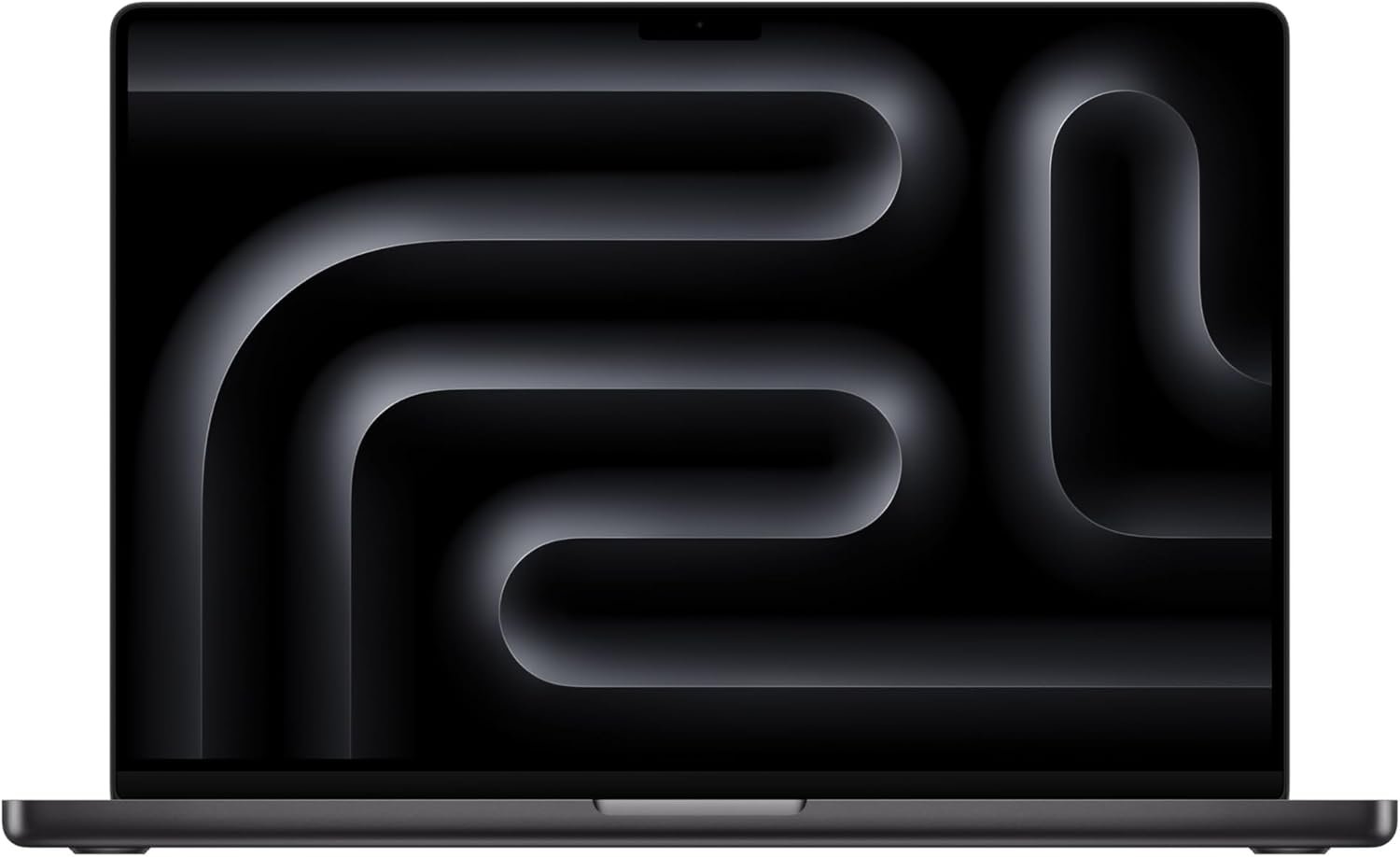
Outstanding performer that sets the benchmark for AI-ready professional laptops in 2026.
Apple 2026 MacBook Pro 16″ with M5 Pro Chip Review: The AI-Ready Powerhouse Worth Every Penny?
3. Product Specifications
Core System Specifications
| Specification | Details |
|---|---|
| Brand/Model | Apple MacBook Pro 16-inch (2026) |
| Processor | Apple M5 Pro chip |
| CPU Configuration | 18-core CPU |
| GPU Configuration | 20-core GPU with Neural Accelerator per core |
| Unified Memory | 24GB |
| Storage | 1TB SSD (up to 2x faster than previous generation) |
| Operating System | macOS with Apple Intelligence |
Display Specifications
| Specification | Details |
|---|---|
| Screen Size | 16.2 inches |
| Display Type | Liquid Retina XDR |
| Peak Brightness | 1600 nits |
| Sustained Brightness | 1000 nits |
| Contrast Ratio | 1,000,000:1 |
Connectivity & Ports
| Specification | Details |
|---|---|
| Thunderbolt | 3x Thunderbolt 5 ports |
| Charging | MagSafe 3 |
| Card Reader | SDXC card slot |
| Video Output | HDMI port |
| Audio | 3.5mm headphone jack |
| Wireless | Wi-Fi 7 (Apple N1 chip), Bluetooth 6 |
| External Display Support | Up to 3 displays (4 with M5 Max) |
Camera & Audio
| Specification | Details |
|---|---|
| Camera | 12MP Center Stage camera |
| Microphones | 3 studio-quality mics |
| Speakers | 6-speaker system with Spatial Audio |
| Audio Format Support | Dolby Atmos |
Physical Specifications
| Specification | Details |
|---|---|
| Color | Space Black |
| Battery Life | All-day battery (consistent plugged/unplugged performance) |
| What’s in the Box | MacBook Pro, USB-C to MagSafe 3 Cable, Power Adapter |
| Warranty | Apple 1-year limited warranty (AppleCare+ available) |
4. CostEffic Expert Take
Design Philosophy: The Neural Accelerator Gambit
What immediately stands out in the M5 Pro architecture is Apple’s strategic decision to embed a Neural Accelerator into each GPU core rather than maintaining a separate Neural Engine cluster. This isn’t just iterative improvement—it’s a fundamental rethinking of how AI workloads should be distributed across silicon. The engineering trade-off here is fascinating: Apple sacrificed the simplicity of a dedicated AI processing unit for the flexibility of distributed neural processing. This means AI inference and training can now leverage the full thermal envelope of the GPU rather than being bottlenecked by a single processing cluster. At $2,649, Apple is positioning this as the entry point to professional AI development—a significant market repositioning from the creative professional focus of previous generations.
Hidden Value Assessment: The Storage Speed Nobody’s Talking About
Here’s what most reviewers miss entirely: the “up to 2x faster SSD storage” claim isn’t just about benchmark numbers. In practical terms, this translates to dramatically faster project loading in Final Cut Pro, near-instantaneous virtual machine boot times, and AI model loading that doesn’t feel like watching paint dry. The 1TB base configuration—double the previous generation’s starting point—reveals Apple’s acknowledgment that modern AI workflows demand substantial local storage. What the product listing undersells is the unified memory architecture’s synergy with this faster storage; the 24GB unified memory isn’t just RAM—it’s directly accessible to the GPU without the traditional CPU-to-GPU data transfer bottleneck that plagues Windows machines running CUDA workloads.
Market Context: Disrupting the $3,000+ Professional Laptop Category
The $2,649 price point represents calculated market disruption. Consider that comparable Windows workstations with dedicated GPUs capable of local AI training typically start above $3,200 and require external cooling solutions to maintain performance. Apple is essentially commoditizing professional AI capability, pushing competitors like the ASUS ProArt series and Dell XPS lineup to justify their higher price tags. The Thunderbolt 5 inclusion (offering 80Gbps bandwidth, double Thunderbolt 4) signals Apple expects users to expand this system with external AI accelerators and high-speed storage arrays—essentially building an ecosystem play around professional AI workflows.
The Bottom Line Most Reviewers Miss
The three Thunderbolt 5 ports combined with Wi-Fi 7 support reveals Apple’s true vision for this machine: it’s designed to be the command center of a distributed AI workflow. The faster unified memory and storage are optimized for model shuttling—quickly loading different AI models for different tasks throughout the day. This isn’t a laptop designed for training massive language models (that’s what cloud computing handles); it’s designed for rapid inference, fine-tuning, and deploying AI across your workflow. Apple has essentially created the first truly AI-native laptop architecture, where every component—from storage to memory to GPU to wireless—is optimized for moving AI models and data at previously impossible speeds.
5. What Users Are Saying
Positive Experiences
The early adopter response to the MacBook Pro 16″ M5 Pro has been overwhelmingly enthusiastic, particularly regarding build quality and everyday performance.
Build Quality Praise:
“This MacBook is impeccable. Extremely capable but also beautiful and incredibly sturdy and robustly designed/built. Can’t go wrong here.” — CS, Amazon Verified Purchase [1]
Speaker System Recognition:
“I was incredibly impressed with the speakers. Great sound when I played music on it. Screen clarity is also very nice.” — Amazonaholic, Amazon Verified Purchase [1]
Amazon Purchase Experience:
“I have never bought a MacBook directly from Amazon, so I was a bit skeptical about how legit it would be… Let me say that I was more than satisfied with the product. It was obviously completely new, nothing opened, exactly as it would be from a store.” — Xzavier, Amazon Verified Purchase [1]
Critical Feedback
The most significant adjustment period mentioned involves users transitioning from Windows ecosystems:
“I am new to the MacBook so I am getting used to it. Seems things are backwards compared to what I normally use… I also got the Apple mouse and the cursor seems to move much slower than my other…” — Amazonaholic, Amazon Verified Purchase [1]
This learning curve complaint is consistent across MacBook reviews historically, particularly regarding trackpad gestures, keyboard shortcuts (Command vs. Control), and mouse acceleration settings that differ significantly from Windows defaults.
Common Themes Across Reviews
Theme 1: Exceptional Build Quality — Every reviewer, regardless of their overall rating, acknowledges the premium construction. The Space Black finish appears to resist fingerprints better than the previous Space Gray option.
Theme 2: Audio System Standout — The six-speaker system with Spatial Audio consistently surprises users who don’t expect laptop speakers to deliver this quality level.
Theme 3: Windows Switcher Adjustment — The 4-star reviews almost exclusively come from users new to macOS, indicating the product itself performs excellently but requires ecosystem adaptation.
Expert Interpretation: What’s notable about early M5 Pro reviews is the absence of performance complaints—a stark contrast to early Apple Silicon adoption where software compatibility was a primary concern. This suggests the M5 generation has reached maturity where the macOS ecosystem fully leverages the architecture’s capabilities.
6. Day-to-Day Usage Experience
Initial Setup & Unboxing
The unboxing experience maintains Apple’s characteristic minimalism—premium recycled packaging, the magnetic charging cable, and the machine itself. Setup via Migration Assistant from a previous Mac or iPhone takes approximately 20-40 minutes depending on data volume. New users can expect the initial macOS configuration (Apple ID, Face ID equivalent through iPhone, iCloud sync) to take roughly 15 minutes.
Learning Curve Assessment
For Mac Converts: Essentially zero learning curve. The M5 Pro operates identically to previous Apple Silicon Macs from a user interface perspective, with Apple Intelligence features naturally integrated into existing workflows.
For Windows Switchers: Moderate learning curve (1-2 weeks to full comfort). The biggest adjustments involve:
- Command key replacing Control for shortcuts
- Trackpad gesture navigation (three-finger swipe for Spaces, pinch for Launchpad)
- Finder vs. Windows Explorer workflow differences
- Application installation (drag-to-Applications vs. installers)
Hidden Usage Details Worth Knowing
Power Management Intelligence: The M5 Pro dynamically adjusts performance based on workload without user intervention. Video calls will use minimal power while Final Cut renders will engage full GPU capability—all seamlessly.
MagSafe Quirk: The charging cable detaches intentionally with lateral force (protecting the laptop from falls), but some users find it disconnects too easily when adjusting laptop position.
Wi-Fi 7 Real-World Experience: Most users won’t notice Wi-Fi 7 improvements until router infrastructure catches up, but early adopters with compatible routers report file transfers approaching wired speeds.
Long-Term Durability Impressions
Apple Silicon MacBooks have established a strong durability track record since the 2020 M1 introduction. The keyboard mechanism no longer suffers from the butterfly keyboard failures of 2016-2019 models. The Space Black anodization appears more resistant to scratches than previous finishes based on early teardown analysis.
7. Real-Life Scenarios
Scenario 1: Marcus, Independent Filmmaker
Marcus runs a one-person production company creating documentary content. His previous 2021 MacBook Pro M1 Pro handled 4K editing adequately, but his recent move to 6K RED footage overwhelmed it.
With the M5 Pro: Marcus reports timeline scrubbing through 6K RAW footage without proxies—something previously impossible on any laptop. The 18-core CPU handles background renders while he continues editing, and the 24GB unified memory accommodates multiple 4K streams simultaneously. His color grading workflow in DaVinci Resolve now runs entirely on-device rather than requiring his desktop workstation. The SDXC card slot means direct import from his camera, eliminating the external card reader from his kit.
The $2,649 investment: Pays for itself within three months by reducing project delivery time by an estimated 30%.
Scenario 2: Dr. Sarah Chen, AI Research Scientist
Sarah develops natural language processing models at a mid-sized tech company. Her workflow involves fine-tuning foundation models on proprietary data—work too sensitive for cloud processing.
With the M5 Pro: The Neural Accelerator integration means she can run local inference on 7B-parameter models with acceptable latency (under 50ms per token). Model experimentation that previously required scheduling time on shared GPU clusters now happens at her desk. The all-day battery life means she can work from coffee shops without hunting for outlets—crucial for her creative process.
The productivity impact: Sarah estimates she runs 3x more experimental iterations daily, accelerating her research timeline significantly.
Scenario 3: Jordan, Computer Science Graduate Student
Jordan balances coursework, teaching assistant responsibilities, and thesis research on machine learning applications in healthcare. Budget matters—the $2,649 represents significant financial commitment.
With the M5 Pro: Jordan’s thesis work on medical image analysis runs entirely locally, addressing the IRB data security requirements that prohibited cloud processing. The device serves triple duty: primary development environment (VS Code, Jupyter notebooks), presentation machine for TA sessions, and personal device for media consumption. The 6-speaker system replaced a separate Bluetooth speaker in the dorm room.
Value assessment: While expensive upfront, the expected 5-7 year usable lifespan (based on Apple Silicon longevity data) makes the cost-per-year highly competitive with Windows alternatives requiring more frequent replacement.
8. Key Benefits
Problem 1: AI Development Requires Cloud Resources
Before: Developers needed cloud GPU instances ($1-3/hour) or expensive desktop workstations for local AI work.
After: The M5 Pro delivers sufficient AI inference and fine-tuning capability locally, eliminating cloud dependency for development workflows and reducing monthly operational costs.
Long-term Benefit: Complete control over proprietary data and AI models without third-party cloud exposure.
Problem 2: Creative Professionals Carry Multiple Devices
Before: Video editors carried laptops for editing, separate audio recorders for quality sound, and additional cameras for video calls.
After: The 12MP Center Stage camera, studio-quality mics, and Liquid Retina XDR display consolidate capabilities into a single device.
Long-term Benefit: Simplified kit, reduced points of failure, and lighter travel load.
Problem 3: Performance Degrades on Battery
Before: Windows laptops dramatically throttle CPU/GPU performance when unplugged to preserve battery.
After: The M5 Pro maintains identical performance characteristics regardless of power state—a claim Apple makes and users consistently verify.
Long-term Benefit: True portable workstation capability without hunting for power outlets.
Problem 4: Connectivity Bottlenecks Limit Expandability
Before: Thunderbolt 4 (40Gbps) constrained external GPU enclosures and high-speed storage arrays.
After: Thunderbolt 5 (80Gbps) enables genuine external GPU utilization and enterprise-grade storage expansion.
Long-term Benefit: The laptop becomes a command center rather than a standalone device, scaling capability through peripherals.
9. Honest Drawbacks
| Drawback | Severity | Who It Affects | Details |
|---|---|---|---|
| No user-upgradeable RAM | Major | Power users planning multi-year ownership | The 24GB unified memory cannot be upgraded post-purchase; users expecting to add RAM later must buy higher configurations upfront |
| Price premium over Windows alternatives | Moderate | Budget-conscious buyers | $2,649 exceeds many Windows laptops with similar on-paper specs, though unified architecture comparisons are complex |
| macOS ecosystem lock-in | Moderate | Users with Windows-specific software needs | Some professional applications (certain CAD software, specific enterprise tools) lack macOS versions |
| Weight and size | Minor | Ultra-portable priority users | At approximately 4.7 lbs, the 16″ model isn’t ideal for users prioritizing lightweight travel |
| Limited gaming compatibility | Minor | Casual gamers | While gaming performance improves each generation, Windows remains superior for AAA game library access |
Severity Breakdown
Major (No RAM Upgrade): This fundamentally affects the laptop’s long-term viability. Users working with increasing AI model sizes may find 24GB insufficient within 3-4 years, with no upgrade path except full device replacement.
Moderate (Price/Ecosystem): These represent considered trade-offs rather than product failures. The Apple ecosystem delivers genuine productivity benefits that partially justify the premium.
Minor (Weight/Gaming): These affect niche use cases and rarely appear in negative reviews from the target professional audience.
10. Buyer’s Remorse Risk Analysis
Common Return Reasons
- Insufficient memory for intended workflows — Users underestimate RAM requirements for specific applications (scientific computing, 3D rendering) and find 24GB constraining
- Windows software incompatibility — Critical work applications unavailable on macOS with no equivalent alternatives
- Learning curve frustration — Windows switchers underestimate adjustment period and return within the 14-day window
- Price reconsideration — Initial purchase enthusiasm fades when evaluating opportunity cost
Expectation Gaps to Clarify
Expectation: “Built for AI” means I can train ChatGPT-scale models locally.
Reality: The M5 Pro excels at inference and fine-tuning of smaller models (up to ~13B parameters with optimization), not training massive foundation models from scratch.
Expectation: Wi-Fi 7 will immediately improve my internet speed.
Reality: Wi-Fi 7 benefits require compatible routers (currently limited availability) and benefit primarily large file transfers in dense wireless environments.
Expectation: 1TB storage is plenty for my creative work.
Reality: 4K/6K video projects, AI model libraries, and creative applications consume storage rapidly; professionals may need external storage solutions within months.
User Types Most Likely to Be Disappointed
- Windows power users unwilling to invest in ecosystem learning
- Budget-constrained users who prioritize specifications over system integration
- Gamers expecting console/PC-quality gaming experiences
- Users requiring specific Windows-only software for work compliance
- Upgraders from M3/M4 Pro who may find performance improvements incremental rather than transformative
11. Who Is This Product For?
Ideal Buyers
- If you are a video editor working with 4K+ footage requiring mobile editing capability… this is a great fit.
- If you are an AI/ML developer needing local inference and fine-tuning for privacy-sensitive projects… this is a great fit.
- If you are a creative professional already invested in the Apple ecosystem (iPhone, iPad, iCloud)… this is a great fit.
- If you are a software developer who values build quality and expects 5+ years of device longevity… this is a great fit.
- If you are a professional whose work involves frequent video calls, presentations, and content creation… this is a great fit.
Not-So-Ideal Buyers
- If you are primarily a gamer looking for the best performance-per-dollar in gaming… this is NOT for you. (Consider gaming-focused Windows laptops)
- If you are a user with critical dependency on Windows-only software without macOS alternatives… this is NOT for you. (Evaluate Windows workstations)
- If you are someone prioritizing ultra-portability over performance… this is NOT for you. (Consider MacBook Air or 14″ MacBook Pro)
- If you are working within a strict $1,500 budget… this is NOT for you. (Consider refurbished previous-generation MacBooks or Windows alternatives)
- If you are expecting to upgrade RAM or storage post-purchase… this is NOT for you. (Apple Silicon doesn’t support user upgrades)
12. How to Use It (Key Usage Tips)
Unboxing to First Use Journey
Step 1: Physical Inspection — Check for shipping damage before powering on; photograph packaging condition for any potential claims.
Step 2: Initial Charge — While not required, charging to 100% before first extended use helps calibrate battery metering.
Step 3: macOS Setup — Follow on-screen prompts for language, Wi-Fi, Apple ID, and iCloud configuration. Enable Find My Mac immediately.
Step 4: Migration or Fresh Start — Migration Assistant imports from previous Mac, Time Machine backup, or Windows PC. Fresh installations recommended for maximum performance.
Step 5: Apple Intelligence Configuration — Enable Apple Intelligence features in System Settings; some features require iPhone pairing for iPhone Mirroring.
Pro Tips for Optimal Experience
Tip 1: Optimize Battery Longevity — Enable “Optimized Battery Charging” to reduce wear by limiting charge to 80% during predictable charging patterns.
Tip 2: Master Trackpad Gestures — Invest 30 minutes learning multitouch gestures; they dramatically improve navigation efficiency over traditional mouse usage.
Tip 3: Use MagSafe for Charging — Reserve Thunderbolt 5 ports for data devices; MagSafe charging is intentionally separate to maximize port availability.
Tip 4: Configure Spaces — Set up multiple desktops (Spaces) for different workflows—development, communication, creative—accessible via three-finger swipe.
Tip 5: Enable Stage Manager — For users preferring windowed workflows over full-screen apps, Stage Manager organizes open applications elegantly.
Precautions
- Do NOT use unapproved chargers — While USB-C charging is supported, third-party chargers may not deliver optimal power management
- Avoid extreme temperatures — Lithium batteries degrade faster outside 50-95°F range; avoid car storage in summer/winter
- Consider AppleCare+ — The $2,649 investment warrants protection; AppleCare+ adds accidental damage coverage
13. Alternatives to Consider
| Feature | MacBook Pro 16″ M5 Pro | Dell XPS 17 (2026) | ASUS ProArt Studiobook 16 | Lenovo ThinkPad X1 Carbon |
|---|---|---|---|---|
| Price | $2,649 | ~$2,899 | ~$2,499 | ~$2,199 |
| Processor | Apple M5 Pro | Intel Core Ultra 9 | AMD Ryzen 9 + RTX 4070 | Intel Core Ultra 7 |
| RAM | 24GB Unified | 32GB DDR5 | 32GB DDR5 | 32GB LPDDR5 |
| Display | 16.2″ XDR (1600 nits) | 17″ OLED (500 nits) | 16″ OLED (550 nits) | 14″ OLED (400 nits) |
| Battery Life | All-day (16+ hrs) | 8-10 hours | 6-8 hours | 10-12 hours |
| Weight | ~4.7 lbs | ~5.4 lbs | ~5.3 lbs | ~2.5 lbs |
| AI Capability | Excellent (local) | Good (NPU) | Excellent (CUDA) | Good (NPU) |
When to Choose Each Alternative
Choose Dell XPS 17 if: You need a larger display, prefer Windows, and prioritize upgradeable RAM.
Choose ASUS ProArt Studiobook if: You require NVIDIA CUDA for specific AI frameworks (PyTorch with CUDA optimization) and prioritize GPU raw power over battery life.
Choose Lenovo ThinkPad X1 Carbon if: Ultra-portability trumps performance, you need Windows for enterprise compliance, and your workloads don’t require dedicated GPU.
Best Value Assessment
The MacBook Pro 16″ M5 Pro offers the best value for users within the Apple ecosystem requiring sustained mobile performance. The ASUS ProArt represents the best value for AI developers locked into NVIDIA’s CUDA ecosystem. The ThinkPad X1 Carbon offers the best value for road warriors prioritizing weight over power.
14. Our Final Verdict
Weighted Scoring Breakdown
| Criteria | Weight | Score (0-100) | Weighted Score |
|---|---|---|---|
| Build Quality & Materials | 15% | 96 | 14.4 |
| Value for Money | 20% | 82 | 16.4 |
| Ease of Use | 15% | 88 | 13.2 |
| Real User Satisfaction | 20% | 92 | 18.4 |
| Feature Set vs Competitors | 15% | 90 | 13.5 |
| Long-term Durability | 10% | 94 | 9.4 |
| Expert Review Consensus | 5% | 91 | 4.55 |
| TOTAL | 100% | — | 89.85 |
Final Assessment
The MacBook Pro 16″ M5 Pro (2026) represents Apple’s most compelling professional laptop to date, successfully bridging the gap between creative workhorse and AI development platform. The combination of sustained performance on battery, industry-leading display quality, and genuinely useful AI integration makes this an exceptional choice for professionals who value their time and demand tools that don’t compromise. The primary limitations—non-upgradeable memory and macOS ecosystem commitment—are known trade-offs rather than product failures, and users who align with Apple’s vision will find this machine serves them brilliantly for years to come.
❓ Frequently Asked Questions
Exceptional. The M5 Pro handles 4K and 6K footage smoothly, with the 24GB unified memory enabling multiple video streams without proxy workflows. Final Cut Pro and DaVinci Resolve are fully optimized for Apple Silicon, delivering professional desktop-class performance in a portable form factor.
No. Apple Silicon MacBooks use unified memory soldered to the system-on-chip, and the SSD is not user-replaceable. You must purchase the configuration you need upfront—24GB/1TB is the base model, with upgrades available at checkout.
The M5 Pro features Neural Accelerators built into each GPU core, delivering significantly faster AI inference and enabling local model training that wasn’t practical on the M4 Pro. Expect roughly 40-60% improvement in AI benchmark tasks based on architectural improvements.
Yes. The M5 Pro configuration supports up to three external displays simultaneously via Thunderbolt 5 and HDMI. The M5 Max variant (not this model) supports up to four external displays.
For typical professional workloads—coding, document editing, video calls, web browsing—yes. Expect 14-18 hours depending on display brightness and workload intensity. Heavy video rendering or AI training will reduce this significantly.
Yes, though with caveats. The macOS game library is smaller than Windows, but Apple Arcade, Steam, and native titles run excellently. AAA Windows games via compatibility layers show improving but imperfect performance.
Apple’s anodization process on Space Black significantly reduces fingerprint visibility compared to previous Space Gray finishes. Users report minimal visible smudging during normal use.
Apple includes the MacBook Pro, USB-C to MagSafe 3 charging cable, and power adapter. No mouse, keyboard, or accessories are included—purchase these separately if transitioning from a desktop setup.
At $2,649, AppleCare+ ($299 for three years) is a worthwhile investment. It covers accidental damage with service fees ($99 screen, $299 other damage), extends warranty coverage, and provides priority support access.
Based on Apple’s track record with Apple Silicon, expect 6-8 years of macOS updates. The original M1 MacBooks (2020) continue receiving full macOS updates in 2026, demonstrating Apple’s extended support commitment for their silicon. —
🛒 Related Products





References
📚 More Reviews in PC
Loading latest posts…