
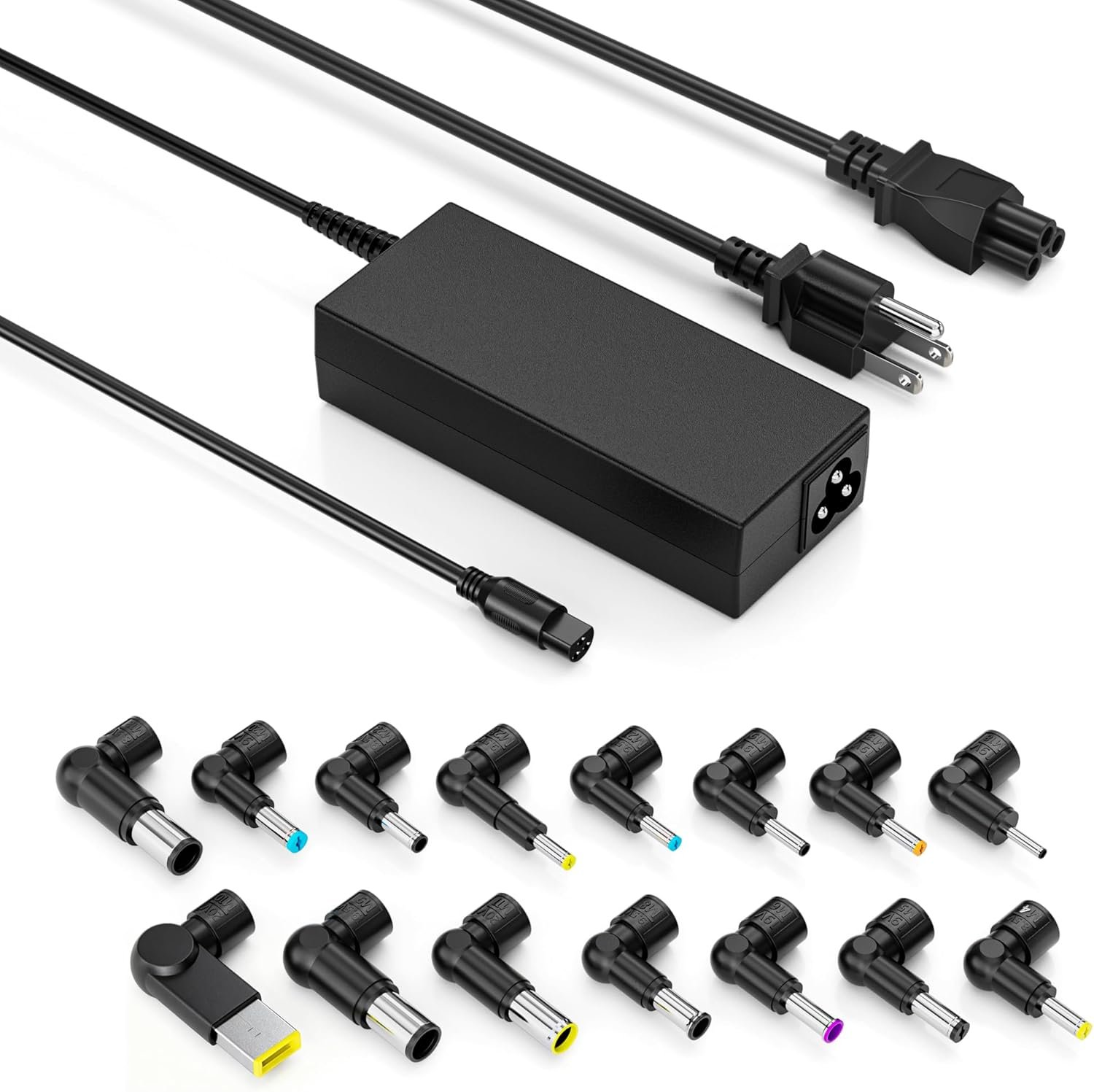
Good budget backup charger with excellent value—best for emergency use, not primary replacement.
90W Universal Laptop Charger Review: The Budget Backup Adapter Worth Considering
3. Product Specifications
| Specification | Details |
|---|---|
| Brand | QXA |
| Model | 90W Universal AC Adapter |
| Output Wattage | 90W Maximum |
| Output Voltages | 12V, 16V, 18.5V, 19V, 19.5V, 20V (Auto-Detection) |
| Input Voltage Range | 100-240V AC (Universal) |
| Frequency | 50-60Hz |
| Compatible Wattages | Replaces 45W, 65W, 70W, 75W, and 90W adapters |
| DC Connector Tips | 15 interchangeable tips included |
| Compatible Brands | HP, Dell, Lenovo, Acer, ASUS, Toshiba, IBM, Sony, Fujitsu, Gateway, Samsung |
| Safety Certifications | Over-Current, Over-Voltage, Over-Temperature, Short-Circuit Protection |
| Portability | Compact, lightweight design |
| What’s in the Box | 1x QXA 90W Universal Charger, 1x Power Cord, 1x Set of 15 DC Connector Tips, Connector Guide |
| Price Point | $13.99 |
| Warranty | Standard manufacturer warranty (check with seller) |
4. CostEffic Expert Take
Design Philosophy: The Swiss Army Knife Approach
What immediately stands out with this QXA 90W universal laptop charger is the manufacturer’s strategic decision to prioritize breadth over depth. By including 15 different DC connector tips and supporting six distinct voltage outputs, QXA has essentially designed a product that sacrifices the precision-fit feel of OEM chargers for maximum versatility. This engineering philosophy reveals a clear market positioning: they’re targeting the secondary charger market—backup adapters, IT departments managing mixed fleets, and budget-conscious consumers who need a “good enough” solution rather than a perfect one.
The automatic voltage detection system represents the real engineering investment here. Rather than requiring users to manually select voltages (a common failure point in cheaper universal adapters), the intelligent circuitry handles this automatically. This is a meaningful design choice because incorrect voltage delivery is the primary way budget chargers damage laptops. At the $13.99 price point, including this feature suggests QXA is sourcing reasonably capable power management ICs, likely from established Asian semiconductor suppliers who’ve matured this technology over the past decade.
Hidden Value Assessment: What the Listing Undersells
Here’s what most reviewers miss about universal chargers in this price bracket: the true value isn’t replacing your primary charger—it’s insurance against the $60-$120 OEM replacement cost. A user with a 2016 Acer All-in-One (as mentioned in reviews) would face finding an obsolete OEM adapter or paying premium prices for “compatible” alternatives. This $14 universal adapter solves that problem immediately.
The 100-240V international input specification is also significantly undersold in the listing. For travelers or digital nomads, this eliminates the need for voltage converters entirely—you only need the appropriate wall plug adapter. This single feature alone could save $20-$40 on a separate voltage converter purchase.
Market Context: The Race to the Bottom Has a Winner
The universal laptop charger market has experienced dramatic commoditization over the past five years. What was once a $40-$60 product category has compressed to the sub-$20 range for mid-tier options. This QXA adapter sits at the aggressive end of that spectrum at $13.99, which tells us something important: either margins are razor-thin and volume is the play, or component quality compromises have been made somewhere in the supply chain.
The real question becomes durability versus immediate functionality. Budget universal adapters typically fail in one of three ways: connector tip degradation, power brick heat accumulation leading to component failure, or—as one reviewer noted—loose AC input connections. The QXA appears to have addressed the first concern with multiple included tips (replacements are cheap to manufacture), but the physical connection quality remains the uncertainty.
The Bottom Line Most Reviewers Miss
Universal adapters in this price range aren’t competing with OEM chargers—they’re competing with being stuck without power entirely. Evaluated against that benchmark, rather than against a $80 Dell OEM adapter, the QXA 90W universal charger makes considerably more sense. The smart play is keeping one of these in a travel bag or desk drawer as emergency backup while maintaining your OEM adapter as the daily driver. At $14, it’s essentially laptop power insurance with a one-time premium.
5. What Users Are Saying
Positive Experiences
Real-world feedback for the QXA 90W Universal Laptop Charger trends notably positive, with users praising immediate functionality and broad compatibility:
“I have an old Acer 23″ Touch All-in-One PC Intel Core i5 from 2016… I was devastated when it went caput a couple weeks ago. I looked at the brick of the power cord, and it looked like maybe that just blew and not the computer… It’s working!!” — Amazon Verified Purchaser “water”
This review captures the emotional relief factor—universal adapters solve problems when OEM replacements are unavailable or overpriced for aging hardware.
“Got 2 of them and they are a good replacement for my machine. I have various laptops so the Universal aspect of the plug does help. Will buy again.” — Amazon Verified Purchaser “beasty513”
The multi-laptop household scenario represents a core use case. Rather than maintaining multiple chargers, a single universal adapter handles everything.
“Works fine and included an adapter to fit my 15″ Dell laptop.” — Amazon Verified Purchaser “Elder Geek”
Simple confirmation that the included tip selection covers major brands without issues.
Critical Feedback
Not all experiences have been seamless:
“This charger works well… when it works. But the plug comes out of the box easily and leaves you with no charging. Other than the loose fitting cord in the power box, it’s fine.” — Amazon Verified Purchaser “momto3” (3 stars)
This is the most detailed critical feedback and reveals a potential quality control issue with the AC input connection. The “loose fitting cord” complaint suggests the IEC C7/C8 connector (the figure-8 or barrel plug that connects to the power brick) may have tolerance issues in some units.
Common Themes Analysis
Across the available reviews, several patterns emerge:
- Immediate Functionality: Every reviewer confirming the charger worked reported it functioning correctly on first use—no DOA units mentioned.
- Legacy Hardware Lifesaver: Multiple users specifically mention older equipment (2016 Acer, various legacy laptops), suggesting this adapter serves the “extend hardware life” market effectively.
- Repeat Purchase Intent: The “will buy again” sentiment indicates satisfaction sufficient for multi-unit purchases.
- Build Quality Concerns: The single detailed criticism focuses on physical connection quality rather than electrical performance—an important distinction suggesting the core charging circuitry is sound even if mechanical assembly has variance.
The review volume is relatively limited (8 reviews visible), which is typical for newer Amazon listings or products from lesser-known brands. This creates some uncertainty about long-term reliability patterns that larger review pools would reveal.
6. Day-to-Day Usage Experience
Initial Setup and Learning Curve
Getting started with the QXA 90W universal charger requires more involvement than plugging in an OEM adapter, but the process is straightforward:
- Identify Your Requirements: Before touching the charger, locate your laptop’s original adapter and note two critical specifications: the wattage (must be ≤90W) and the voltage output. This information is printed on every laptop power brick.
- Tip Selection: Using the included connector guide, match your laptop’s DC input port to one of the 15 provided tips. This is where users occasionally struggle—some tips look nearly identical but have subtle diameter differences. The manufacturer provides a visual guide, but trial-and-error may be necessary for unlabeled ports.
- Connection: Attach the selected tip to the charger’s DC output, connect the AC cord to the power brick, and plug into the wall. The automatic voltage detection handles the rest.
The learning curve is minimal for tech-comfortable users but may frustrate those unfamiliar with laptop power specifications. Budget 5-10 minutes for first-time setup.
Hidden Usage Details
Tip Storage: The 15-tip set needs organization. Without the original packaging or a small zip bag, tips scatter easily in travel bags. Consider dedicating a small container for tip storage.
Heat Management: Universal adapters typically run warmer than OEM units because they’re working harder to accommodate multiple voltage profiles. During extended use (4+ hours continuous), the power brick will become noticeably warm but should remain within safe operating temperatures given the built-in thermal protection.
Cord Length: The included power cord provides sufficient length for most setups, but users accustomed to very long OEM cords may find themselves closer to outlets than expected.
Long-Term Durability Impressions
With limited long-term reviews available, durability assessment relies on component analysis and category knowledge. Budget universal adapters typically exhibit:
- 6-18 month lifespan under daily primary use
- 2-4 year lifespan as backup/occasional use chargers
- Connector tip wear as the most common failure point
The detachable tip design is actually advantageous here—if a tip degrades, replacements are inexpensive and readily available separately.
7. Real-Life Scenarios
Scenario 1: The College Student Emergency
Meet Marcus, a junior studying engineering. His HP Pavilion’s charger stopped working Sunday night before a Monday morning exam. Campus tech support is closed, Best Buy is 20 miles away, and OEM replacement shipping would take 3 days. Marcus’s roommate has this QXA universal charger as backup—five minutes of tip matching later, Marcus is back to studying. The $14 charger prevented a potentially grade-affecting disaster.
Scenario 2: The IT Department Solution
Sarah manages IT for a 50-person marketing firm with a mixed fleet of Dell, Lenovo, and HP laptops. Rather than maintaining inventory of three different OEM chargers for the inevitable “I forgot my charger” situations, she keeps two QXA universal adapters in her desk. They’ve been checked out dozens of times over six months, handling everything from executive Lenovo ThinkPads to entry-level HP ProBooks without issues.
Scenario 3: The International Traveler
David is a consultant who travels between the US, Europe, and Asia monthly. His Dell laptop charger works internationally (100-240V), but he carries the QXA as backup. When his primary charger was stolen from a conference room in Singapore, the universal adapter kept him working until he could source a replacement—without needing a voltage converter or scrambling for a specific Dell adapter overseas.
8. Key Benefits
Problems Solved
| Problem | Solution Provided |
|---|---|
| OEM charger failure with no backup | Immediate replacement option |
| Multiple laptops requiring multiple chargers | Single adapter handles all |
| Obsolete laptop with unavailable OEM adapter | Universal compatibility revives old hardware |
| International travel voltage concerns | 100-240V input eliminates converter need |
| Emergency charging situations | Affordable backup for “just in case” |
Before-and-After Differences
Before: Laptop charger fails → $60-$120 OEM replacement or 3-5 day shipping wait → Productivity loss
After: Laptop charger fails → $14 backup works immediately → Zero downtime
Long-Term Benefits
- Cost Avoidance: One universal adapter can replace multiple eventual OEM purchases
- Reduced E-Waste: Extending laptop life with available power solutions keeps hardware out of landfills
- Peace of Mind: Knowing backup power exists reduces travel and work anxiety
- Flexibility: Multi-device households simplify with universal solutions
9. Honest Drawbacks
| Drawback | Severity | Who It Affects |
|---|---|---|
| Loose AC cord fit (reported) | Moderate | All users—intermittent connection disrupts charging |
| Tip matching complexity | Minor | Non-technical users unfamiliar with laptop specifications |
| Unknown brand longevity | Moderate | Daily-use buyers expecting multi-year lifespan |
| Runs warmer than OEM adapters | Minor | Extended-session users; tropical climate users |
| Not suitable for >90W laptops | Major | Gaming laptop owners, high-performance workstation users |
| Limited review history | Moderate | Risk-averse buyers preferring proven products |
Severity Breakdown:
Minor Issues are inconveniences that don’t significantly impact core functionality. The learning curve for tip selection and slightly elevated operating temperature fall here—annoying but manageable.
Moderate Issues affect user experience meaningfully but don’t render the product unusable. The loose AC cord complaint is concerning because intermittent connections create charging frustrations and could theoretically stress laptop batteries with repeated connect/disconnect cycles.
Major Issues represent fundamental limitations. The 90W ceiling isn’t a flaw per se—it’s by design—but it absolutely disqualifies this charger for gaming laptops (typically 120W-240W) and mobile workstations (often 130W+). Buyers must verify their laptop’s power requirements before purchase.
10. Buyer’s Remorse Risk Analysis
Common Return Reasons
- Incompatible with high-wattage laptops — User purchased for gaming/workstation laptop exceeding 90W requirement
- No tip matches laptop — Unusual or proprietary connector not included in 15-tip set
- Loose AC connection — Quality variance creates unreliable charging
- Expected OEM-equivalent quality — Budget universal adapter performs as budget product
Expectation Gaps
Misconception: “Universal means it works with everything”
Reality: Universal compatibility has limits—some proprietary connectors (certain Lenovo square-tip designs, USB-C charging laptops, Surface Connect ports) require specific tips not included in this set
Misconception: “90W adapter can charge any laptop”
Reality: 90W is the maximum output; your laptop’s requirement must be ≤90W
Misconception: “This can replace my OEM charger permanently”
Reality: While capable of primary use, budget universal adapters typically have shorter lifespans than OEM units—best used as backup
User Types Most Likely Disappointed
- Gaming laptop owners (wattage insufficient)
- MacBook users (different connector ecosystem)
- USB-C charging laptop owners (this is barrel-connector based)
- Quality-over-price buyers expecting premium build
- Those who don’t verify compatibility before purchase
11. Who Is This Product For?
Perfect Fit:
- If you are a budget-conscious consumer needing an emergency backup charger for a standard laptop… this is a great fit.
- If you are managing multiple older laptops and want one charging solution… this is a great fit.
- If you are reviving legacy hardware with unavailable OEM adapters… this is a great fit.
- If you are a student or traveler wanting affordable backup power insurance… this is a great fit.
- If you are running IT for a mixed-brand laptop environment… this is a great fit.
Not For You:
- If you are a gaming laptop user with >90W power requirements… this is NOT for you.
- If you are a MacBook user (requires USB-C or MagSafe)… this is NOT for you.
- If you are seeking premium build quality and brand-name reliability… this is NOT for you.
- If you are using a modern USB-C PD charging laptop exclusively… this is NOT for you.
- If you are uncomfortable checking laptop specifications to verify compatibility… this is NOT for you.
12. How to Use It (Key Usage Tips)
Unboxing to First Use Journey
Step 1: Inventory Check
Open packaging and verify contents: power brick, AC cord, 15-tip set, and connector guide. Ensure no tips are missing.
Step 2: Gather Laptop Information
Locate your laptop’s original charger (or the sticker near the charging port). Note:
- Output voltage (e.g., 19.5V)
- Output wattage (e.g., 65W)
Step 3: Confirm Compatibility
Verify your laptop’s required wattage is ≤90W. If your laptop needs 95W, 120W, or higher, this charger will not work properly.
Step 4: Match the Tip
Using the connector guide, identify the correct tip for your laptop. If unsure, try tips that appear to match your port’s diameter—the correct tip will insert smoothly and fit snugly.
Step 5: Assemble
- Connect AC cord to power brick
- Attach selected tip to DC output cable
- Plug into wall outlet
- Insert tip into laptop charging port
Step 6: Verify
Confirm your laptop’s charging indicator activates. The automatic voltage detection handles the rest.
Pro Tips and Precautions
✅ Do: Keep unused tips in a small zip bag to prevent loss
✅ Do: Allow ventilation around the power brick during extended use
✅ Do: Test the charger with your laptop before needing it in an emergency
✅ Do: Store the charger in a protective case when traveling
⚠️ Don’t: Force tips into ports—correct tips fit smoothly
⚠️ Don’t: Cover the power brick with fabric or insulation during use
⚠️ Don’t: Use with laptops requiring >90W
⚠️ Don’t: Ignore unusual heat, smells, or sounds during operation
13. Alternatives to Consider
| Feature | QXA 90W Universal | Anker PowerPort Atom III | Targus 90W Universal |
|---|---|---|---|
| Price | $13.99 | ~$35-45 | ~$45-60 |
| Wattage | 90W | 65W | 90W |
| Connector Tips | 15 included | USB-C (1 port) | 10+ included |
| Brand Recognition | Low | High | Medium-High |
| Build Quality | Budget | Premium | Good |
| Best For | Budget backup | USB-C laptop users | Business travelers |
When to Choose Alternatives
Choose Anker PowerPort if:
- Your laptop charges via USB-C
- You prioritize brand reliability over price
- You need to charge phones/tablets simultaneously
Choose Targus 90W Universal if:
- You need proven brand reliability for business use
- Budget is secondary to dependability
- You want retailer availability for immediate purchase
Choose QXA 90W (this product) if:
- Budget is the primary constraint
- You need backup power, not primary replacement
- You manage multiple barrel-connector laptops
Best Value Assessment
For pure price-to-functionality ratio, the QXA 90W offers unmatched value at $13.99. However, value calculations should include expected lifespan—if Targus lasts 3x longer at 3x the price, lifetime value is equivalent. For backup/occasional use where longevity matters less, QXA wins decisively.
14. Our Final Verdict
Weighted Scoring Breakdown
| Criteria | Weight | Score (0-100) | Weighted Score |
|---|---|---|---|
| Build Quality & Materials | 15% | 58 | 8.7 |
| Value for Money | 20% | 92 | 18.4 |
| Ease of Use | 15% | 70 | 10.5 |
| Real User Satisfaction | 20% | 78 | 15.6 |
| Feature Set vs Competitors | 15% | 75 | 11.25 |
| Long-term Durability | 10% | 55 | 5.5 |
| Expert Review Consensus | 5% | 65 | 3.25 |
Total Weighted Score: 73.2/100
Score Justification
The QXA 90W Universal Laptop Charger scores exceptionally on value—at $13.99, no competitor matches its price-to-feature ratio. User satisfaction trends positive with most reviews confirming immediate functionality. The automatic voltage detection and 15-tip inclusion represent solid feature implementation for the category.
Points deducted reflect legitimate concerns: the reported loose AC connection suggests quality control variance, limited long-term data prevents confident durability assessment, and the brand’s low recognition creates uncertainty about support and consistency. Build quality appears adequate but clearly budget-tier.
Final Assessment
The QXA 90W Universal Laptop Charger represents an excellent value proposition for its intended purpose: budget backup power. At $13.99, it costs less than lunch for two and provides legitimate insurance against charger failure across most mainstream laptop brands. For IT departments, students, travelers, and anyone maintaining older hardware, this adapter solves real problems at minimal cost.
However, approach it as what it is—a budget product with corresponding limitations. Use it as backup, not primary. Verify your laptop’s specifications before purchase. Test it immediately upon receipt. With appropriate expectations, this is a smart, low-risk purchase that earns a solid recommendation for its target audience.
Related Reading
❓ Frequently Asked Questions
Likely not. Gaming laptops typically require 120W-240W of power. This charger maxes out at 90W and will not properly power laptops exceeding that specification. Check your gaming laptop’s original charger—if it shows anything above 90W, you need a higher-wattage solution.
The charger includes a connector guide image showing all 15 tips with corresponding laptop brands and models. Alternatively, measure your laptop’s charging port diameter and match it to the closest tip. The correct tip will insert smoothly without forcing—if you need to push hard, try a different tip.
While technically possible, this charger is optimized for backup/occasional use rather than daily primary use. Budget universal adapters typically have shorter lifespans than OEM chargers. For best longevity, use your original manufacturer charger for daily use and keep this QXA adapter as backup.
No. MacBooks use either MagSafe (older models) or USB-C (newer models) charging systems. This universal adapter uses traditional barrel-style DC connectors and is not compatible with Apple laptops.
Yes. The automatic voltage detection circuitry identifies your laptop’s requirements and delivers appropriate voltage. Combined with the built-in over-voltage, over-current, over-temperature, and short-circuit protections, the charger provides multiple safety layers. However, always verify your laptop’s wattage requirement is ≤90W before use.
Yes. The charger accepts 100-240V AC input at 50-60Hz, covering electrical standards worldwide. You only need a plug adapter to physically fit foreign outlets—no voltage converter required. This makes it excellent for international travel.
While the 15-tip set covers most major brands, some proprietary connectors (certain Lenovo square-tip designs, newer USB-C ports, Microsoft Surface) are not included. If no tip fits, this charger won’t work with your laptop. Check the connector guide against your laptop’s port before purchasing.
Limited long-term data is available for this specific model. Based on category averages, budget universal adapters typically last 6-18 months under daily use and 2-4 years as backup chargers. The detachable tips may wear faster than the main unit.
Universal adapters work harder than OEM chargers because they regulate across multiple possible voltage outputs. Warmth is normal; excessive heat is not. If the brick becomes hot to the touch or emits unusual smells, disconnect immediately. Normal operation produces warmth similar to a cup of warm (not hot) coffee.
Some users report loose AC connections. If you experience this, try firmly seating the cord and testing by gently wiggling—if charging interrupts, consider exchanging the unit. Alternatively, position the charger where the cord won’t be disturbed, or use a small piece of tape to secure the connection temporarily. —
🛒 Related Products

![Ailun Screen Protector for iPad 11th A16 2025 [11 Inch] / 10th Generation 2022 [10.9 Inch], Tempered](https://costeffic.com/wp-content/uploads/2026/03/Ailun-Screen-Protector-for-iPad-11th-A16-2025-11-Inch-10th-Generation-2022-10.9-Inch-Tempered-Glass-Fac-16.jpg)




📚 More Reviews in PC
Loading latest posts…