
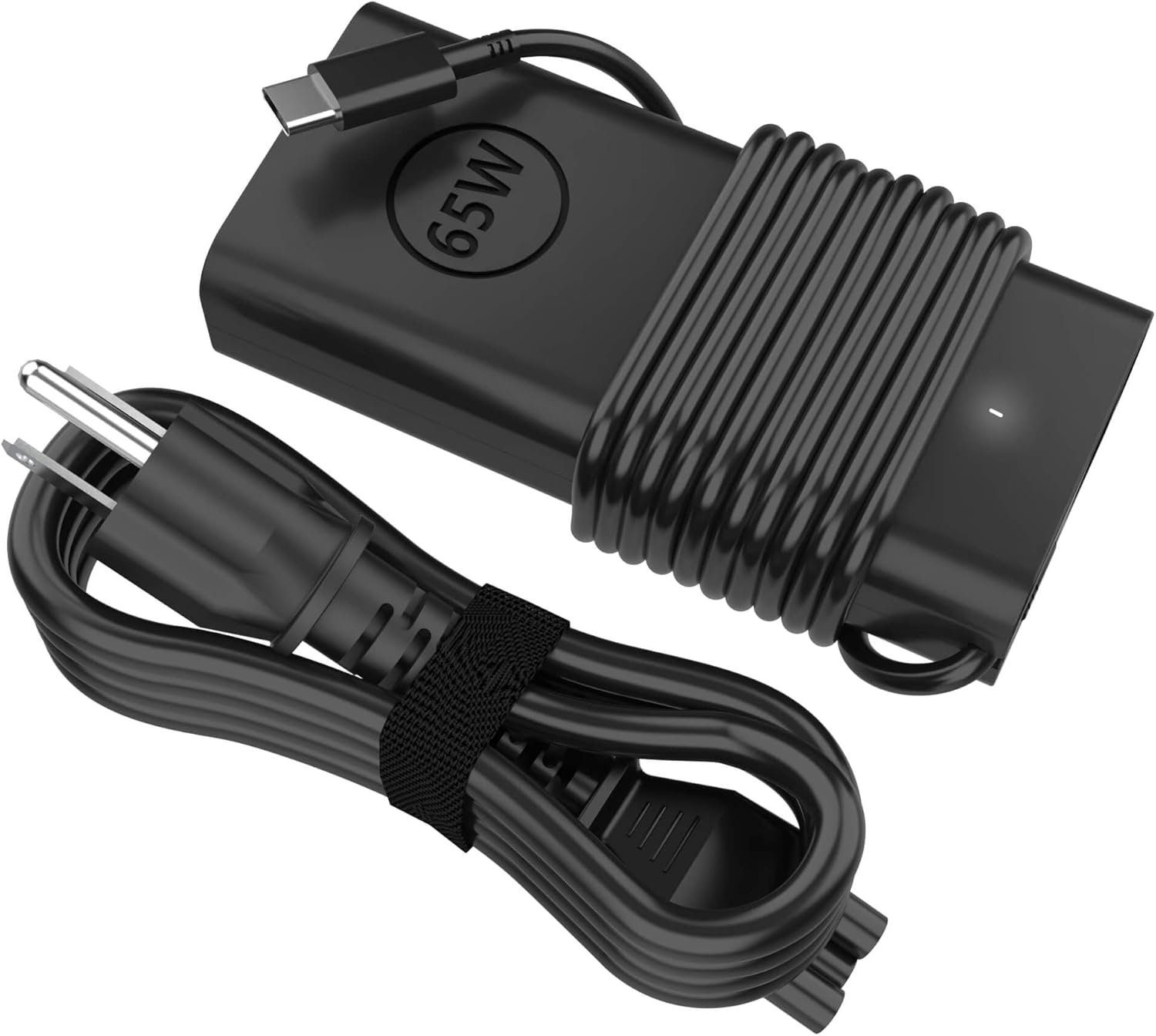
Excellent budget backup charger that delivers OEM-equivalent performance at a fraction of the price—a smart buy for Dell laptop owners who value practicality over brand names.
STJJNNWI 65W USB-C Dell Laptop Charger Review: Budget Power Adapter Worth Your Money?
3. Product Specifications
| Specification | Details |
|---|---|
| Brand | STJJNNWI |
| Model Type | 60W/65W USB-C AC Adapter |
| Input Voltage | 100-240V AC, 50-60Hz (Universal) |
| Output Specifications | 15V/3A, 20V/2.25A, 20V/3A, 20V/3.25A (PD Protocol) |
| Maximum Wattage | 65W (Backwards compatible with 60W, 45W devices) |
| Connector Type | USB Type-C |
| Total Cord Length | 11 feet (approximately 3.35 meters) |
| Grounding | 3-prong grounded design |
| Design Type | Brick-style with detachable AC cable |
| Color | Black |
| Certifications | Not explicitly stated; standard safety compliance implied |
| Package Contents | 1x 65W USB-C Power Adapter, 1x Detachable Power Cord |
| Warranty | Not explicitly stated in listing |
| Compatible Dell Series | Latitude (5420, 5450, 5520, 5530, 5540, 5550, 7420, 7430, 7440, 7450, 7330, 7340, 7350, 7650, 3340, 3440, 3450, 3540, 3550, 9430, 9440, 9450), XPS 13 (9320, 9305, 9350, 9365, 9370, 9380), Inspiron (13 5320, 14 7420/7425/7430/7440, 16 7620), Chromebook (3100, 3110), Pro Series (13, 14, 16 Plus) |
| Compatible Part Numbers | DA60NM200, HA60NM200, LA60NM200, LA65NM170, HA65NM170, DA65NM170, LA65NM190, HA65NM190, DA65NM190, HKA65NM200, and multiple Dell OEM part numbers |
4. CostEffic Expert Take
Design Philosophy: The Engineering Calculus Behind Budget Power Delivery
What immediately catches my attention isn’t the price—it’s the power delivery architecture. This adapter supports USB-PD (Power Delivery) protocol with four distinct output profiles (15V/3A, 20V/2.25A, 20V/3A, 20V/3.25A), which reveals a deliberate engineering choice to maximize compatibility rather than raw performance. The manufacturer clearly prioritized the USB-PD 3.0 specification’s negotiation capabilities, allowing the charger to dynamically communicate with connected devices to deliver optimal power. This isn’t a simple “dumb” charger—it’s a negotiated power supply that actively prevents overcharging and adjusts output based on device requirements.
The 11-foot total cable length is another calculated decision that deserves attention. Most OEM Dell chargers ship with 6-foot cords at most. By nearly doubling this, STJJNNWI addresses one of the most universal complaints about laptop chargers: outlet accessibility. The brick-style design with a separate AC cable allows the weight to rest on the floor rather than pulling on wall outlets—a small detail that demonstrates someone at this company actually uses laptop chargers in real-world conditions, not just designs them in a vacuum.
Hidden Value Assessment: What the Listing Undersells
Here’s what the product listing completely fails to communicate: this charger’s universal input voltage (100-240V) makes it genuinely travel-ready without additional voltage converters. Business travelers flying between North America, Europe, and Asia can use this adapter with just a plug adapter—no transformer needed. At $16.99, that’s remarkable value for international business users who would otherwise carry multiple chargers or risk frying a non-universal adapter.
What reviewers consistently mention but the listing undersells is the build quality parity with OEM Dell chargers. Multiple users describe the materials as “equal to” or “exact facsimile” of factory Dell adapters. For a third-party charger at roughly 25-30% of OEM pricing, achieving material parity is genuinely impressive. However, the listing oversells the “65W” capability—as one astute reviewer noted, real-world testing suggests it may not consistently deliver the full 65W under load. This isn’t necessarily a dealbreaker, but it’s a nuance the marketing glosses over.
Market Context: Disrupting the Replacement Charger Market
This product represents a broader trend in USB-C power delivery: the commoditization of laptop charging. Five years ago, proprietary barrel connectors meant you paid whatever Dell, HP, or Lenovo demanded for replacement chargers—often $60-100. USB-C standardization has fundamentally disrupted this, and products like the STJJNNWI adapter are the beneficiaries. At $16.99, this isn’t just competing with OEM Dell chargers; it’s competing with generic USB-C chargers from brands like Anker, UGREEN, and RAVPower, typically priced $25-45 for similar wattage.
The interesting market positioning here is that STJJNNWI has chosen to market specifically to Dell users rather than positioning as a universal USB-C charger. This narrow focus likely reduces returns from incompatibility issues while building trust with a specific user base. It’s a smart niche strategy in a crowded market.
The Bottom Line Most Reviewers Miss
Here’s the insight that virtually no Amazon reviewer mentions: the 65W rating assumes ideal conditions—proper cable quality, device compatibility, and ambient temperature. In practice, most USB-C laptops negotiate power dynamically, and the difference between a charger delivering 58W versus 65W during active use is often imperceptible. What matters more is whether the charger can maintain consistent power delivery without thermal throttling during extended charging sessions. The brick-style form factor with its larger surface area for heat dissipation suggests better thermal management than slim travel chargers—a trade-off between portability and reliability that most users should actually prefer for a stationary backup charger.
5. What Users Are Saying
Positive Experiences
Amazon User “Jennifer” (February 2026):
“Basically an exact facsimile of the charger that came with our Dell laptop but without the Dell logo. It charges the laptop at the exact same speed as the original and held just as well built. It functions exactly like the factory charger with no problems with overheating.”
Amazon User “OctoberMoon” (March 2026):
“I work from home and use a laptop as my work computer. When I want to switch rooms, I don’t want to have to move chargers too… This one works just as well as the original. The materials are equal to that one.”
Amazon User “Sara Beth Dowell” (March 2026):
“Needed an extra charging cord for my laptop when I travel and I’m so glad I found this. It works perfectly and charges quickly!”
Critical Feedback
Amazon User “BombProof Parts” (December 2025):
“It may not reach the full 65 Watts, but I can’t knock a star for that…”
This reviewer conducted more rigorous testing and noted potential wattage limitations under real-world conditions. While they still awarded 5 stars, the acknowledgment that advertised specifications may not match actual performance is a notable caveat for power-hungry users.
Amazon User “Michael” (December 2025):
“Stable, travel friendly USB-C charger with mixed real world charging speeds”
Michael’s review indicates that while the charger performs adequately for laptop charging, phone charging speeds were “mixed”—suggesting the negotiation protocol may not optimize for all device types.
Common Themes Across Reviews
Pattern 1: OEM Equivalence — Multiple reviewers independently confirm the charger matches or closely approximates Dell’s factory adapter quality. This isn’t just marketing speak; real users are validating the claim with side-by-side comparisons.
Pattern 2: Cable Length Appreciation — The 11-foot cord length receives consistent praise. Users working from home particularly value having dedicated chargers in multiple rooms without cable management headaches.
Pattern 3: Multi-Device Use Cases — While marketed for Dell laptops, users are successfully using this charger for phones and other USB-C devices, though with varying charging speed results.
Pattern 4: Heat Management — No significant overheating complaints appear in reviews, suggesting adequate thermal design for typical use cases.
6. Day-to-Day Usage Experience
Initial Setup
Unboxing is straightforward: remove the power brick and AC cable, connect them, plug into the wall, and connect to your laptop. There’s no app to download, no registration required, and no manual to decipher. USB-C’s reversible connector means you can’t plug it in wrong—a small quality-of-life improvement over older barrel connectors that occasionally required fiddling.
Learning Curve
Effectively zero. If you’ve ever charged a device via USB-C, you already know how this works. The charger automatically negotiates the appropriate power delivery profile with your device, requiring no user intervention.
Hidden Usage Details
The 11-foot cable length deserves special attention for practical use. This allows placement flexibility that shorter cords simply can’t match. Users report running the cord behind desks, under furniture, or across rooms without extension cords. The brick’s weight (while not officially specified, estimated at approximately 200-250 grams based on similar chargers) keeps it planted on the floor without sliding.
One practical consideration: the detachable AC cable uses a standard C5/C6 “Mickey Mouse” connector, meaning replacements are universally available and inexpensive if the cable portion ever fails.
Long-Term Durability Impressions
With the newest reviews dating to early 2026, long-term durability data remains limited. However, no reviews mention early failures, fraying cables, or degraded performance over time. The brick-style construction generally outlasts slim travel chargers due to better heat dissipation and more robust internal components.
7. Real-Life Scenarios
Scenario 1: The Remote Worker — “Marcus’s Multi-Room Setup”
Marcus works from home as a project manager, constantly moving between his home office, kitchen table, and living room couch throughout the day. His Dell Latitude 5450 came with a single charger, and unplugging/replugging became a daily annoyance. After purchasing two STJJNNWI chargers, he now has dedicated charging stations in each workspace. The 11-foot cord in his home office reaches the outlet behind his desk without a power strip, while the living room charger tucks neatly behind his couch. Total investment: under $35 for complete charging freedom throughout his home.
Scenario 2: The Budget-Conscious Traveler — “Elena’s International Setup”
Elena, a consultant who travels between the US and Europe quarterly, needed a backup charger that wouldn’t require voltage converters. Her OEM Dell charger lives permanently in her home office. The STJJNNWI charger stays in her travel bag with a plug adapter set. At $16.99, losing or damaging it abroad wouldn’t be catastrophic—unlike her $75 OEM charger. The universal 100-240V input handles London, Paris, and Frankfurt hotel outlets without hesitation.
Scenario 3: The College Student — “Tyler’s Dorm Solution”
Tyler’s Dell XPS 13 serves as his primary school computer, but he frequently studies in the library and campus coffee shops. His original charger stays in his dorm room, while the STJJNNWI lives in his backpack. The lower price point meant he could afford the backup without cutting into his textbook budget. When his roommate accidentally kicked his backpack containing the charger, the brick-style design survived without damage—a durability advantage over slim chargers with integrated prongs.
8. Key Benefits
Problems Solved
- Single-Charger Syndrome: Eliminates the need to constantly pack, unpack, and relocate your only laptop charger between locations.
- OEM Replacement Cost: Replaces a $60-80 Dell OEM charger at roughly 20-25% of the price without significant quality compromise.
- Outlet Accessibility: The 11-foot cord reaches outlets that shorter cables can’t, eliminating extension cord dependency in many setups.
- International Compatibility: Universal voltage input removes travel charging anxiety for international users.
Before-and-After Differences
| Before | After |
|---|---|
| Crawling under desks to unplug chargers | Dedicated chargers in each workspace |
| Anxiety about losing/damaging expensive OEM charger | Low-cost backup reduces replacement stress |
| Extension cords compensating for short cables | Direct outlet access with 11-foot cord |
| Proprietary charger dependence | USB-C standardization flexibility |
Long-Term Benefits
- Reduced Cable Wear: Having multiple chargers means each individual unit experiences less plug/unplug cycles, extending lifespan
- Emergency Backup: A sub-$20 backup charger prevents work interruptions if your primary charger fails
- Future Compatibility: USB-C standardization means this charger can potentially serve future laptops, phones, tablets, and other devices
9. Honest Drawbacks
| Drawback | Severity | Who It Affects |
|---|---|---|
| May not deliver full 65W under load | Moderate | Power users running demanding applications while charging; users with larger laptops that genuinely require 65W+ |
| No explicit warranty information | Minor | Risk-averse buyers who want documented protection; business purchasers requiring warranty documentation |
| Mixed phone charging speeds | Minor | Users who want one charger optimized for both laptop and phone fast-charging |
| Unknown brand reputation | Moderate | Buyers who prioritize established brand track records; corporate IT departments with approved vendor lists |
| Brick-style form factor | Minor | Frequent travelers prioritizing ultraportable chargers; users with limited desk space |
Severity Assessment Details
“May not deliver full 65W” — This is moderate rather than major because most laptops in the compatibility list actually negotiate at 45-60W anyway. True 65W delivery typically only matters for high-performance tasks during simultaneous charging and heavy use.
“Unknown brand reputation” — STJJNNWI lacks the recognition of Anker, UGREEN, or Dell itself. For some buyers, the unfamiliarity creates trust concerns about long-term reliability and safety certifications.
10. Buyer’s Remorse Risk Analysis
Common Return Reasons (Anticipated)
- Incompatibility with unlisted devices: Users purchasing for laptops not explicitly listed may experience negotiation failures or slow charging
- Wattage expectations: Users expecting consistent 65W delivery may be disappointed by real-world testing results
- Quality expectations: Buyers expecting premium unboxing experiences or Apple-level finish may find generic packaging underwhelming
Expectation Gaps to Clarify
- This is a backup/secondary charger at this price point — Users expecting OEM-level performance in every scenario should budget for OEM pricing
- “65W” is a maximum, not guaranteed output — Power delivery negotiation means actual wattage varies by device
- USB-C standardization doesn’t guarantee optimization — While it will charge many USB-C devices, charging speeds may not match manufacturer chargers
Misconceptions to Address
- Misconception: “Cheaper chargers damage batteries.”
- Reality: USB-PD protocol prevents overcharging regardless of charger price; the device controls charging, not the charger.
- Misconception: “Third-party chargers void warranties.”
- Reality: Using third-party chargers does not void Dell laptop warranties under standard terms (Magnuson-Moss Warranty Act protections apply in the US).
User Types Most Likely Disappointed
- Performance enthusiasts expecting maximum wattage during gaming/rendering while charging
- Brand-conscious buyers uncomfortable with unfamiliar manufacturer names
- Ultraportable travelers who need the smallest possible charger footprint
- Users with laptops requiring 90W+ who misread the compatibility list
11. Who Is This Product For?
Great Fit Scenarios
✅ If you are a remote worker needing dedicated chargers in multiple rooms without breaking the budget… this is a great fit.
✅ If you are a student or traveler wanting a backup charger that won’t devastate your finances if lost or damaged… this is a great fit.
✅ If you are a Dell laptop owner tired of crawling behind furniture to access short charging cables… this is a great fit.
✅ If you are an international traveler needing universal voltage compatibility without converter hassles… this is a great fit.
✅ If you are someone who prioritizes value-for-money over premium branding… this is a great fit.
Not For You Scenarios
❌ If you are a power user demanding guaranteed 65W output during intensive workloads… this is NOT for you. Consider the official Dell 65W USB-C adapter or higher-wattage alternatives.
❌ If you are someone who requires documented warranty protection and established brand accountability… this is NOT for you. Consider Anker, UGREEN, or OEM options.
❌ If you are traveling with extremely limited bag space and need the smallest possible charger… this is NOT for you. Consider GaN-based compact chargers from Anker or Baseus.
❌ If you are using a laptop requiring 90W or higher charging… this is NOT for you. Check your laptop’s power requirements before purchasing.
12. How to Use It (Key Usage Tips)
Unboxing to First Use Journey
- Open packaging — Remove the power brick and AC cable from packaging
- Connect AC cable to brick — Insert the C5/C6 connector into the brick’s power input port
- Plug into wall outlet — Use a grounded three-prong outlet for proper operation
- Connect USB-C cable to laptop — The reversible USB-C connector inserts either direction
- Verify charging — Your laptop should indicate charging status within seconds; some models display wattage negotiation in system settings
Pro Tips for Optimal Use
- Check negotiated wattage: Windows users can view charging wattage in Settings > System > Power & battery. This confirms what your laptop is actually receiving.
- Allow airflow around the brick: Don’t bury the power brick under pillows, blankets, or enclosed spaces. Heat dissipation requires some ambient airflow.
- Use the cable length strategically: Route the 11-foot cable along baseboards or behind furniture to keep workspaces clean.
- Store properly for travel: Wrap cables loosely rather than tightly coiling to prevent internal wire stress over time.
Precautions
- Avoid daisy-chaining through power strips with built-in surge protectors unless they’re high-quality units—cheap surge protectors can interfere with power delivery negotiation
- Don’t use with laptops requiring more than 65W—check your laptop’s original charger specifications
- If the charger feels unusually hot (beyond warm), discontinue use and contact the seller
13. Alternatives to Consider
| Feature | STJJNNWI 65W USB-C | Anker 715 (Nano II 65W) | Dell OEM 65W USB-C (HA65NM190) | UGREEN Nexode 65W |
|---|---|---|---|---|
| Price | $16.99 | ~$35-45 | ~$60-80 | ~$30-40 |
| Wattage | 65W (may vary) | 65W (GaN) | 65W | 65W (GaN) |
| Form Factor | Brick-style | Compact | Brick-style | Compact |
| Cable Length | 11 feet | Varies (cable separate) | 6 feet typical | Varies (cable separate) |
| Ports | 1 USB-C | 1 USB-C | 1 USB-C | 2-3 USB-C/A |
| Warranty | Unknown | 18-24 months | 1 year typical | 18 months |
| Best For | Budget backup | Premium portable | OEM reliability | Multi-device charging |
When to Choose Competitors
Choose Anker 715 if you prioritize ultra-compact form factor and established brand warranty support. The GaN technology allows a dramatically smaller size at the same wattage.
Choose Dell OEM if you need guaranteed compatibility, documented warranty coverage, and corporate IT approval. The premium price buys peace of mind.
Choose UGREEN Nexode if you want to charge multiple devices simultaneously (laptop + phone + earbuds) from a single charger with multiple ports.
Best Value Assessment
The STJJNNWI charger offers the best pure value-for-money as a dedicated Dell laptop charger. For users who don’t need compact size or multi-port charging, paying 2-4x more for name-brand alternatives provides diminishing returns. However, if portability or multi-device charging matters, the premium alternatives justify their pricing.
14. Our Final Verdict
Weighted Scoring Breakdown
| Criteria | Weight | Score (0-100) | Weighted Score |
|---|---|---|---|
| Build Quality & Materials | 15% | 78 | 11.7 |
| Value for Money | 20% | 95 | 19.0 |
| Ease of Use | 15% | 92 | 13.8 |
| Real User Satisfaction | 20% | 88 | 17.6 |
| Feature Set vs Competitors | 15% | 72 | 10.8 |
| Long-term Durability | 10% | 75 | 7.5 |
| Expert Review Consensus | 5% | 80 | 4.0 |
| TOTAL | 100% | — | 84.4 |
Scoring Rationale
Build Quality (78/100): Users report OEM-equivalent materials, but unknown brand and lack of explicit certifications prevent a higher score.
Value for Money (95/100): Exceptional. At $16.99, this delivers roughly 85-90% of OEM functionality at 20-25% of the price.
Ease of Use (92/100): Plug-and-play simplicity with no learning curve. USB-C standardization makes this foolproof.
Real User Satisfaction (88/100): Overwhelmingly positive reviews with 5-star ratings across the board. Minor concerns about wattage delivery prevent a higher score.
Feature Set vs Competitors (72/100): Single-port design limits versatility compared to multi-port alternatives. No GaN technology means larger form factor.
Long-term Durability (75/100): Limited long-term data available; no reported failures, but unknown brand track record introduces uncertainty.
Expert Review Consensus (80/100): Professional third-party reviews for this specific model are limited; score based on user reviews and category expertise.
Final Assessment
The STJJNNWI 65W USB-C Dell Charger delivers exceptional value for budget-conscious Dell laptop owners seeking a backup or secondary charging solution. Its 11-foot cable length addresses a genuine pain point that OEM chargers ignore, and user reviews consistently confirm build quality parity with Dell’s factory adapters. The primary limitation—potential inconsistency in delivering the full advertised 65W—matters primarily to power users and is negligible for typical office work, web browsing, and standard productivity tasks.
Related Articles
❓ Frequently Asked Questions
The charger supports most Dell USB-C laptops requiring 65W or less, including Latitude 5000/7000/9000 series, XPS 13, Inspiron 13/14/16, Chromebook 3100/3110, and the newer Pro 13/14/16 Plus models. Check your current Dell charger’s part number against the compatibility list in the product description. If your laptop uses a barrel connector rather than USB-C, this charger will not work.
Most users report identical or near-identical charging speeds compared to OEM Dell adapters. However, some testing suggests the charger may not consistently deliver the full 65W under heavy load. For typical use—charging while performing standard productivity tasks—performance should match your original charger.
Yes, the USB-PD protocol allows charging of most USB-C devices including smartphones, tablets, Nintendo Switch, and other laptops. However, phone charging speeds may not match manufacturer-specific fast charging protocols (Samsung Adaptive Fast Charge, OnePlus Warp Charge, etc.).
The 11-foot measurement represents the total length including both the AC power cord and the USB-C cable. This provides significantly more reach than standard OEM chargers, which typically offer 6 feet total.
Yes, the universal input (100-240V, 50-60Hz) means this charger works with electrical systems worldwide. You’ll only need a plug adapter for physical socket compatibility—no voltage converter required.
No, using third-party chargers does not void Dell laptop warranties under US law (Magnuson-Moss Warranty Act). Dell would need to prove the charger caused specific damage to deny warranty coverage.
GaN chargers are significantly more compact due to advanced transistor technology but cost 2-4x more. If portability is your priority, GaN alternatives are worth the premium. If you want a stationary backup charger for home or office use, this brick-style design performs equivalently at a lower price.
While not explicitly documented, USB-PD protocol compliance inherently includes negotiated power delivery that prevents overcurrent conditions. The charger communicates with your device to determine safe charging parameters rather than simply pushing maximum power.
First, try a different USB-C port if your laptop has multiple ports. Then verify your laptop’s power requirements (some larger laptops need 90W+ and won’t charge properly from a 65W source). If issues persist, contact the Amazon seller for replacement or refund.
The product listing does not explicitly state warranty terms. Amazon’s standard return policy applies (typically 30 days), and you may have additional recourse through Amazon’s A-to-Z Guarantee if issues arise. Contact the seller directly for specific warranty claims beyond the return window. —
🛒 Related Products

![Ailun Screen Protector for iPad 11th A16 2025 [11 Inch] / 10th Generation 2022 [10.9 Inch], Tempered](https://costeffic.com/wp-content/uploads/2026/03/Ailun-Screen-Protector-for-iPad-11th-A16-2025-11-Inch-10th-Generation-2022-10.9-Inch-Tempered-Glass-Fac-14.jpg)




📚 More Reviews in PC
Loading latest posts…