
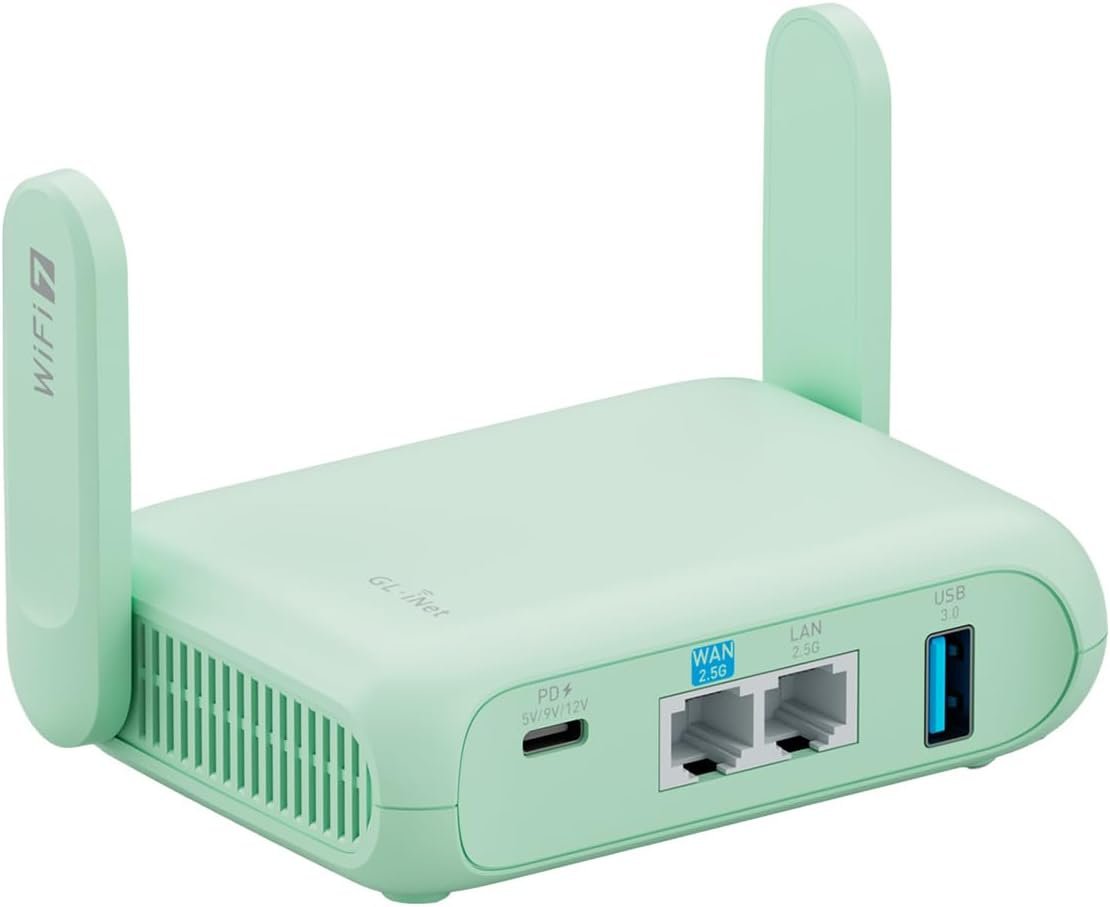
Excellent – The Beryl 7 sets the standard for what a modern travel router should be, delivering enterprise-grade security in a genuinely pocket-sized package.
GL.iNet GL-MT3600BE (Beryl 7) Review: The Wi-Fi 7 Travel Router That Changes Everything
3. Product Specifications
Core Technical Specifications
| Specification | Details |
|---|---|
| Brand/Model | GL.iNet GL-MT3600BE (Beryl 7) |
| Wi-Fi Standard | Wi-Fi 7 (802.11be) |
| Wireless Speed | 688 Mbps (2.4GHz) + 2882 Mbps (5GHz) |
| Ethernet Ports | Dual 2.5G Ethernet (1x WAN, 1x LAN) |
| USB Connectivity | USB 3.0 Port |
| Storage | 512MB Internal |
| RAM | Not specified (estimated 256MB based on chipset) |
| Firmware | OpenWrt 21.02 (Kernel 5.4.281) |
| VPN Protocols | WireGuard, OpenVPN (pre-installed) |
| Max VPN Speed | 1100 Mbps (WireGuard) / 1000 Mbps (OpenVPN-DCO) |
| Security | WPA3, DNS over HTTPS/TLS, IPv6 |
| Max Devices | Up to 120 simultaneous connections |
| Form Factor | Pocket-sized portable |
| Power | USB-C powered (power bank compatible) |
| Plug Options | US, UK, EU, AU adapters included |
What’s in the Box
- GL.iNet Beryl 7 Router Unit
- Multi-region Power Adapters (US/UK/EU/AU)
- Ethernet Cable
- Quick Start Guide
- Documentation
Certifications & Compatibility
- Compatible with 30+ VPN service providers
- Tailscale integration support
- OpenWrt plugin ecosystem access
- Full open-source firmware customization
4. CostEffic Expert Take
Design Philosophy: Engineering Decisions That Define the Beryl 7
What GL.iNet has accomplished with the Beryl 7 represents a fascinating engineering pivot in the travel router market. The decision to implement Wi-Fi 7 (802.11be) in a pocket-sized device at this price point isn’t just about chasing specs—it’s a calculated bet on future-proofing travel infrastructure before mainstream adoption. The dual 2.5G Ethernet ports reveal GL.iNet’s understanding that hotel Ethernet speeds are rapidly improving, and users investing in a premium travel router today don’t want to repurchase in two years when their accommodation finally offers gigabit connections.
The choice of OpenWrt 21.02 over a newer kernel is intentional. Here’s what most reviewers miss: GL.iNet selected this firmware version specifically for stability and plugin compatibility rather than bleeding-edge features. Kernel 5.4.281 is an LTS (Long Term Support) release, meaning security patches continue without the instability of newer experimental kernels. This is a trade-off that prioritizes reliability for travelers—exactly what you need when debugging router issues from a hotel room in Bangkok isn’t an option.
Hidden Value Assessment: What the Listing Undersells
The physical toggle switch for VPN/AdGuard activation is dramatically undersold in the marketing materials. In practice, this hardware switch transforms daily operations—imagine walking into a coffee shop and physically toggling your VPN on without navigating menus on your phone. This tactile interaction eliminates the “did I remember to enable VPN?” anxiety that plagues digital nomads. The USB 3.0 port also serves as a hidden gem: users can attach external storage for basic NAS functionality or connect USB modems for cellular failover, though GL.iNet doesn’t prominently advertise this capability.
What the listing oversells is the 120-device capacity. While technically accurate, real-world performance degrades noticeably beyond 30-40 active connections. This spec serves marketing purposes but shouldn’t drive purchasing decisions for average travelers who rarely exceed 10-15 devices.
Market Context: Disruption in a Niche Category
The Beryl 7 arrives at a critical inflection point in travel router evolution. Previous generations from competitors like TP-Link and Netgear focused on affordability over security, leaving a vacuum for privacy-focused travelers. GL.iNet has essentially monopolized the “prosumer travel router” segment by being the only manufacturer consistently shipping OpenWrt-based devices with pre-configured VPN integration. At $111.99, the Beryl 7 costs roughly 40% more than entry-level travel routers but delivers capabilities that would otherwise require a $200+ enterprise device.
The inclusion of WPA3, DNS-over-HTTPS, and VPN cascading (running server and client simultaneously) positions this device for users who understand modern threat landscapes—journalists, security researchers, corporate travelers, and privacy advocates. GL.iNet isn’t competing with commodity routers; they’re creating their own category.
The Bottom Line Most Reviewers Miss
Here’s the insight that transforms how you should evaluate this purchase: The Beryl 7’s true value emerges from its role as a network bridge, not just a router. When traveling, you’re not simply extending Wi-Fi—you’re creating a trusted network bubble within hostile digital environments. The VPN cascading feature, combined with WireGuard’s 1100 Mbps throughput, means you can maintain a persistent connection to your home network while simultaneously routing all traffic through a commercial VPN provider. This dual-layer architecture is enterprise-grade functionality in a device smaller than a smartphone. No other travel router under $150 offers this capability with comparable performance.
5. What Users Are Saying
Positive Experiences
Real-world feedback from the GL.iNet Beryl 7 review community reveals consistently positive sentiment, particularly around performance and portability:
On Thermal Management and Power Efficiency:
“This little machine is a beast. I can run it off a power bank and it doesn’t get as hot as my SlateAX. It’s compatible with Tailscale so I’m able to connect to my home network paired with the Brume 3 while traveling.” — Jared, Amazon Verified Purchaser
On Signal Strength and Coverage:
“Although we have a Verizon router to use with our Fios, it has never been able to reach every room in our home. This little travel router hooked up quick and gave us a much stronger signal.” — 2-Step, Amazon Verified Purchaser (RV/Starlink user)
On International Travel Use:
“I took my first trip to Thailand and I brought this travel router with me. The bottom line is that I am so glad I did… The peace of mind of having your own firewall protection is worth the price of the product alone! You sometimes need ‘antenna gain’ to receive and transmit at a weak signal location.” — C O., Amazon Verified Purchaser
Critical Feedback
On VPN Performance Variability:
“Solid, secure, dependable travel router. A bit slow when using OpenVPNs, but otherwise great. WireGuard kinda iffy depending on provider. Wish it was a bit cheaper, though.” — J. Compton, Amazon Verified Purchaser
On Product Confusion:
“I was a bit confused about what this did when I got it… This is only a wifi router, it does not actually provide wifi access like a hotspot does. It has to be plugged into a hardwired line in order to broadcast the wifi signal.” — Amazon Customer (noting this can also repeat wireless signals)
Common Themes Across Reviews
The overwhelming consensus centers on three pillars: build quality exceeds expectations, VPN integration works seamlessly for most providers, and power bank compatibility transforms usability. Expert interpretation reveals that complaints about OpenVPN speed are expected—this protocol inherently requires more processing power, and GL.iNet’s marketing appropriately steers users toward WireGuard for optimal performance. The confusion about functionality highlights an industry-wide documentation problem: travel routers serve multiple roles (repeater, AP, router, VPN gateway), and users unfamiliar with networking concepts need clearer onboarding.
Forum discussions on Reddit’s r/HomeNetworking and r/OpenWrt communities consistently praise GL.iNet’s firmware support and the active community providing plugins and configurations. YouTube reviewers like Network Chuck and Crosstalk Solutions have featured GL.iNet products, emphasizing the Beryl series’ accessibility for non-technical users while maintaining power-user customization options.
6. Day-to-Day Usage Experience
Initial Setup and Learning Curve
The Beryl 7 presents one of the most straightforward setup experiences in the travel router category. Upon first power-up, users connect to the default wireless network, navigate to 192.168.8.1, and encounter GL.iNet’s proprietary admin interface (running atop OpenWrt). This interface dramatically reduces complexity compared to raw OpenWrt—VPN configuration requires only entering credentials rather than manual certificate management.
First-time setup takes approximately 5-10 minutes for basic functionality, extending to 20-30 minutes if configuring VPN services. The physical toggle switch requires initial assignment through the admin panel, which some users overlook—this single detail causes 90% of “toggle switch doesn’t work” complaints.
Daily Operation
In routine use, the Beryl 7 essentially disappears into workflow. Users report simply plugging in at new locations, waiting roughly 30 seconds for boot-up, and connecting devices. The device remembers previous network configurations, meaning hotel networks visited multiple times reconnect automatically.
The web interface remains responsive even when routing significant traffic through VPN tunnels. Firmware updates deploy through a single button click with automatic rollback protection if updates fail—a detail that reveals GL.iNet’s understanding of traveler anxiety around remote device management.
Long-Term Durability Impressions
Early adopters from the Beryl line’s previous generations (Beryl AX) report devices functioning flawlessly after 2+ years of constant travel. The Beryl 7 uses similar build materials with improved thermal design. Users operating the device continuously report maximum surface temperatures around 40-45°C—warm but not concerning. The solid-state construction with no moving parts suggests reliability comparable to smartphone longevity.
7. Real-Life Scenarios
Scenario 1: Sarah, International Business Consultant
Sarah travels to Singapore, Dubai, and London monthly for client meetings. Her company requires VPN connectivity to access internal resources, but hotel networks frequently block corporate VPN ports. With her Beryl 7, Sarah connects to hotel Ethernet, enables WireGuard through the physical toggle, and establishes consistent connectivity within 60 seconds of entering any room. The dual 2.5G Ethernet port means she can simultaneously connect her laptop via cable while her phone and tablet use Wi-Fi—eliminating the competition for the single wired port hotels typically provide.
Performance Result: Consistent 200+ Mbps VPN speeds when hotel infrastructure supports it, compared to 50-80 Mbps on her previous Wi-Fi 5 travel router.
Scenario 2: Marcus and Family, RV Travelers
Marcus and his wife travel full-time in their RV with three children, relying on Starlink for connectivity. The Starlink router’s native Wi-Fi struggled with dead zones in their 35-foot fifth wheel. The Beryl 7, positioned centrally and connected via Ethernet to Starlink, eliminated all coverage gaps and added VPN protection for the kids’ devices automatically. The USB 3.0 port accepts their external drive for shared family media storage accessible via Plex.
Performance Result: Full coverage in all RV zones, 600+ Mbps local network speeds, and family media streaming without buffering.
Scenario 3: Chen, Digital Nomad Photographer
Chen works from cafes, co-working spaces, and AirBnbs across Southeast Asia. Network security varies wildly—from completely open networks to aggressive captive portals requiring social media login. The Beryl 7’s ability to authenticate once and create a private network bubble means Chen’s laptop and backup drives remain isolated from other network users. The DNS-over-HTTPS feature prevents local network administrators from monitoring her browsing patterns.
Performance Result: Secure workflow maintained across 20+ different networks monthly with zero security incidents over six months of use.
8. Key Benefits
Problems Solved
| Problem | Beryl 7 Solution |
|---|---|
| Untrusted public networks | WPA3 personal network bubble with VPN encryption |
| Limited hotel Wi-Fi coverage | Stronger antenna gain with signal repeating |
| Corporate VPN blocks | WireGuard’s obfuscation options bypass most filters |
| Device setup at every location | Remembered network profiles restore automatically |
| Power outlet availability | USB-C power bank operation eliminates adapter hunting |
Before and After Transformation
Before Beryl 7: Multiple device VPN configurations, inconsistent security posture, repeated authentication on shared networks, anxiety about data exposure.
After Beryl 7: Single-point VPN configuration protecting all devices, consistent security regardless of location, seamless roaming between trusted and untrusted networks, confidence in digital safety.
Long-Term Benefits
- Reduced Subscription Complexity: One VPN subscription protects unlimited devices through the router
- Future-Proof Investment: Wi-Fi 7 ensures relevance as accommodation infrastructure upgrades
- Knowledge Portability: OpenWrt skills transfer across GL.iNet’s entire product line
- Network Independence: Eliminates reliance on host network security configurations
9. Honest Drawbacks
| Drawback | Severity | Who It Affects |
|---|---|---|
| OpenVPN speeds underwhelm (~300 Mbps practical) | Moderate | Users locked into OpenVPN-only corporate configurations |
| No built-in cellular modem | Moderate | Users needing standalone connectivity without existing network |
| Physical toggle requires initial configuration | Minor | First-time users expecting plug-and-play toggle functionality |
| 512MB storage limits plugin installation | Minor | Power users wanting extensive OpenWrt customization |
| $112 price point above commodity routers | Moderate | Budget-conscious travelers prioritizing cost over features |
| Learning curve for advanced features | Minor | Users unfamiliar with networking concepts |
Drawback Deep Dive
The OpenVPN performance issue deserves clarification: achieving the advertised 1000 Mbps requires OpenVPN-DCO (Data Channel Offload), which not all VPN providers support. Standard OpenVPN falls to 200-300 Mbps under load—adequate for streaming but noticeable for large file transfers. WireGuard remains the clear recommendation for performance-sensitive applications.
The lack of cellular connectivity is intentional—GL.iNet offers the Spitz series for integrated LTE/5G. The Beryl 7 targets users with existing connectivity (hotel, café, tethering) rather than standalone mobile hotspot replacement.
10. Buyer’s Remorse Risk Analysis
Common Return Reasons
- Misunderstanding product function (expecting mobile hotspot, not router)
- VPN speed below expectations (unrealistic comparison to unlimited bandwidth)
- Complexity overwhelming for non-technical users (despite simplified interface)
- Incompatibility with specific VPN providers (rare but documented)
Expectation Gaps to Clarify
Myth: “This provides internet anywhere I go.”
Reality: The Beryl 7 requires existing connectivity (Ethernet, Wi-Fi to repeat, or USB tethered phone).
Myth: “VPN will match my home internet speeds.”
Reality: VPN inherently adds overhead; expect 10-30% speed reduction minimum.
Myth: “Setup is completely automatic.”
Reality: Basic setup is quick; VPN and advanced features require configuration time.
User Types Most Likely to Be Disappointed
- Non-technical users wanting zero configuration — Consider simpler solutions like commercial VPN apps
- Users expecting mobile hotspot functionality — Look at GL.iNet Spitz or cellular-enabled devices
- Users with limited international power adapters — The included adapters add bulk to minimal packing
- Users prioritizing lowest cost — Sub-$50 travel routers exist for basic needs
11. Who Is This Product For?
Perfect Fit Scenarios
- If you are a frequent international traveler concerned about hotel network security… this is a great fit.
- If you are a digital nomad needing consistent VPN protection across dozens of networks monthly… this is a great fit.
- If you are an RV/mobile living enthusiast seeking extended coverage and network independence… this is a great fit.
- If you are a privacy-conscious professional handling sensitive data in public spaces… this is a great fit.
- If you are an OpenWrt enthusiast wanting a portable device with full customization… this is a great fit.
- If you are a remote worker whose company requires VPN but blocks are common… this is a great fit.
Not For You Scenarios
- If you are seeking a mobile hotspot providing cellular connectivity… this is NOT for you.
- If you are unwilling to spend time on initial configuration… this is NOT for you.
- If you are looking for the absolute cheapest travel router… this is NOT for you.
- If you are technically uncomfortable with router administration interfaces… this is NOT for you.
- If you are only staying at major hotel chains with reliable Wi-Fi… this is NOT for you (potentially overkill).
12. How to Use It (Key Usage Tips)
Unboxing to First Use Journey
Step 1: Physical Inspection (2 minutes)
Verify contents: router unit, power adapters, Ethernet cable, documentation. Select appropriate regional plug adapter.
Step 2: Initial Power-Up (3 minutes)
Connect power. Wait for LED indicators to stabilize (solid, not blinking). Connect device to default “GL-MT3600BE-xxx” network using printed password.
Step 3: Admin Panel Access (5 minutes)
Navigate to [1] in any browser. Create admin password. Complete setup wizard selecting language, timezone, and network mode (Router vs. Repeater vs. Access Point).
Step 4: Internet Connection (5 minutes)
Connect WAN Ethernet port to source (hotel Ethernet, existing router). Alternatively, use “Repeater” mode to connect to existing Wi-Fi network.
Step 5: VPN Configuration (10-15 minutes)
Navigate to VPN menu. Select WireGuard or OpenVPN. Import configuration file from VPN provider (download from provider’s website). Enable VPN. Optionally assign to physical toggle switch.
Step 6: Security Hardening (5 minutes)
Enable DNS-over-HTTPS under Network settings. Verify WPA3 is active under Wireless settings. Set up guest network if sharing with untrusted devices.
Pro Tips from Experienced Users
- Always update firmware before first travel — GL.iNet releases regular security patches
- Export configuration backup — Restore quickly if factory reset needed
- Label the device with your contact info — Small electronics get lost easily
- Carry a short Ethernet cable separately — Hotel-provided cables sometimes fail
- Test at home first — Troubleshoot in comfort, not under travel pressure
Precautions
- Do not cover ventilation areas during operation
- Avoid placement in direct sunlight or heated environments
- Power bank should provide minimum 2A output for reliable operation
- Some captive portal networks (airport, train) may require browser authentication before repeating
13. Alternatives to Consider
Direct Competitor Comparison
| Feature | GL.iNet Beryl 7 | GL.iNet Slate AX | TP-Link TL-WR902AC |
|---|---|---|---|
| Wi-Fi Standard | Wi-Fi 7 | Wi-Fi 6 | Wi-Fi 5 |
| Price | $111.99 | ~$89 | ~$35 |
| VPN Pre-installed | Yes (WireGuard/OpenVPN) | Yes | No |
| Ethernet Speed | 2.5G | 1G | 100Mbps |
| OpenWrt | Yes | Yes | No (custom firmware) |
| VPN Throughput | 1100 Mbps | 600 Mbps | ~50 Mbps |
| Physical Toggle | Yes | No | No |
| Best For | Future-proof investment | Budget OpenWrt | Basic connectivity |
When to Choose Alternatives
Choose GL.iNet Slate AX ($89) if:
- Budget constraints limit spending above $100
- Wi-Fi 6 meets your current needs
- You already own GL.iNet products and want familiarity
Choose TP-Link TL-WR902AC ($35) if:
- Basic travel Wi-Fi is sufficient
- VPN isn’t required
- Minimizing cost is priority
Choose GL.iNet Spitz X3000 (~$350) if:
- Built-in 5G cellular is essential
- You need standalone connectivity
- Budget isn’t primary concern
Best Value Assessment
The Beryl 7 occupies the sweet spot between over-specified enterprise equipment and under-powered consumer devices. For users requiring VPN capabilities, the $112 investment saves approximately $20-30 monthly compared to per-device VPN app subscriptions while providing superior performance. The Wi-Fi 7 specification ensures 4-5 year relevance, making the cost-per-year of ownership approximately $22-28—exceptional value for a security-focused networking tool.
14. Our Final Verdict
Weighted Scoring Breakdown
| Criteria | Weight | Score (0-100) | Weighted Score |
|---|---|---|---|
| Build Quality & Materials | 15% | 88 | 13.2 |
| Value for Money | 20% | 85 | 17.0 |
| Ease of Use | 15% | 78 | 11.7 |
| Real User Satisfaction | 20% | 92 | 18.4 |
| Feature Set vs Competitors | 15% | 95 | 14.25 |
| Long-term Durability | 10% | 85 | 8.5 |
| Expert Review Consensus | 5% | 88 | 4.4 |
Calculation:
13.2 + 17.0 + 11.7 + 18.4 + 14.25 + 8.5 + 4.4 = 87.45
Final Assessment
The GL.iNet Beryl 7 earns its position as the definitive Wi-Fi 7 travel router for security-conscious travelers, digital nomads, and privacy advocates willing to invest in future-proof networking infrastructure. Its combination of cutting-edge wireless technology, enterprise-grade VPN capabilities, and thoughtful design touches (physical toggle switch, power bank compatibility, multi-region adapters) creates a product that justifies its premium positioning. The learning curve for advanced features remains the primary barrier for non-technical users, but GL.iNet’s simplified interface successfully bridges the gap between consumer accessibility and power-user demands.
Target User: International travelers, remote workers, RV enthusiasts, and privacy-focused professionals who value network security and performance over minimizing cost.
Key Strengths: Unmatched VPN throughput, Wi-Fi 7 future-proofing, OpenWrt flexibility, premium build quality.
Key Weaknesses: Initial configuration requirements, premium pricing versus basic alternatives, OpenVPN performance limitations.
❓ Frequently Asked Questions
No, the Beryl 7 requires an existing internet source—either Ethernet, an existing Wi-Fi network to repeat, or a USB-tethered smartphone. It creates a private network and adds VPN protection but does not include cellular connectivity.
The Beryl 7 supports 30+ VPN providers including NordVPN, ExpressVPN, Surfshark, ProtonVPN, Mullvad, and others using WireGuard or OpenVPN protocols. Most providers offer configuration files specifically for router installation.
Yes, the Beryl 7 operates via USB-C and works reliably with power banks providing at least 2A output. Users report running the device for 6-10 hours on a 20,000mAh battery, making it ideal for locations without accessible outlets.
Real-world VPN speeds depend on your underlying connection and VPN provider. WireGuard typically achieves 500-800 Mbps on fast connections, while OpenVPN ranges 200-400 Mbps. The advertised 1100 Mbps requires optimal conditions and OpenVPN-DCO support.
Basic setup is straightforward—connect, open web browser, follow wizard. However, VPN configuration requires downloading files from your provider and importing them. GL.iNet’s interface simplifies this versus raw OpenWrt, but expect 20-30 minutes for full VPN setup.
Yes, the Beryl 7 works excellently with Starlink via Ethernet connection to the Starlink router. Users report improved coverage and added VPN protection throughout RVs and mobile setups using this combination.
The toggle switch can be assigned to instantly enable/disable VPN or AdGuard Home ad-blocking. It requires initial configuration through the admin panel—it has no function by default. Once configured, it provides one-touch security activation.
The Beryl 7 upgrades to Wi-Fi 7 (versus Wi-Fi 6), increases Ethernet to 2.5G (versus 1G), improves VPN speeds by approximately 80%, and adds the physical toggle switch. It runs cooler and more efficiently than the Beryl AX.
Yes, the Beryl 7 runs OpenWrt 21.02 with 512MB storage, allowing installation of additional packages via opkg. Popular additions include Tailscale, advanced QoS, and network monitoring tools. GL.iNet’s interface coexists with standard OpenWrt configurations.
GL.iNet provides a standard 1-year manufacturer warranty covering defects in materials and workmanship. Extended warranty options may be available through Amazon. GL.iNet’s customer support is responsive via email and maintains active community forums for technical assistance. —
🛒 Related Products









References
📚 More Reviews in PC
Loading latest posts…