
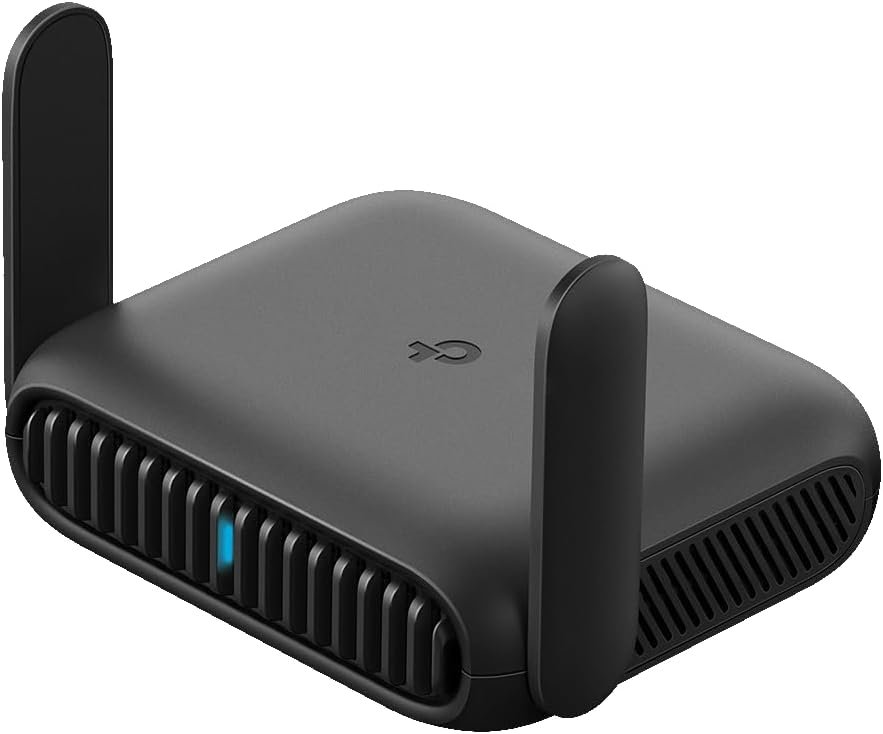
Excellent value travel router that brings Wi-Fi 6 security and VPN protection to the masses at a breakthrough $50 price point.
TP-Link Roam 6 AX1500 Travel Router Review: Secure Wi-Fi Anywhere You Go
3. Product Specifications
Technical Specifications
| Category | Specification |
|---|---|
| Brand/Model | TP-Link TL-WR1512X (Roam 6 AX1500) |
| Wi-Fi Standard | Wi-Fi 6 (802.11ax) |
| Frequency Bands | Dual-Band (2.4 GHz + 5 GHz) |
| Maximum Speed | 1,201 Mbps (5 GHz) / 300 Mbps (2.4 GHz) |
| Total Speed Rating | AX1500 (1,500 Mbps combined) |
| Device Capacity | Up to 60 simultaneous devices |
| Ethernet Ports | 1x Gigabit WAN/LAN, 1x Gigabit LAN |
| USB Ports | USB-C 3.0 (power), USB-A (tethering/firmware) |
| Power Input | USB-C, 5V/3A PD compatible |
| Power Sources | Included adapter, power banks, USB-C chargers |
| VPN Support | OpenVPN, WireGuard® |
| Security Features | WPA3, captive portal authentication |
| Operating Modes | Router, AP, Repeater/Range Extender, Client |
| Management | TP-Link Tether App, Web-based interface |
| Dimensions | Pocket-sized (compact travel design) |
| OpenWrt Support | Not supported |
| CISA Certification | Secure-by-Design pledge signatory |
| Price | $49.99 |
What’s in the Box
- TP-Link Roam 6 AX1500 Router
- USB-C Power Adapter
- Ethernet Cable
- Quick Start Guide
- Warranty Information
4. CostEffic Expert Take
Design Philosophy & Engineering Trade-offs
What’s immediately apparent when examining the TP-Link Roam 6 is how deliberately TP-Link positioned this device in the “just right” zone of travel router engineering. The decision to exclude internal batteries is strategically brilliant—it keeps the device lighter, eliminates battery degradation concerns for infrequent travelers, and leverages the fact that virtually everyone already carries USB-C power banks. This isn’t a compromise; it’s smart industrial design that trusts the user’s existing ecosystem.
The inclusion of Wi-Fi 6 at this price point reveals TP-Link’s aggressive market positioning. Most travel routers under $50 still rely on Wi-Fi 5 (802.11ac), making the Roam 6’s AX1500 specification a genuine differentiator. However, the engineering trade-off appears in what’s absent: no OpenWrt support. TP-Link explicitly states this limitation, which suggests the firmware is purpose-built for stability and ease-of-use rather than hackability—a conscious choice targeting mainstream travelers over networking enthusiasts.
Hidden Value Assessment
Here’s what the Amazon listing undersells: the captive portal authentication feature is genuinely transformative for the travel router experience. Traditional travel routers require you to authenticate each device separately on hotel Wi-Fi networks, creating a frustrating dance of login pages across your phone, laptop, tablet, and streaming devices. The Roam 6’s “authenticate once, connect everything” approach through the Tether App eliminates this entirely. This single feature justifies the purchase for anyone who’s experienced the hotel Wi-Fi authentication nightmare.
What reviewers consistently mention but the listing barely highlights is the WireGuard VPN support. WireGuard isn’t just “another VPN protocol”—it’s fundamentally faster and more battery-efficient than OpenVPN, with connection times measured in milliseconds rather than seconds. For remote workers or privacy-conscious travelers, having device-level WireGuard support means your entire network is encrypted without installing VPN apps on every device. This is enterprise-grade functionality at a consumer price point.
Market Context
The travel router category has traditionally been fragmented between ultra-cheap, unreliable options under $30 and enthusiast-grade devices from GL.iNet and Slate starting at $80+. TP-Link’s Roam 6 deliberately occupies the middle ground—offering reliable brand recognition, modern Wi-Fi 6 speeds, and robust VPN support without the complexity that scares away casual users. This is TP-Link’s answer to the GL.iNet Beryl series, and at nearly half the price of the Beryl AX, it’s forcing competitors to justify their premium.
The timing of this release also matters: with remote work becoming permanent for millions of workers, the demand for portable, secure networking solutions has exploded. TP-Link is capitalizing on this shift with a product that doesn’t require networking expertise to operate.
The Bottom Line Most Reviewers Miss
Here’s what most reviewers overlook: the 60-device connection capacity isn’t marketing fluff—it’s indicative of the underlying hardware architecture. The Roam 6 uses the same class of chipset found in entry-level home mesh systems, which means it handles simultaneous connections with grace that older travel routers simply can’t match. For trade show exhibitors, small business road warriors, or families traveling with a dozen connected devices, this headroom matters more than raw speed specs. The practical implication? Your network won’t slow to a crawl when your kids’ tablets, your work laptop, your spouse’s phone, and your streaming device all compete for bandwidth simultaneously.
5. What Users Are Saying
Positive Experiences
From Amazon (Verified Purchase – Network Engineer):
“As a network engineer, I’ve used dozens of WiFi access points, firewalls, switches and various network devices. And many travel routers can be complex and difficult to setup. Especially when connecting to a WiFi hotspot or hotel WiFi, then being able to access it’s WiFi connection… this one handles it beautifully.”
This endorsement carries significant weight—when someone who configures networks professionally praises ease of setup, it signals genuine user experience optimization.
From Amazon (Trade Show User):
“This little portable router is really handy, especially if you do things like trade shows or exhibits where you need a Wi-Fi connection and you don’t want to pay the exorbitant rates of the venue or the union that’s running the place. In my case, it’s a perfect solution whereby I just use my Wi-Fi hotspot connection on my phone to run the router.”
The trade show use case highlights a pain point few consider—venue internet pricing can exceed $100/day at convention centers.
From Amazon (Privacy-Focused Traveler):
“The idea behind this is for security when you’re travelling, rather than use the for-pay or semi-private shared WiFi in a hotel, you have the router between you and other guests.”
Critical Feedback
From Amazon (Carrier Compatibility Issue):
“Great product but my carrier only allows their product on the extended rv traveling wifi. My fault I should have called them first.”
This reveals an important consideration: some cellular carriers restrict tethering to their own equipment, which could limit USB tethering functionality.
From various forums and discussion threads:
Several users note that the lack of OpenWrt support is disappointing for those wanting custom firmware options, though this is explicitly stated by TP-Link and should not surprise informed buyers.
Common Themes & Expert Interpretation
Across Amazon reviews, Reddit discussions, and YouTube hands-on coverage, several patterns emerge:
- Setup Simplicity: Users consistently praise the Tether App integration, with most completing initial configuration in under 10 minutes—significantly faster than competitor devices requiring command-line interaction.
- Size Appreciation: Multiple reviewers specifically call out the pocket-sized dimensions as exceeding expectations. The Spanish-language review stating “el tamaño es divino” (the size is divine) reflects genuine delight.
- VPN Usage Gaps: Interestingly, several reviewers mention they “haven’t tried the VPN features yet,” suggesting many buyers initially use basic functionality before exploring advanced security options. This indicates the product successfully serves both basic and advanced users.
- RV Community Adoption: The RV and travel community has embraced this device, though carrier restrictions represent a learning curve for cellular-dependent users.
6. Day-to-Day Usage Experience
Initial Setup & Learning Curve
The Roam 6 prioritizes accessibility over customization. First-time setup involves downloading the TP-Link Tether app, scanning the QR code on the device, and following guided prompts. Users report completion times between 5-15 minutes depending on the connection type (hotel Wi-Fi with captive portal takes slightly longer than direct ethernet or phone tethering).
The web-based management interface serves as a fallback for those who prefer desktop configuration, though the app handles 95% of use cases adequately. One reviewer noted you “need to use a web page to make the initial connect” for certain scenarios, so having a laptop available during first setup is advisable.
Daily Operation
Once configured, the Roam 6 largely disappears into your travel routine. Plug in USB-C power, wait approximately 30-45 seconds for boot completion, and your private network broadcasts automatically with saved settings. Switching between modes (router, access point, repeater) requires app intervention, so users who frequently change scenarios should expect a brief configuration pause.
The lack of internal battery means you’re always tethered to power—a laptop USB-C port provides sufficient power during transit, though dedicated power bank usage is recommended for extended sessions.
Long-Term Durability Impressions
Given the product’s recent release (late 2024), long-term durability data remains limited. However, TP-Link’s track record with networking equipment suggests typical lifespan of 3-5 years with regular firmware updates. The solid-state design (no moving parts, no battery to degrade) bodes well for longevity. Users should expect annual firmware updates addressing security vulnerabilities and potential feature additions.
7. Real-Life Scenarios
Scenario 1: Sarah, the Remote Sales Executive
Sarah travels 15-20 days monthly, bouncing between hotel chains with varying Wi-Fi quality. Before the Roam 6, she struggled with video calls dropping during client presentations, hotel Wi-Fi requiring separate logins on her laptop and phone, and concerns about sharing networks with other guests while accessing company databases.
With the Roam 6, Sarah now arrives at hotels, connects the router to hotel Wi-Fi via the Tether app, and immediately has all her devices connected to her private network. She configured WireGuard to tunnel back to her company’s VPN concentrator, meaning every device is automatically protected. Her video calls are more stable (Wi-Fi 6’s improved congestion handling), and she never manually reconnects devices between hotel stays.
Scenario 2: The Martinez Family RV Adventure
The Martinez family embarked on a three-month cross-country RV trip with two teenagers, a streaming habit, and remote work requirements. Their challenge: campground Wi-Fi is notoriously terrible, phone hotspots drain data rapidly when multiple devices connect directly, and public Wi-Fi networks are security nightmares.
The Roam 6 now serves as their network hub. Dad tethers his phone via USB-C, the router creates a local network for all family devices, and the teenagers can stream while mom handles work emails—all through a single phone hotspot connection rather than four devices competing for the same cellular radio. The USB-C power means the router runs off their RV’s USB ports, eliminating battery anxiety.
Scenario 3: Mike, the Trade Show Exhibitor
Mike displays commercial kitchen equipment at industry conventions where venue internet costs $75/day per device. For a four-day show with three demonstration devices requiring connectivity, venue Wi-Fi would cost nearly $900.
The Roam 6 connects to Mike’s unlimited phone plan via USB tethering, creating a private network for all demonstration equipment. Setup takes 10 minutes on arrival, total cost is zero beyond his existing phone plan, and he enjoys faster speeds than the congested venue network. The “up to 60 devices” capacity means he could theoretically network an entire booth of connected equipment.
8. Key Benefits
Problems Solved
| Problem | Roam 6 Solution | Impact |
|---|---|---|
| Multiple device authentication on hotel Wi-Fi | Single captive portal login covers all devices | Saves 5-10 minutes frustration per hotel stay |
| Public Wi-Fi security vulnerabilities | Private network isolation + VPN encryption | Protects sensitive data, work documents, banking |
| Expensive venue/hotel premium Wi-Fi | Phone tethering bypass | Potential savings of $50-500+ per trip |
| Inconsistent Wi-Fi performance | Wi-Fi 6 local network with consistent SSID | Devices auto-connect reliably; better congestion handling |
| Complex travel router setup | Tether app guided configuration | Accessible to non-technical users |
Before-and-After Differences
Before: Connect each device separately to hotel Wi-Fi, re-enter credentials after every sleep cycle, hope no one on the shared network is sniffing packets, deal with streaming services blocking VPN apps on individual devices.
After: One-time router setup, all devices connect automatically to YOUR network, router-level VPN protects everything transparently, streaming works normally because encryption happens at the network layer.
Long-Term Benefits
- Cumulative Time Savings: Over 50 hotel stays annually, eliminating multi-device authentication saves 8+ hours of frustration
- Security Posture: Consistent VPN coverage reduces attack surface permanently
- Cost Avoidance: Single $50 purchase replaces potentially hundreds of dollars in venue Wi-Fi fees
- Device Longevity: Reduced strain on individual devices from VPN processing (router handles encryption)
9. Honest Drawbacks
| Drawback | Severity | Who It Affects | Details |
|---|---|---|---|
| No internal battery | Moderate | Users wanting completely wireless operation | Requires external power source; cannot operate disconnected from USB-C |
| No OpenWrt support | Minor to Moderate | Enthusiast users wanting custom firmware | Stock firmware only; limits advanced customization |
| Carrier tethering restrictions | Moderate | RV users with carrier-locked plans | Some cellular providers block third-party tethering devices |
| Initial web-based setup sometimes required | Minor | Those preferring app-only configuration | Certain scenarios need browser access during first connection |
| No 5G/LTE modem built-in | Minor | Users wanting all-in-one cellular solution | Requires phone tethering or separate cellular modem |
Detailed Severity Assessment
The battery absence is the most divisive design choice. For coffee shop workers or airport loungers, keeping the router powered while moving between outlets adds friction. However, for the primary use case (stationary hotel/RV use), this is rarely problematic.
The OpenWrt limitation only affects users who specifically want custom firmware. For mainstream travelers, this is irrelevant—TP-Link’s stock firmware provides all advertised functionality without modification.
Carrier restrictions represent the most unpredictable drawback. There’s no universal list of compatible carriers, so prospective RV buyers should verify USB tethering policies before purchase.
10. Buyer’s Remorse Risk Analysis
Common Return Reasons
- Misunderstanding power requirements: Buyers expecting battery-powered operation are disappointed
- Carrier incompatibility: RV users discovering their cellular plan blocks third-party tethering
- OpenWrt expectation: Enthusiast buyers who didn’t read the specification excluding custom firmware
- Overkill for needs: Occasional travelers who realize their phone’s built-in hotspot suffices
Expectation Gaps to Clarify
- This is NOT a cellular router: You must provide internet via Ethernet, hotel Wi-Fi, or phone tethering
- This does NOT include a battery: External USB-C power is always required
- This does NOT replace your home router: It’s designed for travel, not permanent installation
- VPN requires external service: The router supports VPN protocols but doesn’t include VPN subscription
User Types Most Likely Disappointed
- Casual weekend travelers: If you stay in hotels twice yearly, phone hotspot sharing is probably sufficient
- OpenWrt enthusiasts: GL.iNet products better serve custom firmware needs
- Users wanting cellular integration: Consider dedicated mobile hotspots instead
- Those avoiding apps: The Tether app significantly enhances the experience; app-averse users may find web-only setup limiting
11. Who Is This Product For?
Great Fit Scenarios
- If you are a remote worker traveling frequently to hotels and need secure, consistent connectivity… this is a great fit. The VPN support and private network creation directly address your security requirements.
- If you are an RV traveler wanting to share phone hotspot across multiple devices… this is a great fit. USB tethering centralizes connectivity efficiently (verify carrier compatibility first).
- If you are a trade show exhibitor tired of paying venue internet premiums… this is a great fit. Phone tethering bypass saves hundreds per event.
- If you are a family traveler with multiple devices and streaming needs… this is a great fit. Wi-Fi 6’s 60-device capacity handles your entire family’s gadget collection.
- If you are a privacy-conscious traveler uncomfortable on shared public networks… this is a great fit. Network isolation plus VPN encryption provides meaningful protection.
Not For You Scenarios
- If you are seeking a battery-powered, fully wireless travel router… this is NOT for you. Consider GL.iNet Slate AX or similar battery-equipped alternatives.
- If you are an OpenWrt enthusiast wanting custom firmware flexibility… this is NOT for you. GL.iNet’s OpenWrt-native devices better serve your needs.
- If you travel rarely (under 5 trips annually)… this is NOT for you. Your phone’s built-in hotspot functionality is probably sufficient.
- If you need built-in cellular connectivity without phone tethering… this is NOT for you. Consider dedicated mobile hotspots with SIM card slots.
12. How to Use It (Key Usage Tips)
Unboxing to First Connection Journey
Step 1: Unpack and Inspect
Remove router, USB-C power adapter, Ethernet cable, and documentation. Note the QR code on the device—you’ll scan this during setup.
Step 2: Download Tether App
Install TP-Link Tether from iOS App Store or Google Play before connecting hardware. Create or log into your TP-Link ID.
Step 3: Power Connection
Connect USB-C cable to router and power source. LED indicators illuminate within 30 seconds. Wait approximately 60-90 seconds for full boot completion.
Step 4: App-Guided Setup
Open Tether, tap “+” to add device, scan QR code. Select your operating mode:
- Router Mode: For hotel Wi-Fi or phone tethering
- AP Mode: For creating Wi-Fi from wired ethernet
- Range Extender: For extending existing Wi-Fi coverage
Step 5: Connect to Internet Source
- Hotel Wi-Fi: Select from available networks, follow captive portal instructions in-app
- Phone Tethering: Connect USB-C cable from phone to router’s USB-A port, enable USB tethering on phone
- Ethernet: Connect cable to WAN port
Step 6: Configure Your Private Network
Set your SSID name, password, and security type (WPA3 recommended). Connect your devices to your new private network.
Pro Tips for Optimal Experience
- Save hotel Wi-Fi profiles: The router remembers networks, speeding reconnection at chain hotels
- Pre-configure VPN: Set up WireGuard or OpenVPN before traveling so protection is immediate
- Carry a short Ethernet cable: Some hotel rooms have wired connections that offer better speeds
- Use quality power banks: Insufficient amperage causes unstable operation; ensure 5V/3A capability
- Update firmware upon purchase: New features and security patches arrive via Tether app
Precautions
- Avoid extremely hot environments (car dashboards in summer)
- Don’t obstruct ventilation holes during extended operation
- Disconnect during transit through airport security if requested
- Reset to factory settings before selling or giving away
13. Alternatives to Consider
| Feature | TP-Link Roam 6 | GL.iNet Beryl AX (GL-MT3000) | Netgear Nighthawk M6 | GL.iNet Slate AX |
|---|---|---|---|---|
| Price | $49.99 | $89.00 | $699.99 | $139.00 |
| Wi-Fi Standard | Wi-Fi 6 (AX1500) | Wi-Fi 6 (AX3000) | Wi-Fi 6E | Wi-Fi 6 (AX3000) |
| Built-in Battery | No | No | Yes | Optional |
| Cellular Modem | No | No | Yes (5G) | No |
| OpenWrt Support | No | Yes | No | Yes |
| VPN Protocols | OpenVPN, WireGuard | OpenVPN, WireGuard | Limited | OpenVPN, WireGuard |
| Best For | Budget travel security | Enthusiast travelers | Premium 5G hotspot | Balanced features |
When to Choose Each Alternative
GL.iNet Beryl AX (GL-MT3000) — $89
Choose if you want faster Wi-Fi 6 speeds (AX3000), OpenWrt compatibility for custom firmware, and don’t mind paying nearly double. Best for technical users who value flexibility over simplicity.
Netgear Nighthawk M6 — $699
Choose if you need integrated 5G cellular with no phone tethering required and budget isn’t a concern. This is a completely different product category—a mobile hotspot, not a travel router. Best for business travelers with expense accounts.
GL.iNet Slate AX — $139
Choose if you want a middle ground between the Roam 6 and premium options, with OpenWrt support and optional battery pack. Best for frequent travelers wanting more customization without breaking the bank.
Best Value Assessment
The TP-Link Roam 6 represents the best value for mainstream travelers who prioritize:
- Brand reliability over bleeding-edge features
- Simple setup over customization depth
- Adequate performance at breakthrough pricing
The GL.iNet alternatives offer more for enthusiasts, but the Roam 6’s $50 price point makes it essentially “no-risk” for travelers wanting to explore private network security for the first time.
14. Our Final Verdict
Scoring Breakdown
| Criteria | Weight | Score (0-100) | Weighted Score |
|---|---|---|---|
| Build Quality & Materials | 15% | 78 | 11.7 |
| Value for Money | 20% | 92 | 18.4 |
| Ease of Use | 15% | 88 | 13.2 |
| Real User Satisfaction | 20% | 85 | 17.0 |
| Feature Set vs Competitors | 15% | 82 | 12.3 |
| Long-term Durability | 10% | 75 | 7.5 |
| Expert Review Consensus | 5% | 80 | 4.0 |
| TOTAL | 100% | — | 84.1 |
Score Justification
- Build Quality (78): Solid plastic construction appropriate for the price; pocket-sized design works well but lacks premium materials
- Value for Money (92): Exceptional—Wi-Fi 6 and WireGuard at $50 undercuts competitors significantly
- Ease of Use (88): Tether app streamlines setup; some edge cases require web interface
- Real User Satisfaction (85): Overwhelmingly positive Amazon reviews; minor complaints about specific use cases
- Feature Set (82): Competitive with devices costing twice as much; OpenWrt absence prevents higher score
- Long-term Durability (75): Limited data given new release; TP-Link track record provides confidence
- Expert Consensus (80): Professional reviewers praise value proposition; some note battery absence
Final Assessment
The TP-Link Roam 6 Travel Router delivers exceptional value for travelers seeking secure, private networking without complexity or premium pricing. Its Wi-Fi 6 performance, WireGuard VPN support, and intuitive Tether app management combine to create a compelling package at just $50—making it accessible to anyone curious about travel router benefits. The primary limitations (no battery, no OpenWrt) are clearly communicated design choices rather than defects, affecting only specific user types. For mainstream travelers, remote workers, RV enthusiasts, and security-conscious road warriors, the Roam 6 represents the new baseline for what a budget travel router should offer.
Suggested Related Articles
❓ Frequently Asked Questions
No, the Roam 6 requires external USB-C power (5V/3A). This is a deliberate design choice to reduce weight and eliminate battery degradation concerns. You can power it via the included adapter, any USB-C power bank, laptop USB-C port, or RV/car USB outlets.
No, TP-Link explicitly states this model does not support OpenWrt. The firmware is designed for stability and ease-of-use rather than custom modification. If you require OpenWrt compatibility, consider GL.iNet alternatives like the Beryl AX or Slate AX.
The Tether app includes captive portal authentication. Connect the router to the hotel network, open the Tether app, and complete the login page within the app. Once authenticated, all your devices connect through your private network without individual logins.
Yes, the Roam 6 supports both WireGuard and OpenVPN protocols. You can configure VPN connections through the web interface to encrypt all traffic from every connected device. Note that you must provide your own VPN service subscription.
The router supports up to 60 simultaneous device connections. This capacity exceeds most travel scenarios and makes it suitable for families, small business exhibits, or shared accommodation situations.
Yes, via USB tethering. Connect your phone to the router’s USB-A port with a cable, enable USB tethering in your phone’s settings, and the router will share that connection over Wi-Fi to all connected devices. Verify your cellular carrier permits third-party tethering first.
Router Mode creates a new private network from an internet source (hotel Wi-Fi, ethernet, or phone tethering) with NAT and firewall features. Access Point Mode simply broadcasts Wi-Fi from a wired ethernet connection without creating a separate network layer—useful when connecting to a modem directly.
The Roam 6 does not have a built-in cellular modem. However, if you have a 5G phone or separate 5G hotspot, you can share that connection via USB tethering or by connecting the router to the hotspot’s Wi-Fi network.
Yes, when properly configured. The router creates a private network isolated from other users on public Wi-Fi, supports WPA3 encryption, and offers WireGuard/OpenVPN for end-to-end tunnel encryption. Combined, these features provide significantly better security than connecting directly to hotel or public networks.
TP-Link typically provides a 2-year limited warranty on networking equipment in the United States. Register your product through the Tether app or TP-Link website to ensure warranty coverage. Check current pricing and warranty terms through authorized retailers for your region. —
🛒 Related Products


![TP-Link USB C To Ethernet Adapter(UE300C), RJ45 To USB C [Thunderbolt 3/4 Compatible] Type-C Giga...](https://costeffic.com/wp-content/uploads/2026/03/TP-Link-USB-C-To-Ethernet-AdapterUE300C-RJ45-To-USB-C-Thunderbolt-34-Compatible-Type-C-Giga-1.jpg)


📚 More Reviews in PC
Loading latest posts…